ADOBE READER 8
User Guide
32
See also
“About PDF layers” on page 33
Display PDFs in Line Weights view
The Line Weights view applies a constant stroke width (one pixel) to lines, regardless of zoom. When you print the
document, the stroke will print at the true width. Line Weights view is off by default.
❖ Choose View > Line Weights. To turn off Line Weights view, choose View > Line Weights again.
Note: Line Weights view is not available for viewing PDFs within a web browser.
Measure the height, width, or area of objects
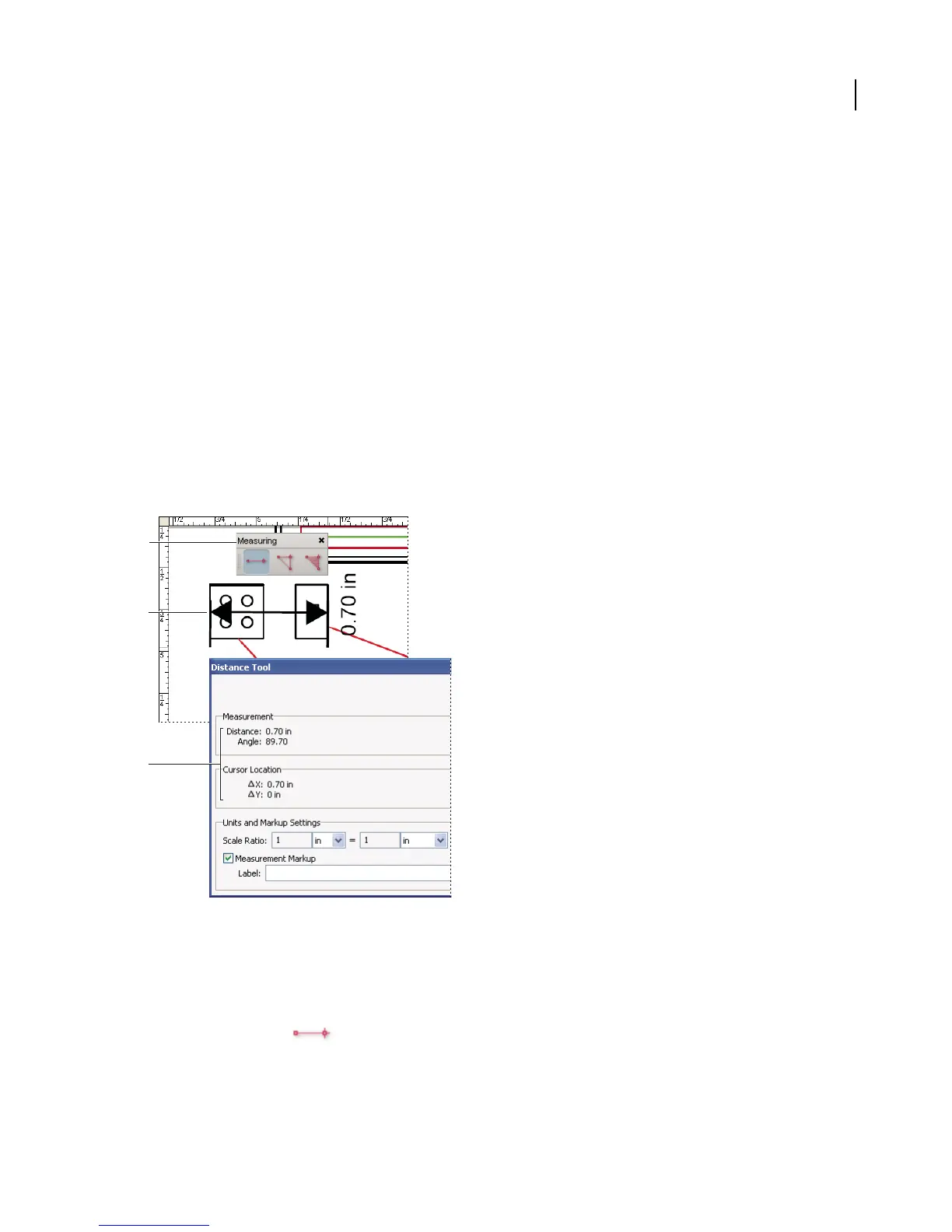
The Measuring toolbar contains tools you can use to measure distances and areas of objects in PDF documents. The
measuring tools are especially useful when you need to know the distances or areas associated with objects in a form
or CAD drawing, or when you want to measure certain areas of a document before sending it to a professional
printer. The measuring tools are available to Reader users only if the PDF creator enables measuring functionality.
When you use a measuring tool, the tool dialog box displays the measurements of the line segments you draw.
Measuring tools
A. Measuring toolbar B. Object being measured C. Tool display
1 Choose Tools > Measuring, and select a measuring tool. Or, right-click/Control-click the toolbar area, and then
choose Measuring.
2 To measure areas of your PDF document, do any of the following:
• SelecttheDistancetool tomeasurethedistancebetweentwopoints.Clickthefirstpoint,movethepointer
to the second point, and then click again. The measurements appear in the tool dialog box.
A
B
C



 To Next Page