ADOBE READER 8
User Guide
52
Review Tracker
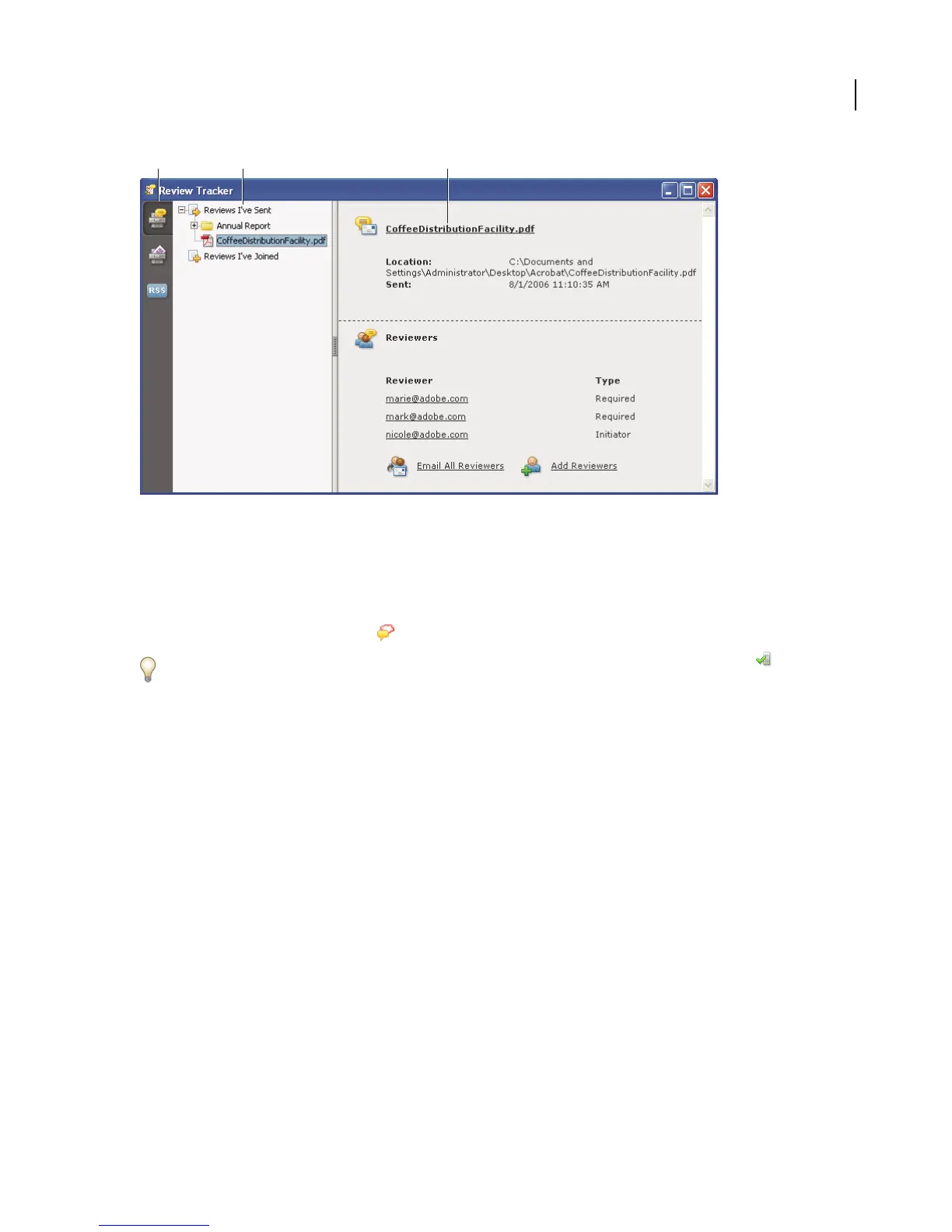
A. Review Tracker icon B. Reviews you initiated or received C. Information for the selected review
Open the Review Tracker
❖ Do one of the following:
• Choose View > Review Tracker.
• Click the Review & Comment button in the Tasks toolbar, and choose Review Tracker.
If you’re participating in a shared review, you can open the Review Tracker by clicking the Status button menu
in the document message bar of the shared PDF.
Track reviewed PDFs
1 Choose View > Review Tracker.
2 Expand the appropriate folder:
Reviews I’ve Sent Lists PDFs in reviews that you initiated.
Reviews I’ve Joined Contains PDFs in reviews that you’ve received. PDFs appear in this list only after you open
them.
Note: Bolded PDFs contain comments that you haven’t yet read.
3 Select a PDF.
InformationspecifictotheselectedPDFreviewappearsontheright.Sharedreviewsopenasummarypagethatlists
reviewers who have joined the review and the number of new comments.
Save the PDF with comments
You can save a copy of the review PDF that contains all the comments that reviewers have published or that you’ve
imported (merged).
If the PDF is in a shared review, you can save an archive copy. The copy is no longer connected to the shared review,
and you can edit both content and comments in it.
A B C



 To Next Page