Security System Operation (cont'd)
22
How to Disarm the System
!
IMPORTANT: If you return and the main burglary sounder is on, DO
NOT enter the premises, but call the police from a nearby safe location.
If you return after an alarm has occurred and the main sounder has shut
itself off, the FA700KP-ADS will beep rapidly upon entering, indicating
that an alarm has occurred during your absence. LEAVE
IMMEDIATELY and CONTACT THE POLICE from a nearby safe
location.
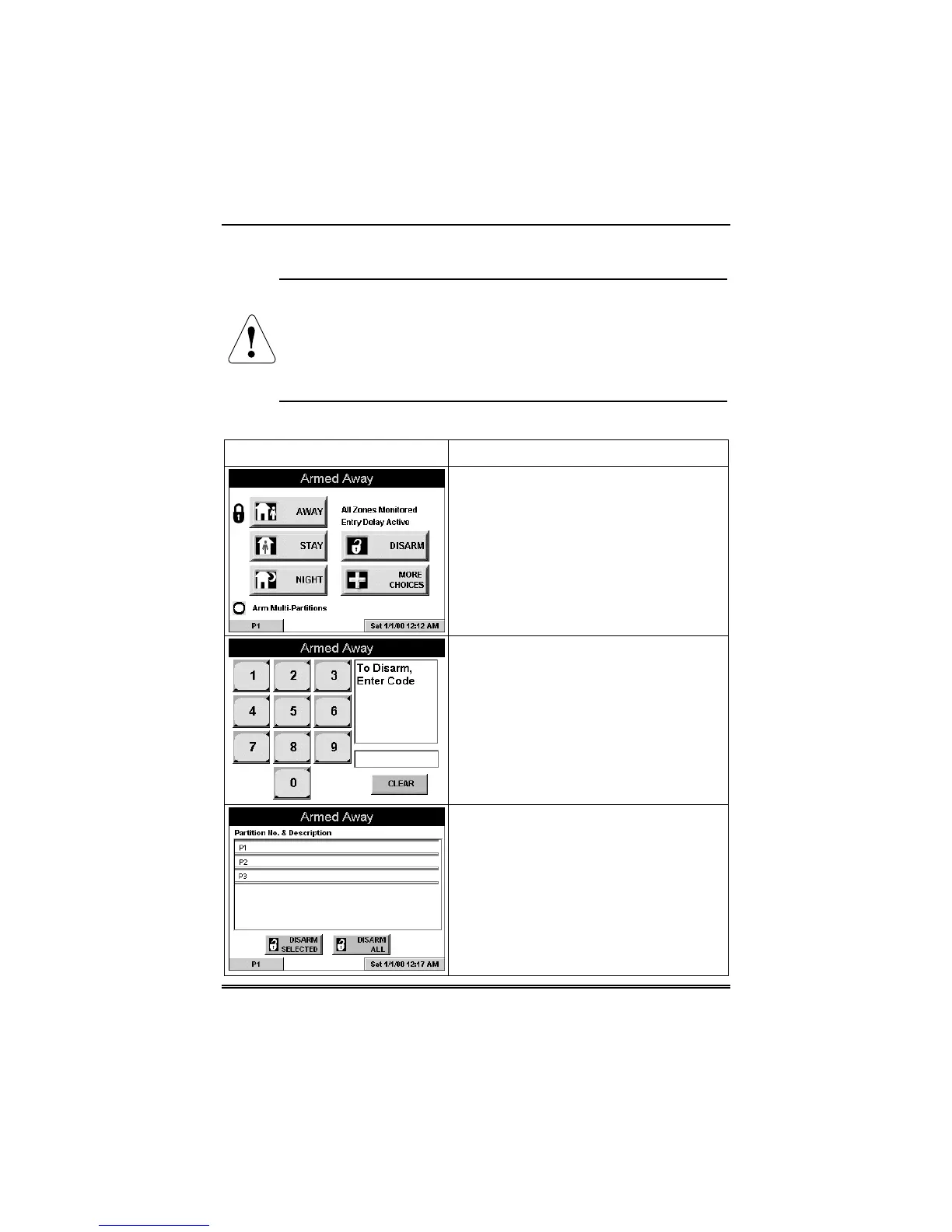
Disarm the system as follows:
SCREEN ACTION
1. Press the DISARM button on any
"Armed" screen. The "User Authorization"
screen is displayed with the instructions
“To Disarm, Enter Code”.
2. Enter your 4-digit user code. The
system will disarm. If you have access to
multiple partitions, the Partition No. &
Description screen is displayed.
3. Press the DISARM ALL button if you
wish to disarm the system. The
FA700KP-ADS beeps once and the
"Arming" screen is displayed showing the
system as Ready to Arm or not ready if
any zone is faulted (open).
Note: If you wish to disarm only selected
partitions, you must first highlight the
partition(s) to be disarmed, then press the
DISARM SELECTED button. The



 To Next Page