EasyManua.ls Logo

Advanced Mxp-554 - 6 Common Configuration Scenarios

Advanced Mxp-554
32 pages
Print Icon
To Next Page IconTo Next Page
To Previous Page IconTo Previous Page
Loading...
www.advancedco.com
22
6 Common Configuration Scenarios
This section outlines some common scenarios and demonstrates which ipGateway configuration settings are
required.
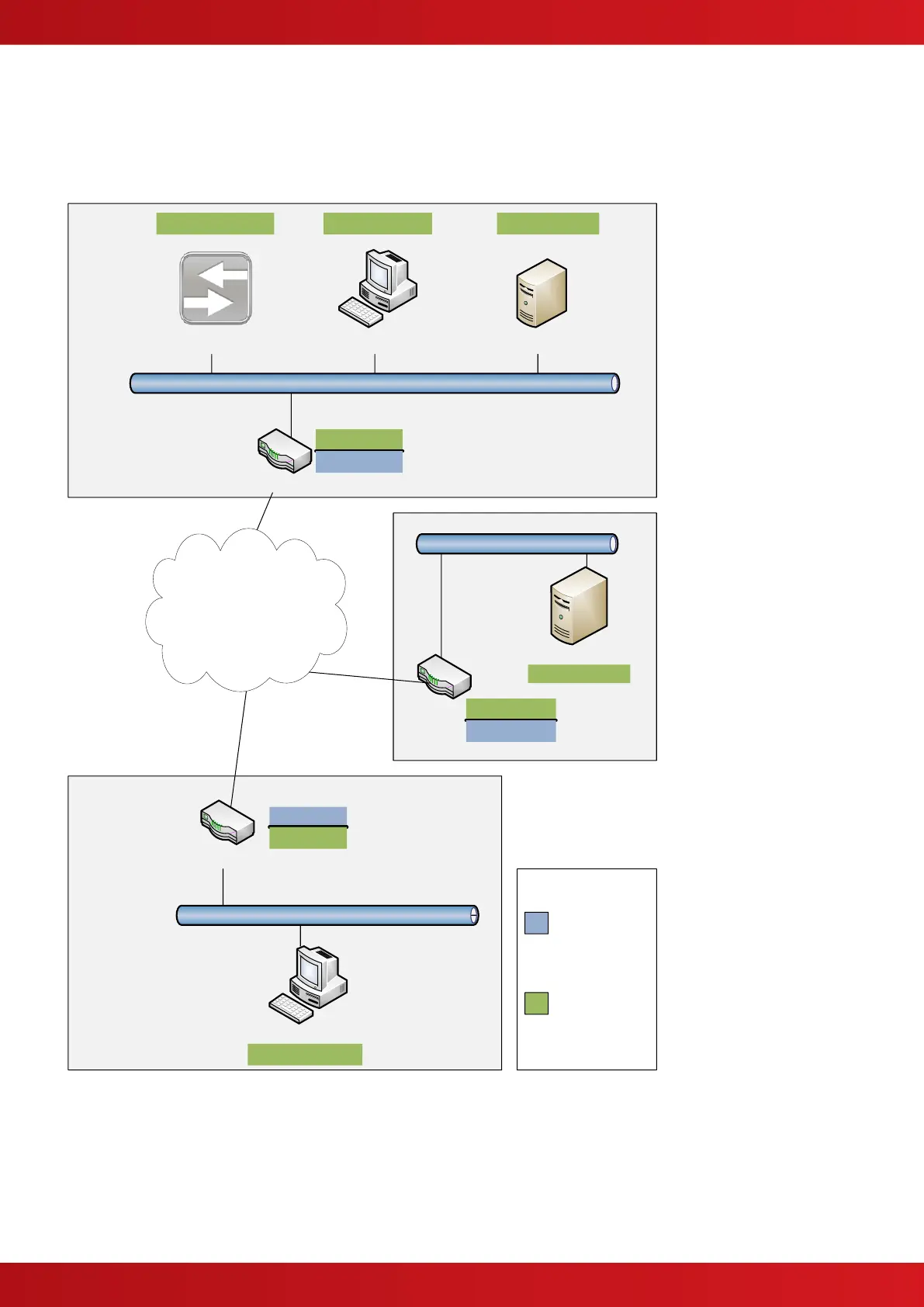
Each of the scenarios uses the networks described in the following diagram:
Router
Email ServerPC
Internet
PC
Email Server
ipGateway
192.168.0.100 192.168.0.10 192.168.0.20
Router
Router
192.168.0.4
74.125.230.148
212.192.68.5
10.100.100.6
10.100.100.81
10.101.100.10
Site A
Site B
ISP
10.101.100.2
75.100.230.100
Key:
IP Address is
visible externally
(i.e. across the
internet).
IP Address is
visible internally
(i.e. on a
private LAN).
Domain: “company.co.uk”