ARK-1122 User Manual 8
2.1 Introduction
The following sections show the internal jumper settings and the external connectors
and pin assignments for applications.
2.2 Jumpers
2.2.1 Jumper list
2.2.2 Jumper Settings
* Default setting
2.2.3 Jumper Description
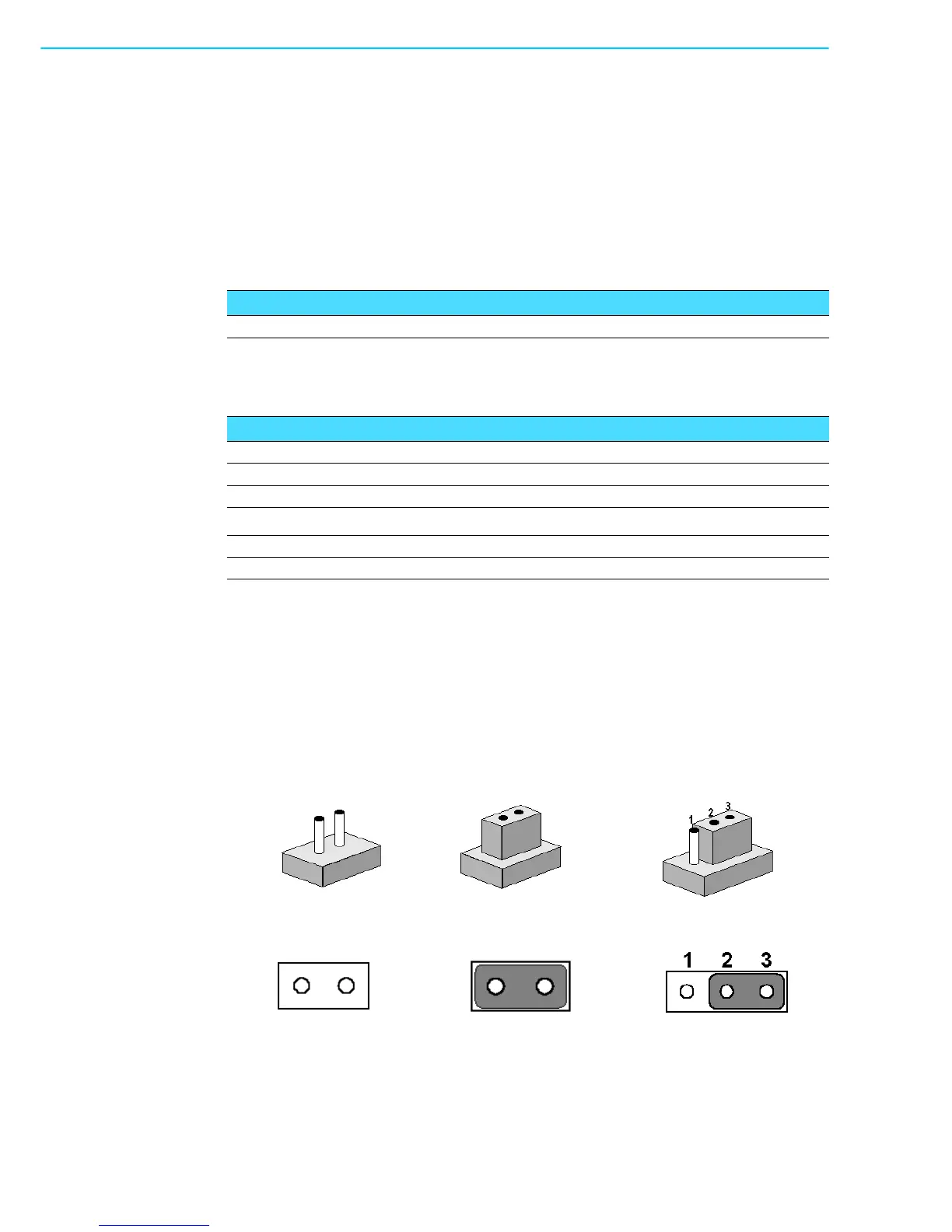
Cards can be configured by setting jumpers. A jumper is a metal bridge used to close
an electric circuit. It consists of two metal pins and a small metal clip (often protected
by a plastic cover) that slides over the pins to connect them. To close a jumper, you
connect the pins with the clip. To open a jumper, you remove the clip. Sometimes a
jumper will have three pins, labeled 1, 2 and 3. In this case you would connect either
pins 1 and 2, or 2 and 3.
The jumper settings are schematically depicted in this manual as follows.
A pair of needle-nose pliers may be helpful when working with jumpers. If you have
any doubts about the best hardware configuration for your application, contact your
local distributor or sales representative before you make any changes.
Table 2.1: Jumper List
J1 AT / ATX Power Selection
Table 2.2: J1: AT / ATX Power Selection
Part Number 1653003260
Footprint HD_3x2P_79
Description PIN HEADER 3*2P 180D(M) 2.0mm SMD SOUARE PIN
Setting Function
(5-6) ON AT power
*(5-6) Empty ATX power


 To Next Page