Copyright2017AdvantechCo.Ltd.Allrightsreserved. Page35
3.2.2 PLATFORMSETUPMENU
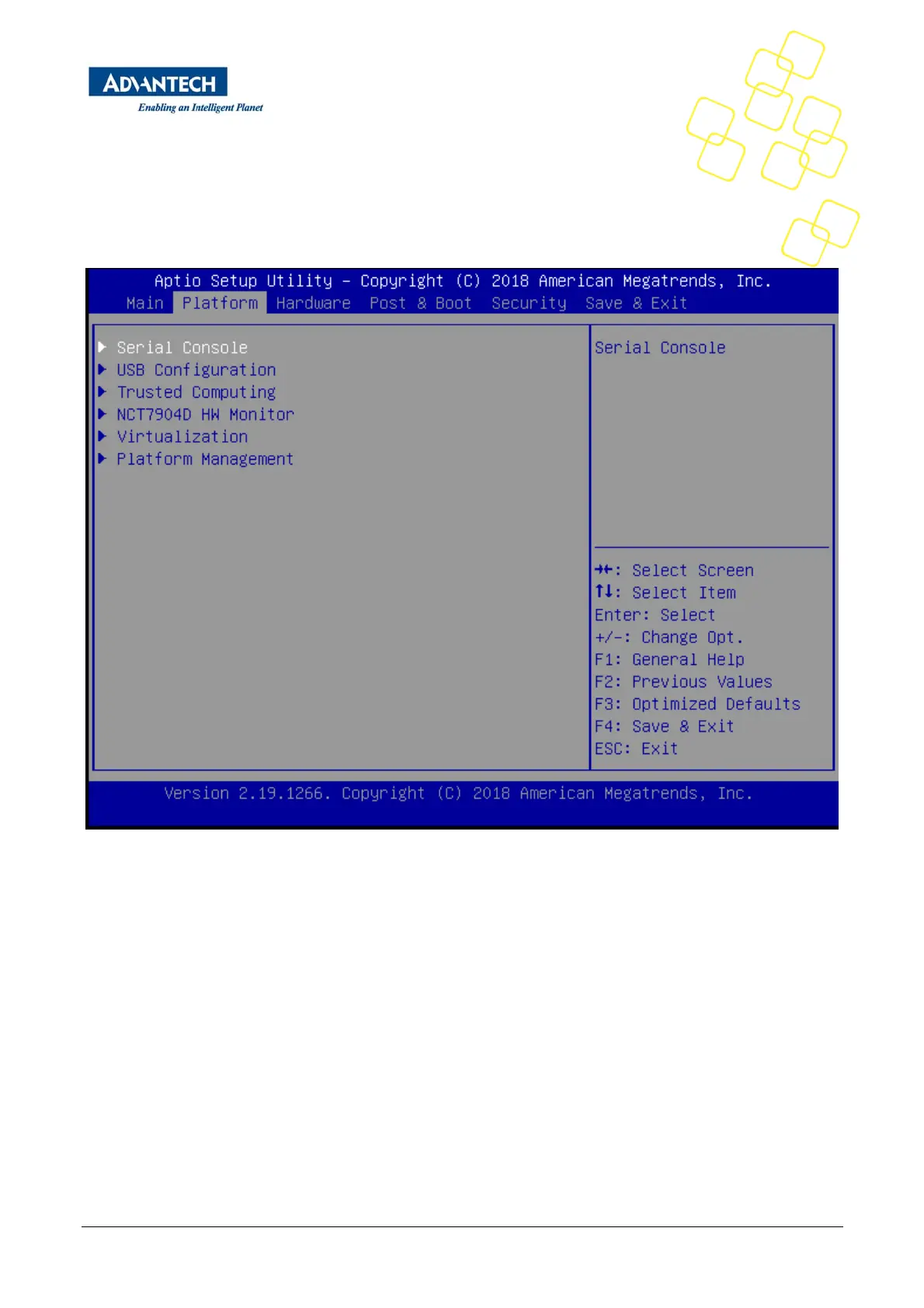
SelectthePlatformtabfromtheFWA‐1012VCsetupscreentoenterthePlatformSetupscreen.Userscan
selectanyoftheitemsintheleftframeofthescreen,suchastheTrustedComputingConfiguration,togoto
the sub menu for that item. Users can display a Platform BIOS Setup option by highlighting it using the
<Arrow>keys.ThePlatformBIOSSetupscreenisshownbelow.The sub menus are described on the
followingpages.Note:IfBMCisPresentinthesystemandHardwareMonitorpagewillbehidden.
Figure18:PlatformSetupMainscreen
3.2.2.1 SerialConsole
Thissubmenuallowsyoutochangethesettingsusedfortheserialconsole.
NotethattheserialconsoleisalwaysusingCOM1whichisconnectedtothefrontpanel.


 To Next Page