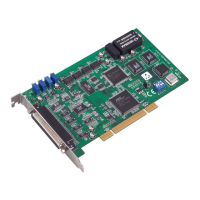
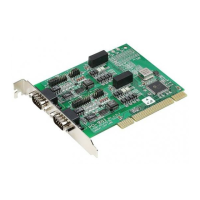
The Advantech PCI-1756 is a 32/32-channel isolated digital input/output (I/O) card designed for advanced-performance data acquisition and control, based on a 32-bit PCI bus architecture. It is suitable for industrial, laboratory, and machinery automation applications.
Function Description
The PCI-1756 provides 32 isolated digital input channels and 32 isolated digital output channels. It supports a wide range of input and output voltages, making it versatile for various industrial environments. The card features robust isolation protection, withstanding up to 2,500 VDC, which safeguards the host system from incidental damage. It also includes 2,000 VDC ESD protection.
Key functions include:
- Digital Input: Each isolated digital input channel accepts bi-directional 10 ~ 50 VDC voltage inputs, allowing for both positive and negative voltage application to an input pin. Input channels are grouped, with every 16 input channels sharing one common pin.
- Digital Output: Each isolated output channel is equipped with a MOSFET, polyswitch for current protection, and a flywheel diode for use with inductive loads. Output channels can be activated by connecting PCOM to VDC, with an external voltage range of 5 ~ 40 VDC. The current through each output channel should not exceed 200 mA.
- Interrupt Handling: The card has interrupt handling capability, with two interrupt inputs (IDI0 and IDI16).
- Output Status Read-back: Allows for reading the current status of the output channels.
- Channel-Freeze Function: This function can be enabled in either dry contact or wet contact mode (selectable via an on-board jumper). When enabled, all ports on the card are locked, preventing data transmitted from the host PC from being transferred to the DO ports. The last valid value of each digital output channel is safely kept for emergency use. This function can also be enabled through software for simulation and testing.
- Reset Protection: The PCI-1756 can retain output values or return to a default open status after a system hot reset (without power-off), depending on the on-board jumper setting. This protects the system from incorrect operations during unexpected resets.
- Board ID Setting: A built-in DIP switch (SW1) allows defining a unique board ID for each card when multiple PCI-1756 cards are installed on the same PC chassis, facilitating identification and access during hardware configuration and software programming. The default board ID is 0.
Important Technical Specifications
Isolated Digital Input:
- Number of Input Channels: 32
- Interrupt Inputs: 2 (IDI0, IDI16)
- Optical Isolation: 2500 VDC
- Opto-isolator Response Time: 100 μs
- Over-voltage Protect: 70 VDC
- Input Resistance: 5.2 KΩ
- Input Voltage (VIH max.): 50 VDC
- Input Voltage (VIH min.): 10 VDC
- Input Voltage (VIL max.): 3 VDC
- Input Current:
- 10 VDC: 1.70 mA (typical)
- 12 VDC: 2.10 mA (typical)
- 24 VDC: 4.40 mA (typical)
- 48 VDC: 9.00 mA (typical)
- 50 VDC: 9.40 mA (typical)
Isolated Digital Output:
- Number of Output Channels: 32
- Optical Isolation: 2500 VDC
- Opto-isolator Response Time: 100 μs
- Supply Voltage: 5 ~ 40 VDC
- Sink Current: 200 mA max/channel
General:
- I/O Connector Type: 100-pin SCSI-II female
- Dimensions: 175 mm x 100 mm (6.8" x 3.9")
- Power Consumption:
- PCI-1756: +5 V @ 285 mA (typical)
- PCI-1756: +5 V @ 475 mA (typical)
- Temperature:
- Operation: 0 ~ +60°C (32 ~ 140°F) (refer to IEC 68-2-1,2)
- Storage: -20 ~ +70°C (-4 ~ 158°F)
- Relative Humidity: 5 ~ 95% RH non-condensing (refer to IEC 60068-2-3)
- Certification: CE Class A certified
Usage Features
- Installation: The card is installed into a PCI slot on a computer. Driver installation is recommended before hardware installation for a smoother process. The Advantech DAQNavi Device Drivers Setup program is included on a companion DVD-ROM.
- Software Support: Advantech offers a rich set of DLL drivers, third-party driver support, and application software. The DAQNavi software includes device drivers and an SDK with a complete I/O function library, compatible with development tools like Visual Studio .Net, Visual C++, Visual Basic, and Borland Delphi. Register-level programming is also an option for experienced programmers.
- Configuration and Testing: The Advantech Navigator program is a utility for setting up, configuring, and testing the device. It allows users to configure DI interrupt trigger edges, enable/disable the Channel-Freeze function, and set the initial status of DO ports. Settings are stored in the system registry and used by DAQNavi device drivers.
- Accessories: Advantech provides accessory products to support the PCI-1756, including wiring cables (PCL-10250, PCL-101100M) and wiring boards (ADAM-3951, ADAM-39100) for DIN-rail mounting.
Maintenance Features
- ESD Precautions: The PCI-1756 contains electronic components vulnerable to electrostatic discharge (ESD). Users are advised to discharge static electricity from their body by touching the computer chassis, touch the anti-static bag to the chassis before opening, and handle the card only by its metal bracket.
- Damage Inspection: Upon receiving the package, users should inspect the card for any signs of external damage. A damaged card should not be installed, and the service department or local sales representative should be notified.
- Anti-static Bag: The original anti-static bag should be kept for future storage or transport of the card.
- Field Wiring Considerations: To ensure data accuracy and reduce noise, signal cables should be kept away from strong electromagnetic sources, power lines, large electric motors, circuit breakers, or welding machines. Individually shielded, twisted-pair wires are recommended for analog input cables in areas with significant electromagnetic interference. Running signal cables through conduits with power lines should be avoided. Maintaining a safe distance or placing signal cables at a right angle to power lines can minimize undesirable effects. Using Advantech's shielded cables (PCL-10250 or PCL-101100M) is recommended for better signal quality.
- Warranty: Advantech provides a two-year warranty against defects in materials and workmanship from the date of purchase. The warranty does not cover products repaired or altered by unauthorized personnel, or those subjected to misuse, abuse, accident, or improper installation. For defective products, users should collect problem information, contact their dealer, obtain an RMA number, and carefully pack the product with proof of purchase for repair or replacement.

 Need help?

 To Next Page
 General