ROM-5620 User Manual 36
6.1 System Recovery
This section provides detailed procedures for restoring the eMMC image. If users
destroy the on-board flash image by accident, they can recover the system by follow-
ing these steps.
6.1.1 Recovery by SD Card
1. Copy 5620A1AIM20LIV90064_iMX8X_flash_tool.tgz package to your desktop
2. Insert SD card to PC
3. Make a bootable SD card
4. Insert SD card and copy 5620A1AIM20LIV90064_iMX8X_flash_tool to USB
disk
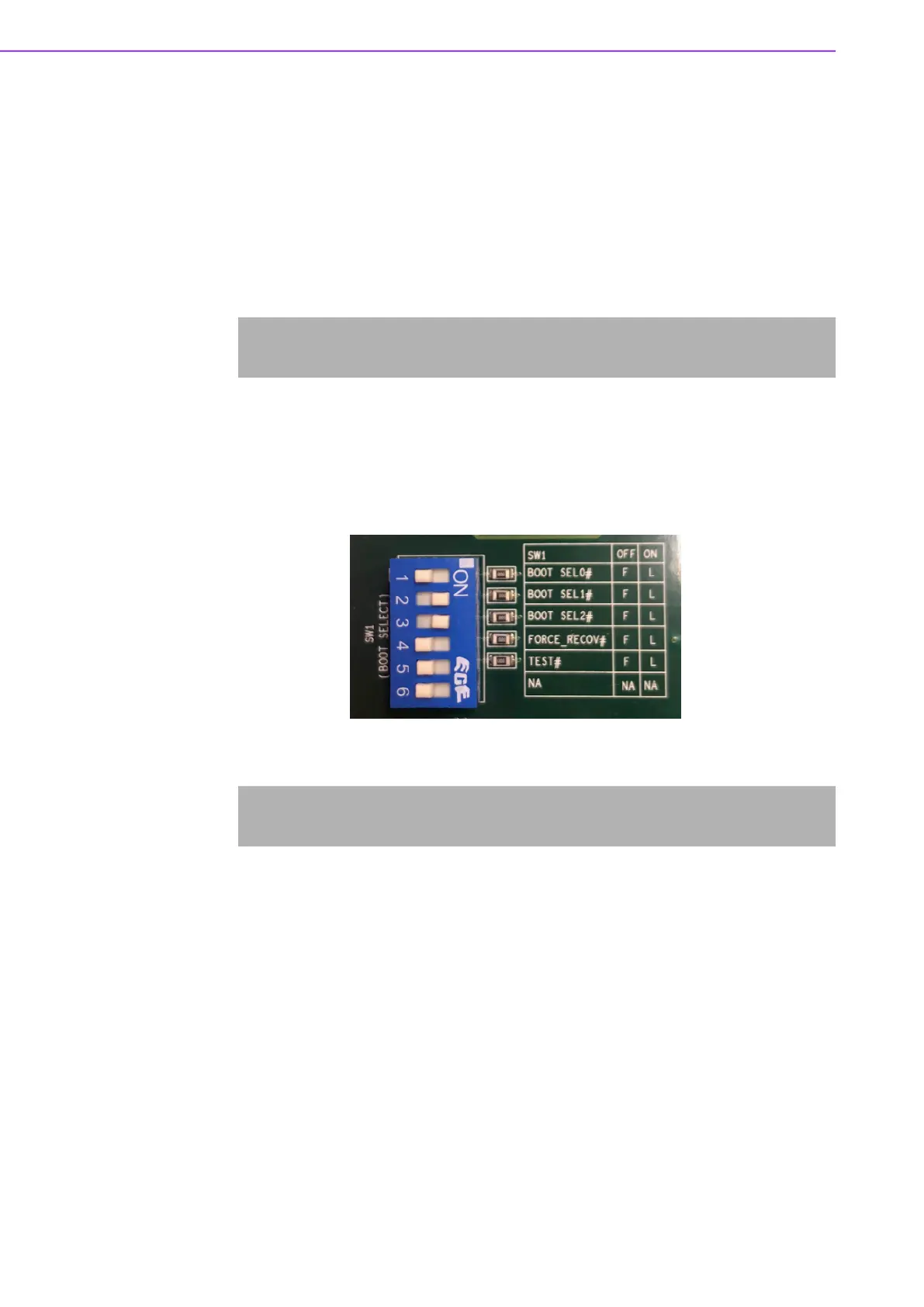
5. Insert USB disk and SD card then boot the whole system from SD card by
changing SW1 on ROM-DB5901 to 1OFF, 2-3ON, 4-6OFF as demonstrated in
the following photo
6. Enter USB disk folder, make a bootable eMMC
# tar zxvf 5620A1AIM20LIV90064_iMX8X_flash_tool.tgz
# cd 5620A1AIM20LIV90064_iMX8X_flash_tool/mk_inand/
# sudo ./mksd-linux.sh /dev/sdg
# cd /run/media/sda1/
# cd 5620A1AIM20LIV90064_iMX8X_flash_tool/mk_inand/
# sudo ./mksd-linux.sh /dev/mmcblk0


 To Next Page