1.1.4 “REPLACE BATTERY” indicator (RED LED): The LED illuminates when the
UPS‘s battery is no longer useful and must be replaced.
Note: When replace battery, disconnect the utility power then open the case and take notice
of the battery‘s polarity while install the new battery to avoid short circuit. See section 8.
1.1.5 “BUCK AVR (VOLTAGE REDUCTION)” indicator (YELLOW LED): The
LED illuminates when the UPS is correcting a high utility voltage condition. The loads
receive normal power.
1.1.6 “LINE NORMAL” indicator (GREEN LED): The LED illuminate when the line
input voltage is normal.
1.1.7 “BOOST AVR (VOLTAGE BOOST)” indicator (YELLOW LED): The LED
illuminates when the UPS is correcting a low utility voltage condition. The loads receive
normal power.
1.1.8 LOAD bar graph: The display shows the power being drawn by the load.
1.1.9 POWER bar graph (BATTERY CHARGE): The display shows the present
battery charge as a percentage of battery capacity.
1.1.10 “OFF” button: Press the OFF button to turn off the UPS and the loads.
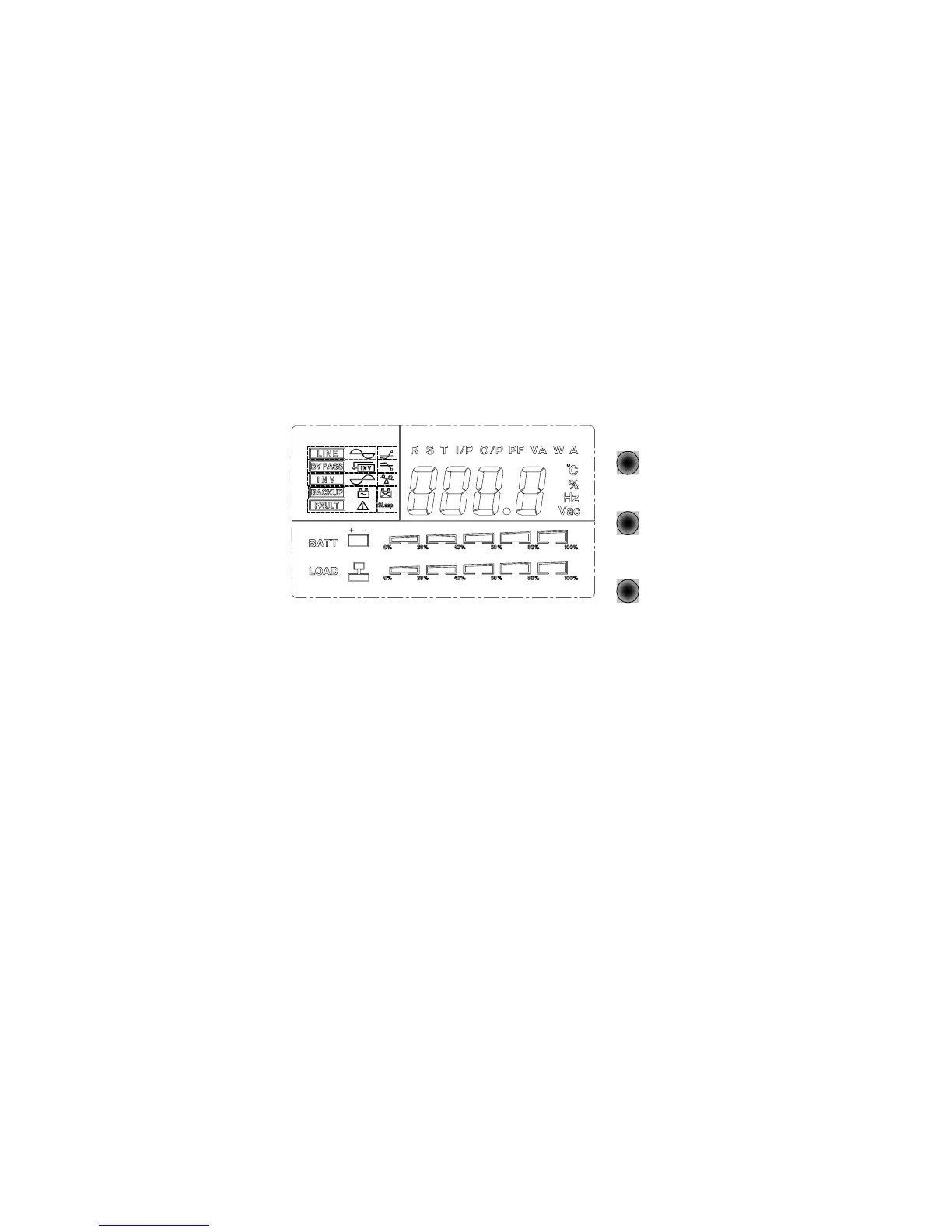
1.2 Front LCD Panel
ON
OFF
SELECT
1.2.1 “LINE” indicator: The indicator illuminates when the line input voltage is normal.
1.2.2 “BY PASS” indicator: The indicator illuminates when the loads are supplied from
the utility power, through the by-pass direction.
1.2.3 “INV” or “INVERTER” indicator: The indicator illuminates when the output
power of UPS is supplied from the inverter circuit.
1.2.4 “BACKUP” indicator (LCD Panel only): The indicator illuminates when the
power is supplied from the batteries.



 To Next Page