Parameter Settings
To set parameters, perform the following operations:
− In the preview mode under power-on state, press the M key to display the menu interface.
− Press the < or > key to choose a left or right option from the menu interface.
− Press the + or – key to choose an upper or lower option from the menu interface.
− After selecting an option, press OK to save settings.
− Press the M key again to save the setting and exit the interface.
Note: After power-on, the video camera adopts all the preset settings, except for audio recording mode. You
can change settings as you desire.
Set video camera parameters.
a
Exe.: Select (the default mode) for video recording and for audio only.
b
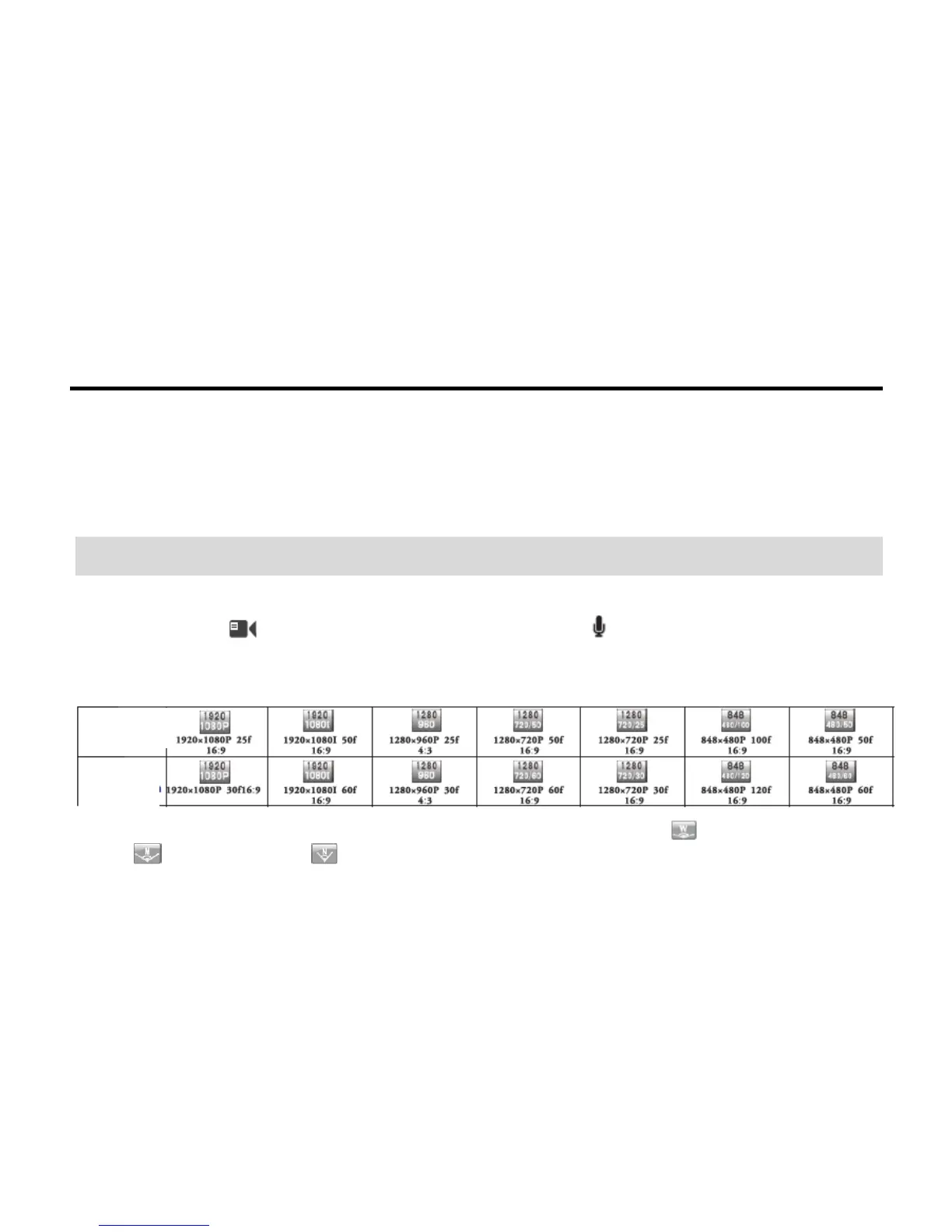
Resolution for video recording: Select the desired resolution for video recording. You can set this
parameter to the 1080P, 1080i, 960P, 720P, or WVGA resolution.
c
View: This parameter involves three types of views: broad (Wide) view ( ), medium (Middle) view
( ), and narrow view ( ).



 To Next Page