••.cam
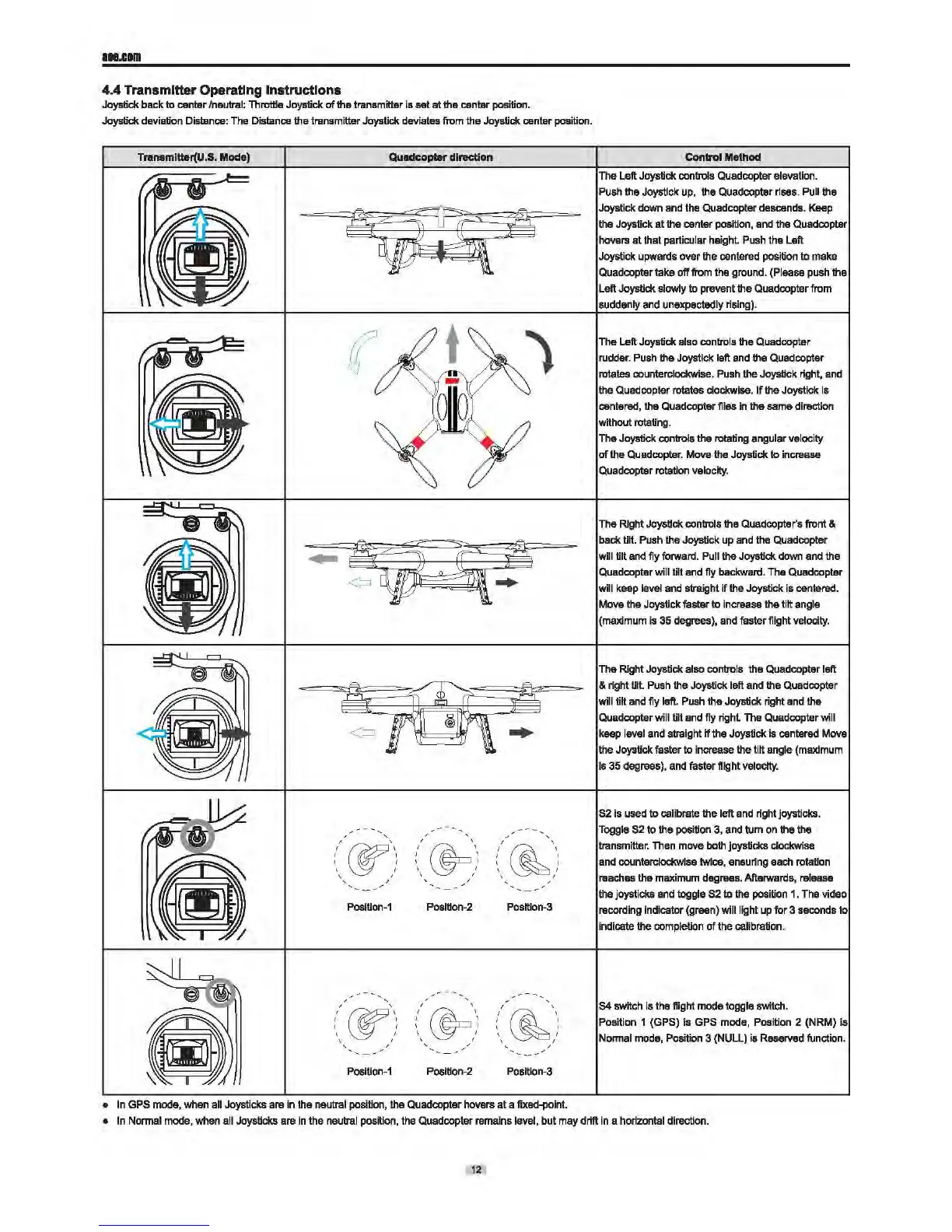
4.4 Transmitter Operating Instructions
Joystick back to canter /neutral: Throttle Joystick
of
the transmitter
is
sat at the canter position.
Joystick deviation Distance:
The
Distance the transmitter Joystick deviates
from
the Joystick center position.
Transmitter(U.S. Mode) Quadcopl8r direction
PosiUon-1
Posltlon-2 Posltlon-3
/
/
w\
I '
I I
' I
' I
,'
Posilion-1 Position-2
Position-3
•
In
GPS
mode, when
all
Joysticks are in the
neu
t
ral
position, the Quadcoptar hovars at a fixed-point.
Control Method
The Left Joystick
controls Quadcopter elevation.
Push
the Joystick up, the Quadcoptar rises. Pull the
Joystick down
end
the
Quadcopter descends.
Keep
the Joystick at the oenter position,
and
the Quadcopter
hovars
at
that particular height.
Push
the Left
Joystick upwards ovar the oentered position
to
make
Quadcoptar take
off from the ground. (Please push the
Left Joystick
slowly
to
prevent the Quadcopter from
suddenly
and unexpectedly rising).
The Left Joystick
also controls the
Quad
copter
rudder.
Push
the Joystick left
and
the Quadoopter
rotates counterclockwise.
Push
the Joystick right, and
the
Quad
copter rotates clockwise.
If
the Joystick
is
centered, the Quadooptar flies
in
the same direction
without rotating.
The Joystick
controls the rotating angular velocity
of
the Quadcopter.
Move
the
Joystick to increase
Quadcoptar rotation
velocity.
The Right Joystick controls the Quadcoptar's front &
back
till. Push the Joystick
up
and
the
Quadoopter
will till and fly forward. Pull the Joystick
down
and
the
Quadcoptar
will tilt
and
fly backward.
The
Quadcopter
will keep
level
and straight
if
the Joystick is centered.
Mova the Joystick
faster to increase the tilt angle
(maximum
is
35 degrees},
and
faster flight velocity.
The Right Joystick also controls the Quadcopter left
& right till.
Push
the Joystick left
and
the Quadcoptar
will till and fly left. Push the Joystick right and the
Quadcopter
will tilt
and
fly right. The Quadcopter will
keep
level
and straight if the Joystick
is
cantered Mova
the Joystick faster
to
increase the till angle
(maximum
Is
35 degrees},
and
faster flight
velocity.
S2
is
used
to
calibrate the left
and
right joysticks.
Toggle
S2
to the position
3,
and
tum
on
the the
transmitter. Then move
both
joysticks clockwise
and
counterclockwise
twloe,
ensuring
each
rotaUon
reaches the maximum degrees. Afterwards, release
the joystick& and toggle
52
to
the
position
1.
The
video
recording indicator (green}
will light
up
for 3 seconds to
indicate the
completion
of
the calibration.
S4
switch is the
Hight
mode toggle switch.
Position 1
(GPS)
is
GPS
mode, Position 2 (NRM}
is
Normal
mode,
Position 3 (NULL) is Reserved function.
•
In
Normal mode, when all Joysticks are in the neutral position, the Quadcopter remains level, but may drift in a horizontal direction.
12


 To Next Page