••.cam
2) When WiFi repeater's blue light indicator is on,
the
repeater is working normally. Toggle
52
switch
on
the transmitter to the canter position then toggle back to
"OK".
3)
Press
the
repeater pairing button
for
3s. The WiFi repeater blue light indicator slow blinks (0.3s on, 3s
off).
This indicates the repeater has successfully paired
with
the
onboard Camera.
If
pairing fails, please repeat procedures 2 and
3.
5.2
How
to
usa
Charging the
Repeater
Connect the repeater to the mini USB port through
the
repeater adapter
to
charge
the
repeater. It takes about 2 hours to fully charge.
• Before each flight,
make
sure
the repeater has sufficient charge.
Switching on the Repeater
1)
Toggle repeater Power switch
to
ON
to
switch on
the
repeater.
2) Wait
until
the
WiFi
indicator blinks blue, indicating
that
the
repeater works properly.
3)
While using this process, ensure the repeater's
LED
side faces you, and try to ensure that visibility between
the
repeater and Quadcopter
is
unobstructed,
to
obtain maximum communication Distance.
•
Mer
the flight
is
completed,
in
addition
to
switching
orr
the Quadcopter and transmitter,
be
sure
to
tum
orr
the
repeater,
or
else
the
repeater's Battery will
be
depleted.
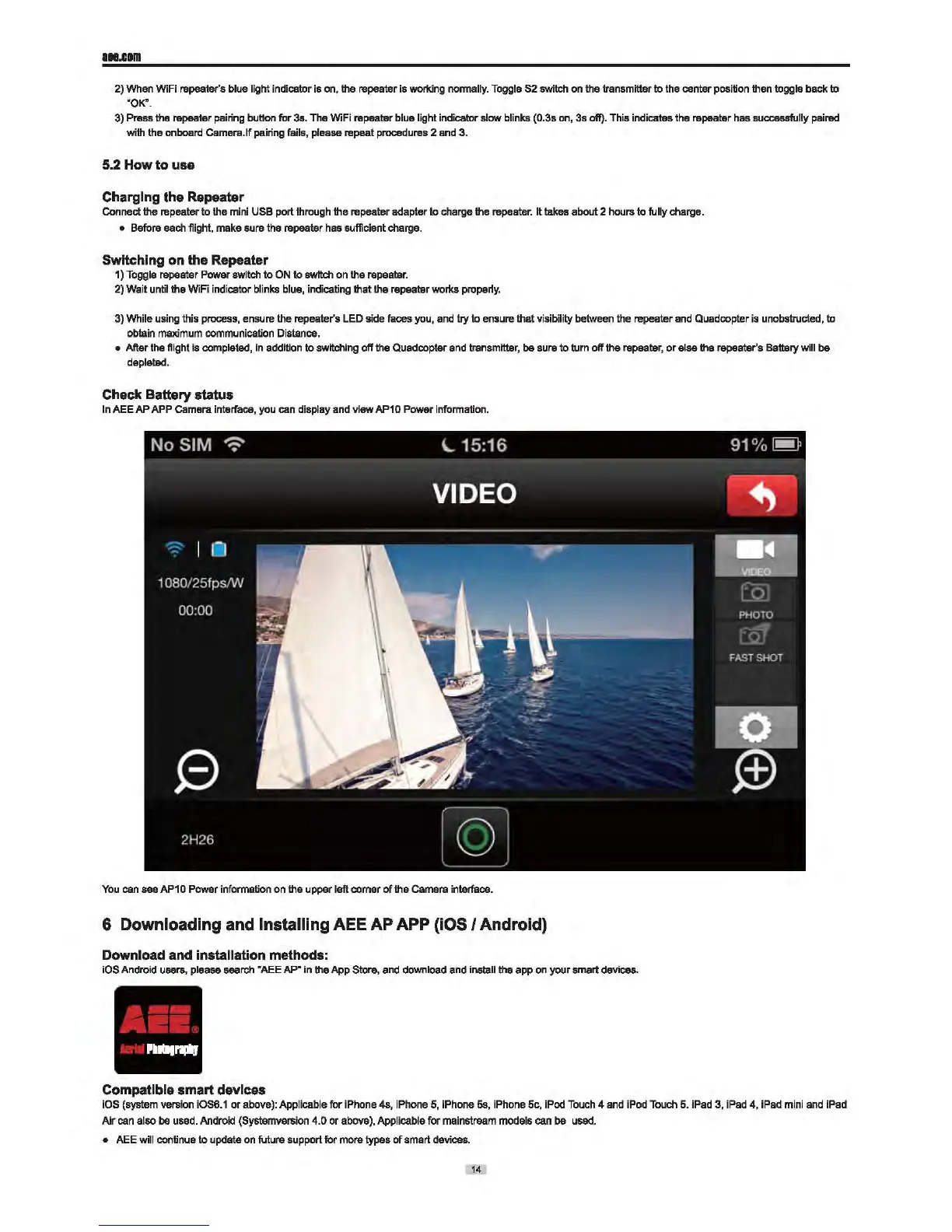
Check Battery status
In
AEE
AP
APP
Camera interface, you can display and
vi-
AP10 Power information.
You can
see
AP1 0
Power
information on
the
upper
left
comer
of the Camera interface.
6 Downloading and Installing AEE
AP
APP (iOS I Android)
Download and installation methods:
iOS Android users, please search "AEE AP"
in
the
App
Store, and download and install
the
app on
your
smart devices.
Compatible smart devices
iOS (system version iOS6.1
or
above): Applicable
for
iPhone 4s, iPhone
5,
iPhone 5s, iPhone 5c, iPod Touch 4 and iPod Touch 5. iPad 3, iPad
4,
iPad mini and iPad
Air
can also
be
used. Android (Systemversion 4.0
or
above), Applicable
for
mainstream models can
be
used.
• AEE will continue
to
update
on
future support
for
more types of
smart
devices.
14


 To Next Page