••.cam
No. Function
Description
[ 1 I
Video Resolution Maximum video resolution is 1080P /30fps
(N
system}, 1
OBOP
/25fps (P system}.
[21
Number of files stored in Micro SD
card
0007 indicates there
are
7 files stored
in
the Micro SD card.
[31
camera available shooting duration OH55indicates under current camera settings, the Micro SD card can store a further 0 hours
55
minutes
of
video
[41
Wifi
signal slntngth The
Wi
Fi
signal strength between
AP1
0 and Wi-Fi repealer.
[51
AP10 Power level AP10 Battery level.
[61
Recording time When the Camera starts recording video, recording time will
be
displayed.
[71
Video Preview window Watch videos recorded in
real
time
Operation
button
has
different functions in different shooting
modes:
Recording
mode:
Press
"Operation button"
to
start video recording; Press "Operation button"
again
to
[81
Operation button stop recording.
camera
mode:
Press "Operation button" once
to
capture photo.
Snapshot mode: Press "Operation button" once
to
capture photos.
[91
Video recording mode
In
this mode, the airborne camera
can
record videos.
[
10
I Settings button View and configura airborne Camara settings.
[
111
Snapshot mode "Snapshot mode" toggle
button.
[
121
camera mode "camera mode" toggle button.
The
preview screen
is
always
shown
in
portrait mode.
Even
when the smart devices is turned sideways, the APP's interface remains
in
portrait mode.
Touch
the
"preview'' area to change the
APP
interface to video preview intarface screen, which supports
both
portrait and landscape modes.
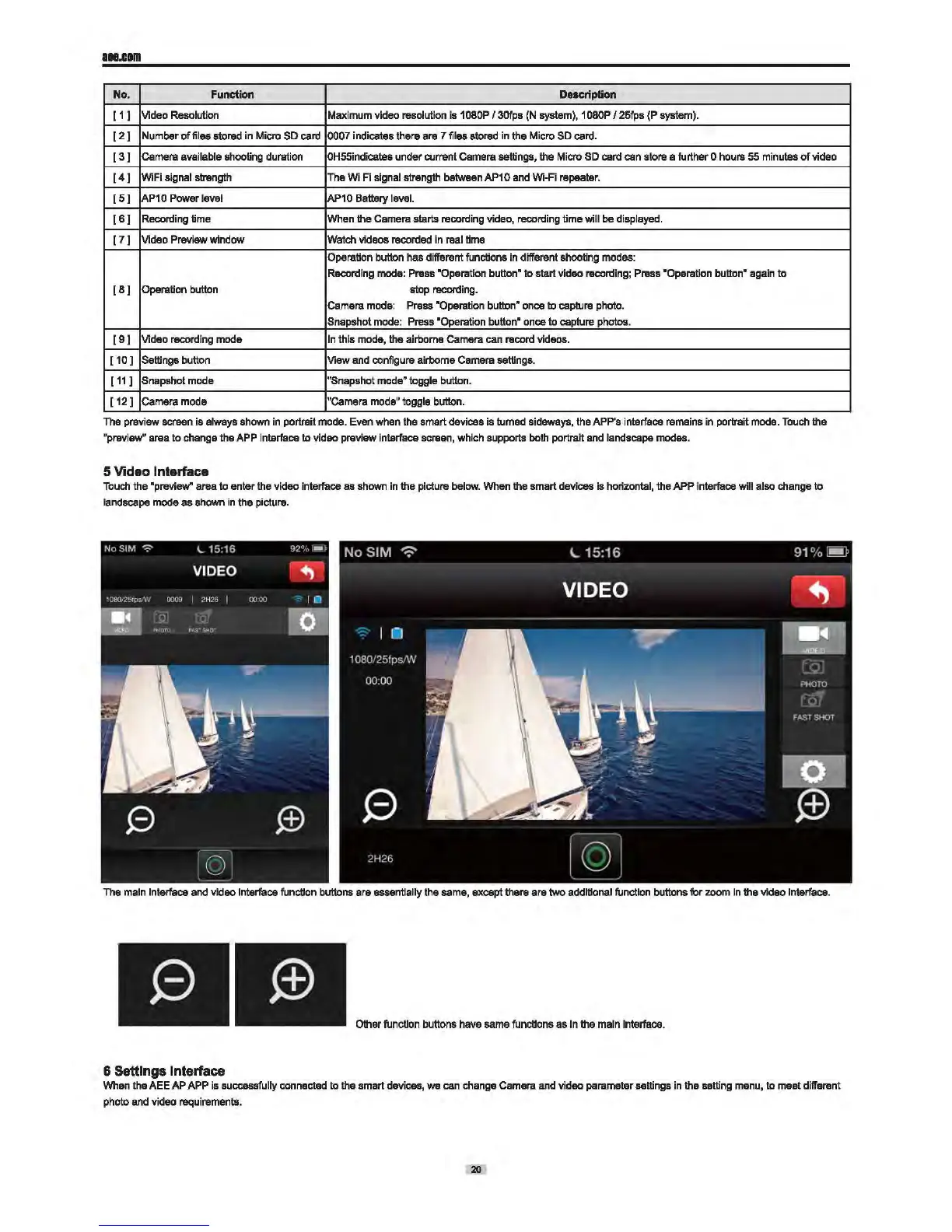
5 Video Interface
Touch
the "preview" area
to
enter the video interface
as
shown
in
the picture
below.
When the smart devices is horizontal, the APP interface will also change
to
landscape mode as shown
in
the picture.
The
main
Interface and video Interface function buttons are essentially the same, except there are
two
additional function buttons for zoom
In
the video lntarface.
Other function buttons
have
same functions as
In
the
main
Interface.
6 Settings Interface
When
the AEE AP
APP
is
successfully connected
to
the smart devices,
we
can change camera
and
video parameter settings
in
the setting
manu,
to meat different
photo and video requirements.
20


 To Next Page