7 Connecting the Camera
The procedures
to
connect the Camera and the smart devices are as follows:
1)
Tum
on the transmitter
and
repeater.
2)
Tum
on
AEE
AP10.
3)
Tum
on
WiFi
on
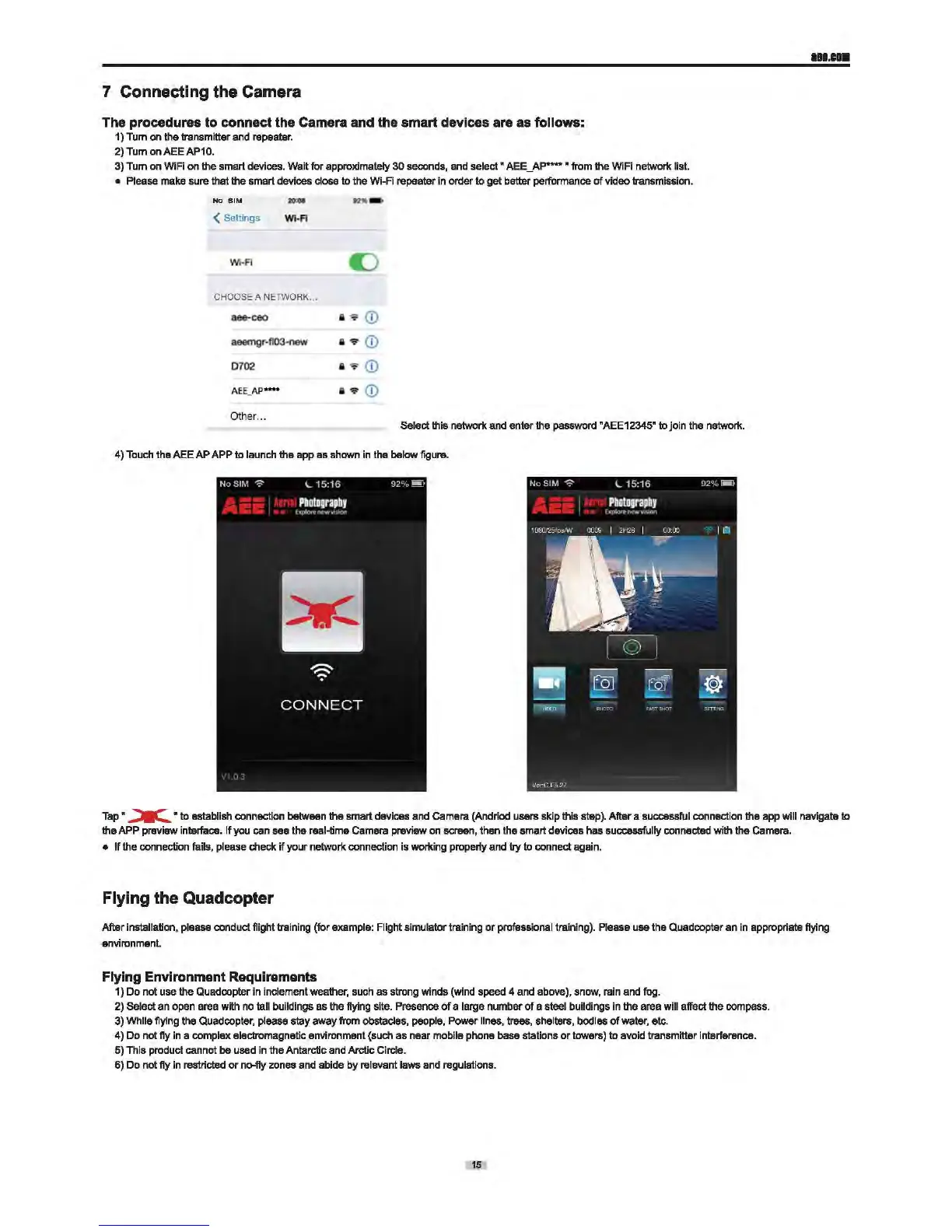
the smart devices. Wait for approximately
30
seconds,
and
select •
AEE_AP
..... • from the WiFi network list.
• Please
make
sure that the smart devices close
to
the
Wi-Fi
repeater in order
to
gat batter performance of video transmission.
NO
SIM
<Settings
WI
· A
Wi·FI
CHOOSE A NET
WORK
...
aee-ceo
aeemgr·fl03·new
0702
AE
E_AP
****
Oth
er
...
--
II
..-
<D
II
•
<D
II
..-
<D
II
•
<D
Select this network
and
enter the password "AEE12345" to join the
network.
4)
Touch
the
AEE
AP
APP
to
launch
the app as
shown
in
the
below
figure.
111.ca•
Tap
•
~
•
to
establish connection
between
the smart devices
and
Camera (Andriod users skip this
step).
After a successful connection the
app
will navigate to
the APP
preview interface.
If
you
can
see the real-time
Camera
preview
on
screen, then the smart devices has successfully connected with the Camera.
• If the connection fails, please check
if
your network connection is
working
properly
and
try to connect again.
Flying the Quadcopter
Mer
installation,
please
conduct flight training (for example: Flight simulator training
or
profassional training).
Please
use the
Quad
copter
an
in
appropriate flying
environment
Flying Environment Requirements
1) Do
not
use
the Quadcopter
in
inclement
weather,
such
as
strong
winds (wind speed 4 and above),
snow,
rain
and
fog.
2)
Select
an
open
area
with
no
tall buildings
as
the
flying
site. Presence
of
a large number
of
a steel buildings
in
the area will affect the
compass.
3)
While flying the
Quad
copter,
please
stay away from obstacles,
people,
Power
lines,
trees, shelters, bodies
of
water,
etc.
4)
Do
not
fly
in
a complex electromagnatic environment (such as near
mobile
phone
base
stations
or
towers) to avoid transmitter interference.
5)
This product cannot
be
used
in
the Antarctic
and
Arctic Circle.
6)
Do
not
fly
in
restricted or no-fly
zones
and
abide by relevant laws
end
regulations.
15


 To Next Page