36
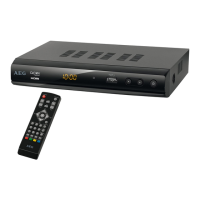
No. Symbol Explanation
1 PVR LIST For showing the recording list on a connected USB device.
2 MUTE Deactivating the sound on/off.
3 INFO Displaying the current channel's reception data
4 TTX Activating teletext
5 SUBTITLE Shows subtitles (if available).
6 EXIT Exiting the menu or a menu option
7 OK – Confirming the menu or a menu option
– Displaying the list of stations
8 TV/RADIO Switching between radio and TV
9 RECALL Switching to the previously selected channel.
10 GOTO Jump to an item.
11 I PREV To the previously stored file.
12 I NEXT To the next stored file.
13 REPEAT Repeat function
14 STOP Stop PVR playback or recording.
15 Blue In various menus for activating the function displayed.
16 Yellow In various menus for activating the function displayed.
17 Green In various menus for activating the function displayed.
18 Red In various menus for activating function.
19 PAUSE II Switching to freeze-frame whilst watching television
20 PLAY Start playing.
21 REV Fast forward search.
22 FWD Fast rewind search.
23 0-9 Directly selecting the channel, entering digits.
24 FAVOURITE Calling up the list of favourites.
25 CH- – Switching to the next lowest channel space
– Moving the cursor down
– Move down in the zoomed picture.
CH+ – Switching to the next highest channel space
– Moving the cursor up
– Move up in the zoomed picture.
VOL- – Lower volume.
– Menu option to the left.
– Move to the left in the zoomed picture.
VOL+ – Raise volume.
– Menu option to the right.
– Move to the right in the zoomed picture.
26 MENU Calling up the menu, carrying out basic settings.
27 AUDIO Shows the audio menu.
28 DTV/VCR Switch between the ”VCR“ and ”TV“ SCART outputs.
29 EPG Electronic Programme Guide
30 STANDBY Switching on and switching to standby mode
31 ● REC Start PVR recording.
I
AEG_BDA_DVB-S2_4546_GB.qxd:CL_BDA_DVB_T776_GB_ka.qxd 22.01.2010 11:33 Uhr Seite 36


 To Next Page