9.2 Automatic switch-off
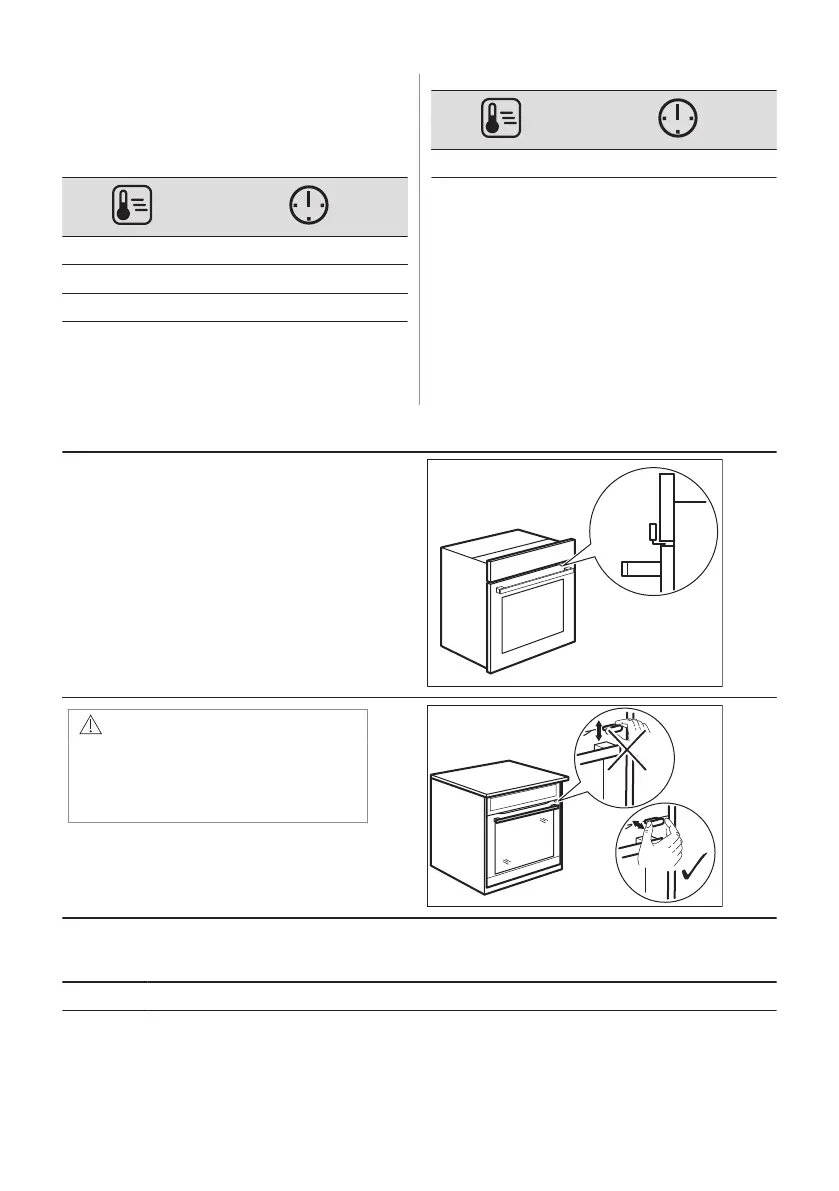
For safety reasons the appliance turns off
after some time, if a heating function works
and you do not change any settings.
(°C) (h)
30 - 115 12.5
120 - 195 8.5
200 - 245 5.5
(°C) (h)
250 - maximum 3
The Automatic switch-off does not work with
the functions: Light, Food sensor, Time
Delay.
9.3 Cooling fan
When the appliance operates, the cooling fan
turns on automatically to keep the surfaces of
the appliance cool. If you turn off the
appliance, the cooling fan can continue to
operate until the appliance cools down.
9.4 Mechanical door lock
The door lock is unlocked when you buy the
oven.
CAUTION!
Do not move the door lock vertical‐
ly.
Do not push the door lock when
you close the oven door.
9.5 How to use: Mechanical door lock
Step 1 To lock the door pull the door lock forward until it locks.
ENGLISH 53


 To Next Page