17
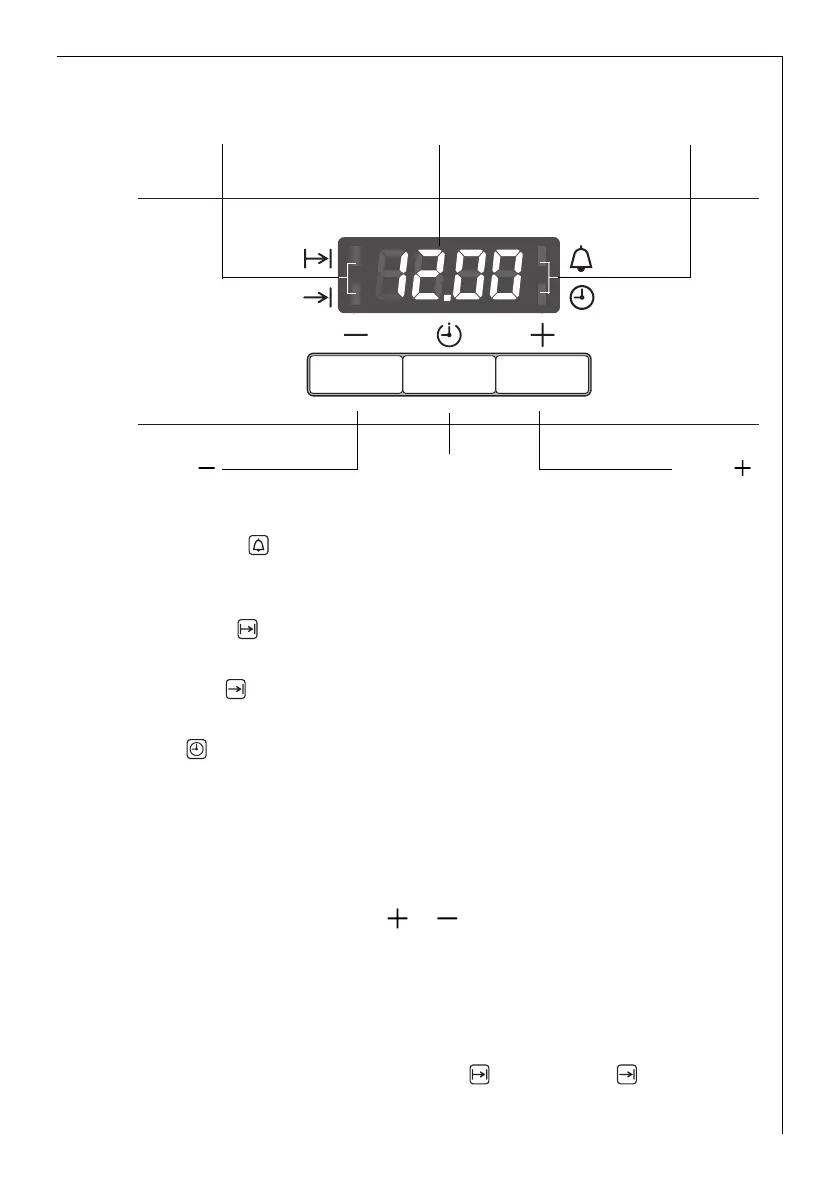
Clock Functions
Countdown
To set a countdown. A signal sounds after the time has elapsed.
This function does not affect the functioning of the oven.
Cook time
To set how long the oven is to be in use.
End time
To set when the oven is to switch off again.
Time
To set, change or check the time
(See also section “Before Using for the First Time”).
3 How to use the clock functions
• After a function has been selected, the corresponding function indi-
cator flashes for about 5 seconds. During this period, the desired
times can be set using the or button.
• When the desired time has been set, the function indicator continues
to flash for approx. 5 seconds. After that the function indicator is
then lit. The set time begins to run.
• Press any of the buttons to stop the audible signal.
• The desired oven function and temperature can be selected before or
after the clock functions Cook time and End time are set.
• When the cooking process is completed, turn the oven function dial
and the temperature selector back to the OFF position.
Selector Button
Button
Button
Time display Function IndicatorsFunction Indicators






 To Next Page