19
Using the Oven
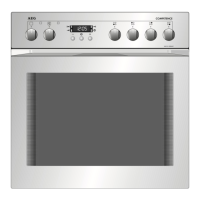
Inserting/Removing the Fat Filter
Always insert the fat filter when roasting uncovered on a shelf unit, on
the fat tray, or in an uncovered roasting dish.
0 Inserting the fat filter
Holding the fat filter by the tab,
insert the two retainers into the
opening on the rear wall of the
oven (fan opening) from the top
downwards.
0 Removing the fat filter
Take hold of the tab on the fat filter
and remove by pulling upwards.
Positioning the Shelf Unit and the Universal Baking Tray
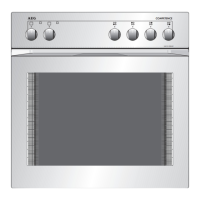
All slide-in units have a small bulge on the left and right. This bulge
serves as an anti-tip device and must always point downwards.
Inserting shelf unit
0 Insert the shelf unit with both guide
rails pointing upwards. The anti-tip
device must point downwards and
be positioned to the rear of the
oven compartment.
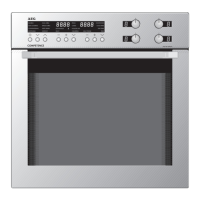
Inserting the shelf unit and tray
0 When the shelf unit and universal
baking tray are used together, care-
fully place the shelf anti-tip device
in the bulges on the tray.






 To Next Page