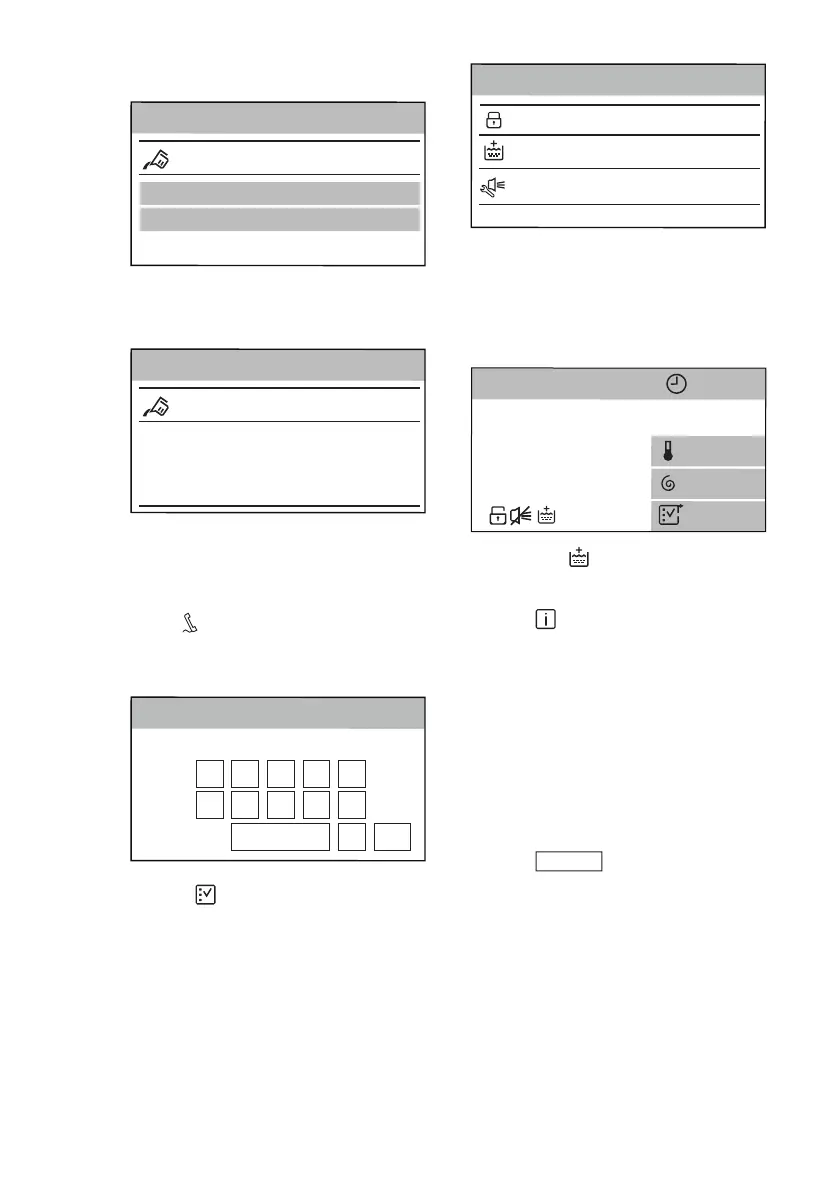
2. Tap on the Detergent Type 1 or
Detergent Type 2 bar.
Detergent Dosing
OFF
Info
Detergent Type 1
Detergent Type 2
3. Scroll the bar right or left to set the
average detergent dosage in ml as
suggested on the detergent
packaging.
Detergent Type 1
OFF
Info
60>
<40
50
ml
4. Tap on the Detergent Dosing bar to
return to the machine setting list or
tap on the Programmes bar to return
to the programme summary screen.
15.9 Service
This area is reserved for the Authorized
Service.
Reserved for service
Back
Services
< OK
0 1 2 3 4
5
6 7 8 9
15.10 Shortcuts
This setting allows to bring the shortcuts
shown in the next drawing visible on the
summary screen.
To activate the shortcuts:
1. Tap on the Shortcuts bar to open
the list of the available shortcuts.
Buzzer Shortcut
Extra Rinse Shortcut
OFF
OFF
OFF
<Back
Shortcuts
Child Lock
2. Tap on the bar of the desired
shortcut/shortcuts by changing the
status to ON.
3. Tap on <Back to return to machine
setting list and on Programmes to
return to summary screen.
The shortcut shows up on bottom.
C
ottons
Max 10
Kg
3h01min
M
o
re
12
00
40
°
The shortcut appears when the
relevant option is set.
15.11
Machine Information
Here you can find a short description
about all programmes, options and
settings.
To find the desired description, e.g.:
1. Tap on the Machine Information
bar.
2. Tap on 1. Programmes bar.
3. Tap on Cottons bar and the relevant
description will appear.
15.12
Factory Reset
Factory Reset restores the original
factory settings.
To return to the factory settings:
1. Tap on the Factory Reset bar.
ENGLISH
43


 To Next Page