Programme Universal
powder
1)
Liquid Univer‐
sal
Liquid for col‐
oureds
Delicates
woollens
Special
20min 3kg -- ▲ ▲ -- --
Outdoor -- -- -- ▲ ▲
Hygiene ▲ ▲ -- -- ▲
1)
At temperature higher than 60 °C the use of powder detergent is recommended.
▲ = Recommended -- = Not recommended
11. WI-FI - CONNECTIVITY SETUP
This chapter describes how to connect the
smart appliance to the Wi-Fi network and to
link it to mobile devices.
By this functionality you can receive
notifications, control and monitor your
appliance from your mobile devices.
The Wi-Fi functionality is off as factory default
setting.
To connect the appliance to enjoy the full
range of features and services you need:
• Wireless network at home with internet
connection enabled.
• Mobile device connected to wireless
network.
Frequency 2.412 - 2.472 GHz for Eu‐
ropean market
Protocol IEEE 802.11b/g/n
Max Power <20 dBm
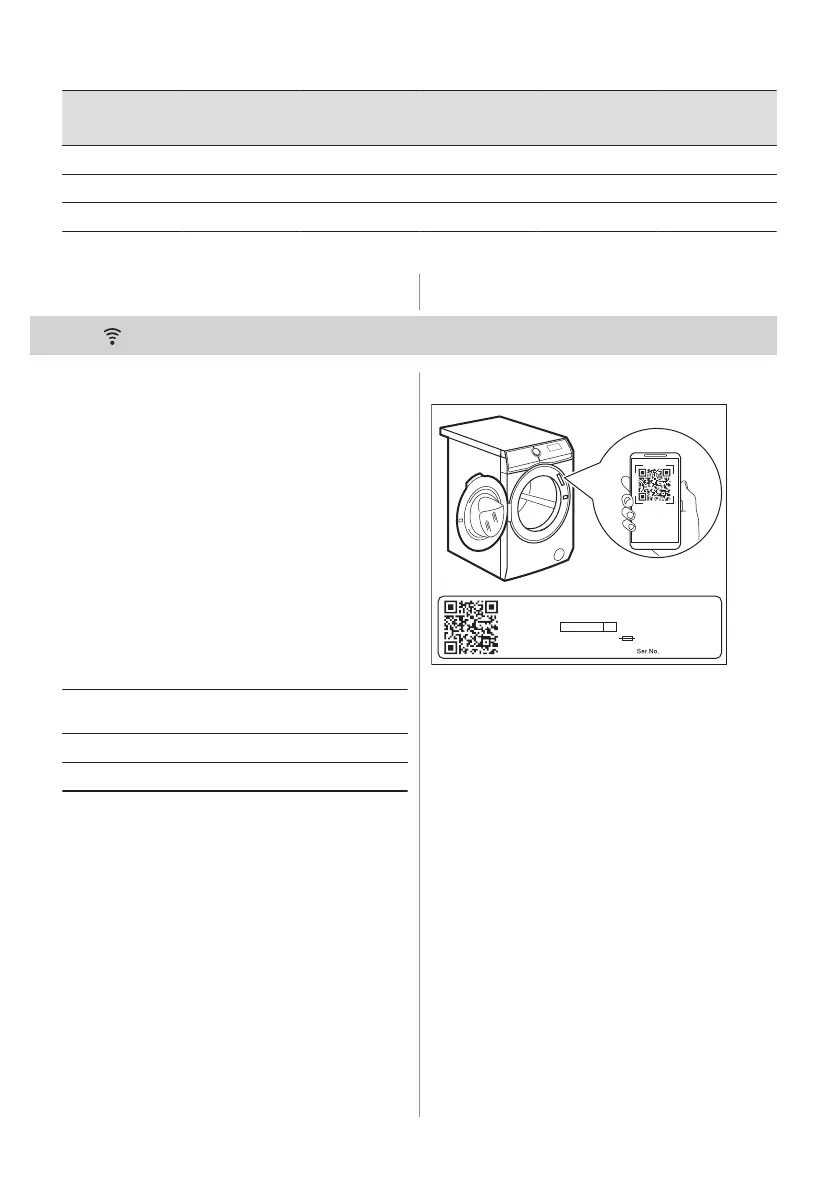
11.1 QR code on rating plate
00000000
00A
Mod.
xxxxxxxxx
000V ~ 00Hz 0000 W
910000000
00
Prod.No.
QR code can be used in two ways:
• Scan the QR code with the built-in camera
app to download our app from the App
store on your smart device and follow the
required steps.
• Pairing your smart device with appliance
to simplify the process. Scan the QR code
with QR code scanner built-in our app.
26 ENGLISH



 To Next Page