ຫׂ֡ፕ၂๖ೡఇ๕൸၍٪ഗҾጎথ၍
ᆅჾ
ୟഗ
ۉጱྃഗ
֪
INTRO
BREAKER
TRIP UNIT
LOCKS ACCESSORIES TESTS APPENDIX
2.1-03
2.1!ׂຫ
2.1.1!ྔ࠵
ۉጱྃഗᆶႚ!MDE!၂๖ೡă௬ӱᇑ3/2!๖௬ӱ
ૌຼăጎዃহ௬ᇕჾཚยዃྺᆈ࿔Ljᅜስ݆࿔Ăڤ
࿔ĂဇӬც࿔ዐ࿔
2.1.2 LCD!֡ፕ
ۉጱྃഗᆶ!6!߲ࠀీLjස!3/3!๖ăӀူඪᅪ
ీഔۯ!MDEă
๑ᆩኄ! 6! ߲Ӏᅜݡ࿚! TFUVQDŽยዃDžĂTUBUVT
DŽጒༀDžĂNFUFSDŽᅏDžࢅ!FWFOUTDŽ้Dž႑တă
..!VQDŽၠฉDžǖၠฉࡐۯሺຕኵă
..!EPXODŽၠူDžǖၠူࡐۯၭຕኵă
..!SJHIUDŽၠᆸDžǖူᅃࠀీူᅃᄻă
..!MFGUDŽၠፑDžǖฉᅃࠀీฉᅃᄻă
..!FOUFSDŽඓۨDžǖԍ٪ยዃڟ٪ئഗዐă
2.1.3!ۉഘᄲ൱
2.1.4!ยԢহ௬
ME09 5000-6400A!ୟഗă
ٷևݴ൧ူLjۉጱྃഗႴথথڟยԢăᆶದ၍
ᇨۨᆩᇀথୟഗ؏ă
ഄยԢႴڦথԈઔڦ൶ᇘስĂۉഗ
0ࢅዐႠدߌഗLj๑ᆩୟഗْܾথ܋ጱฉڦ༬ۨጆ
ᆩথۅă
ܔ႑ࡽDŽ2ࡽDžႜՊײLjᅜՍ૧ᆩณڦຨ้!
)SFMU*ୟഗăْܾDŽ3ࡽDžᅜยዃྺ!
ĐPGGđLjཚࡗՊײยዃྺৈୟഗă
2.1 Product descripƟon
2.1.1 Appearance
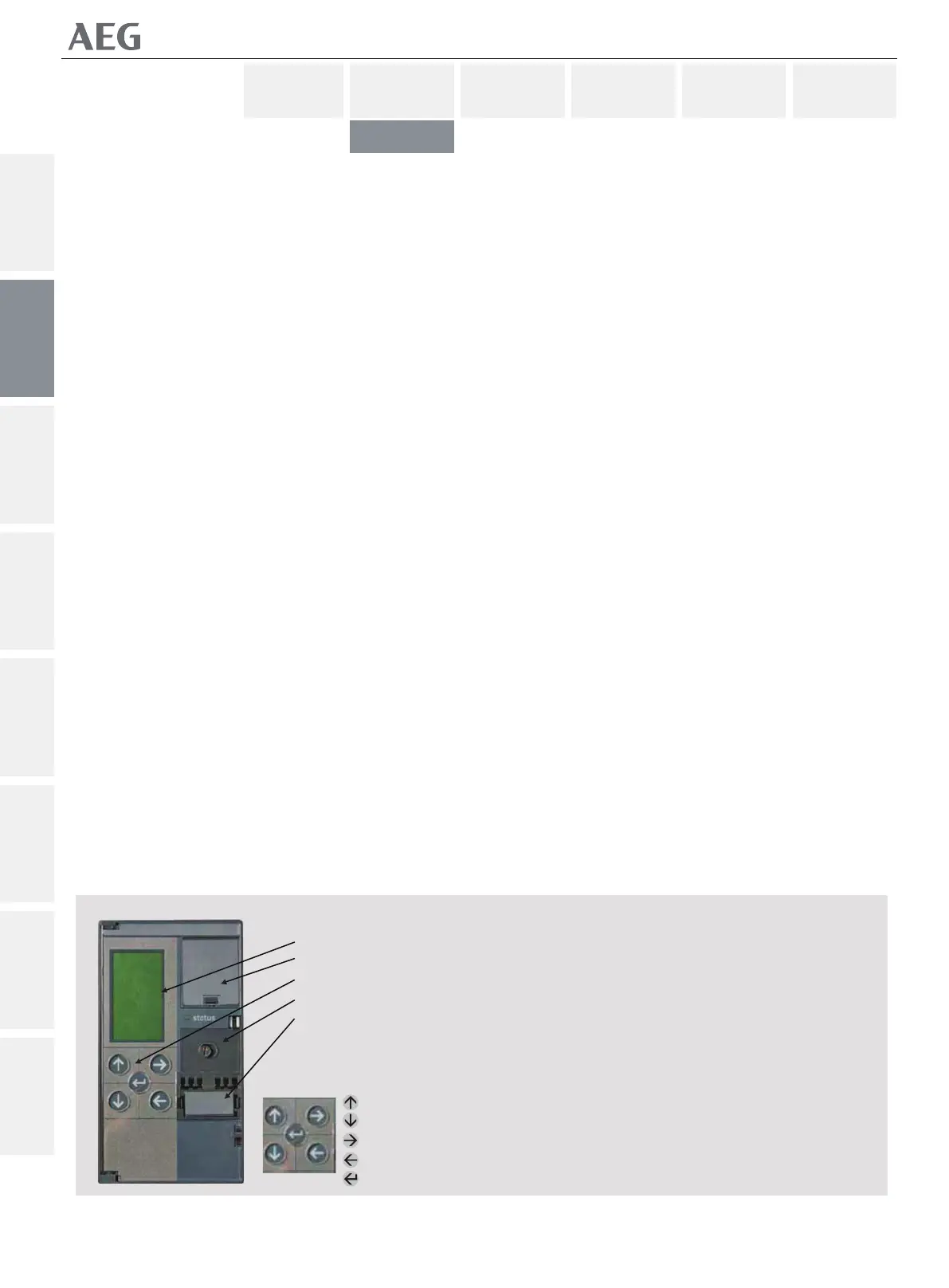
The Trip Unit includes a graphical LCD. The front panel being
similar to that depicted in Figure
2.1. Normally the device is set to the English language,
opƟonally French, German, Spanishor Chinese can be selected.
2.1.2 LCD ACCESS
The trip unit has Įve funcƟon keys as shown in Figure 2.2. Any
key, when pressed, powers up the LCD.
All SETUP, STATUS, METER and EVENTS informaƟon is accessed
through these Įve keys.
-- UP: Scroll up or increment value
-- DOWN: Scroll down or decrement value
-- RIGHT: Next funcƟon or next page
-- LEFT: Previous funcƟon or previous page
-- ENTER: Save or set in to memory
2.1.3 Electrical Requirements
None: Plug in installaƟon. Done on de-energized units.
2.1.4 Equipment Interfaces
ME09 5000-6400ACircuit Breakers.
Trip units, for the most part, do not require direct connecƟons to
the equipment. All wiring is intended to connect to the circuit
breaker or casseƩe.
ConnecƟons that are required for other equipment are the
opƟonal zone-selecƟve interlock, relay in-output and the neutral
sensor, which uses speciĮcally dedicated connecƟon
points on the breaker secondary connecƟon terminals.
A signal Input (nr.1) can be programmed to allow for the use of
reduced instantaneous (RELT) or to trip the breaker. A second
input (nr.2) can be set to ‘OFF’ or programmed to trip
the breaker only.
!2.1
MDE!၂๖ೡ
ۉ࢈
ፗ
BVUP0NBODŽጲۯ0
ۯDžް࿋ስ
ඇݔྷܮ֭ۨཀྵ
无:接通装置电源。在释放单元上完成。
Fig. 2.1
LCD screen
BaƩery Compartment
KEY pad
AUTO/MAN reset choice
Full Range RaƟng Plug
Fig 2.2 Key pad
Up
Down
Right (Next)
LeŌ (Previous)
Enter (Save)
!2.2!ፗ
ၠฉ
ၠူ
ၠᆸDŽူᅃ߲Dž
ၠፑDŽฉᅃ߲Dž
ඓණDŽԍ٪Dž
NF1:ဣଚگუഘୟഗ
SET UP
METER
STATUS
EVENTS


 To Next Page