38 GB
Start-up / Operation
Switch on the ignition again without start-
ing the engine. In some vehicle types this
»ERROR« message is not shown on the
LC-display
1
.
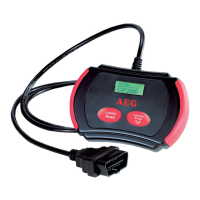
5. Now press the button LESEN / READ
3
, to
read out the OBD II-error memory from the
vehicle. The LC-display
1
will show a series
of possible diagnostic protocols (PWM, VPW,
KWP2000, ISO9141, EKWP2000, CAN).
6. Wait until the device is in the main menu-
»MENU« will be displayed in the upper line
of the LC-display
1
. Select »1.DTC« and
press the button LESEN / READ
3
.
7. If no error code was detected by the device,
»DTC: 00« or »NO CODES« is shown on the
LC-display
1
.
8. If several errors were read out, the LC-dis-
play
1
shows the total number of the error
codes (for example »FAULT: 02«). Appended
error codes appear on the LC-display with
the display »PEND:..«. In order to call up the
single error codes, press the button
LÖSCHEN / ERASE
2
for every single error.
After all errors are called up, the error listing
starts again from the beginning.
9. If an error code is shown with an attached
error code, »PD« is displayed additionally on
the LC-display
1
. The breakdown of the
single error codes can be taken from this
operating manual or the attached CD in the
chapter “Error code list”
Call up menu functions
The AEG OBD II diagnostic device OL 8000 has 5
different menu-functions.
j Press the button Taste LÖSCHEN / ERASE
2
,
to call up the separate menus in sequence;
1. DTC: Display of diagnosed error codes
2. ERASE: Deletion of diagnosed error codes
3. I / M: Inspection program for the ex-
haust system (Readiness Function)
4. VIN: Vehicle Identification Number
5. RESCAN: Rescanning
Delete diagnosed error codes
1. Select the menu function »MENU 2.ERASE«
to delete error codes. Then press the button
LESEN / READ
3
. The input request will ap-
pear in the LC-display
1
whether the error
codes shall be deleted »ERASE? YES NO«.
2. Press the button LÖSCHEN / ERASE
2
to de-
lete the error codes. In case you do not want
to delete the error codes, press the button
LESEN / READ
3
, the menu will be closed.
3. If existing error codes are deleted success-
fully, it will be confirmed in the LC-display
by displaying »ERASE? DONE!«.
4. If the error codes fail to be deleted »ERASE?
FAIL!« will be shown in the LC-display
1
(= Deletion not carried out). Now press the
button LÖSCHEN / ERASE
2
, to enter the
main menu.
A fast and direct deletion of all diagnosed error
codes can also be carried out, without selection
of the menu function.
j To do this, press the button LÖSCHEN / ERASE
2
for at least 3 seconds and press the but-
ton LESEN / READ
3
afterwards.
Menu function inspection
program / exhaust system
The „I / M Readiness function“ is an inspection
program for checking the exhaust system of
vehicles suitable for OBD II.
ATTENTION! Operate the OBD II diagnostic
device OL 8000 only at standstill of the vehicle.
1. Switch on the ignition and start the engine.
2. Select the menu »MENU 3.IM« by pressing
the button LÖSCHEN / ERASE
2
.
3. Now press the button LESEN / READ
3
to
call up the status, to detect if the warning
light (MIL) is ON or OFF and to start the
following control points;
Note: Press the button LESEN / READ
3
, to
go back to the main menu.


 To Next Page
 Loading...