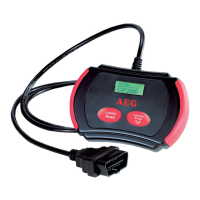
39 GB
Start-up / Operation
MISFIRE Misfire Monitoring – Monitoring of
misfire and ignition failures
FUEL Fuel System Monitoring – Monitoring
of the fuel-air-ratio
CCM Comprehensive Component Monitoring
– Monitoring of the exhaust relevant
components in the vehicle
CAT Catalyst Monitoring – Monitoring of
the catalytic converter
HCM Heated Catalyst Monitoring – Moni-
toring of the heated catalyst
EVAP Evaporative System Monitoring –
Monitoring of the evaporative -emis-
sions-system
2AIR Secondary Air Monitoring – Monitoring
of the secondary air system
A / C A / C System Monitoring – Monitoring
of the air-conditioning system
O2S O2 Sensor Monitoring – Monitoring of
the lambda sensor
HO2S O2 Sensor Heater Monitoring – Moni-
toring of the pre- and post connected
(HO2S) lambda sensors
EGR EGR System Monitoring – Monitoring
of the exhaust gas recirculation
system
After completion of the control program, the
probable error codes are displayed.
The following errors or additional information
can occur with the program »3.IM«:
YES All control programs, which the vehicle
supports, have passed the separate
diagnosis tests and the warning light
MIL is off.
NO Not all control programs (at least 1)
have completed the diagnosis test
and / or the warning light is on.
READY Shows that a specific control program
has carried out the respective diagno-
sis test.
NOT RDY (NOT READY) A specific control pro-
gram has not carried out the diagnosis
test.
N / A This control program is not supported
by the vehicle.
-> (flashing arrow to the right)
The following information can be
called up in the LC-Display
1
. Press
the button LÖSCHEN / ERASE
2
to
call up the information.
<- (flashing arrow to the left).
The previous information is available
on the LC-Display
1
. Press the button
LESEN / READ
3
to call up the infor-
mation.
j Press the button LESEN / READ
3
to go back
to the main menu.
Menu function read Vehicle
Identification Number (VIN)
With the menu function »4.VIN« (Vehicle Identi-
fication Number) the chassis number of the vehicle
can be called up. This is possible for vehicles built
as from year 2002, which support the mode 9.
1. Select the menu »MENU 4.VIN« by pressing
the button LÖSCHEN / ERASE
2
. If the vehi-
cle does not support this function »NOT
SUPPORT« appears in the LC-display
1
.
2. Press the button LÖSCHEN / ERASE
2
. You
can now read the 17 digit vehicle identifica-
tion number.
Note: A flashing arrow to the right indicates
that more digits of the vehicle identification
number can be called up. See these by press-
ing the button LÖSCHEN / ERASE
2
. A flash-
ing arrow to the left indicates that more
digits of the vehicle identification number
can be called up. See these by pressing the
button LÖSCHEN / ERASE
2
.
j Press the button LESEN / READ
3
, to go
back to the main menu.
Menu function rescanning
With the menu function »5.RESCAN« the main
data stored in the control unit can be retrieved.


 To Next Page
 Loading...