22
F11 OPERATING MANUAL
© 2002 Design, 2013 Doc. No. 12-7285-r01 (5/3/13)
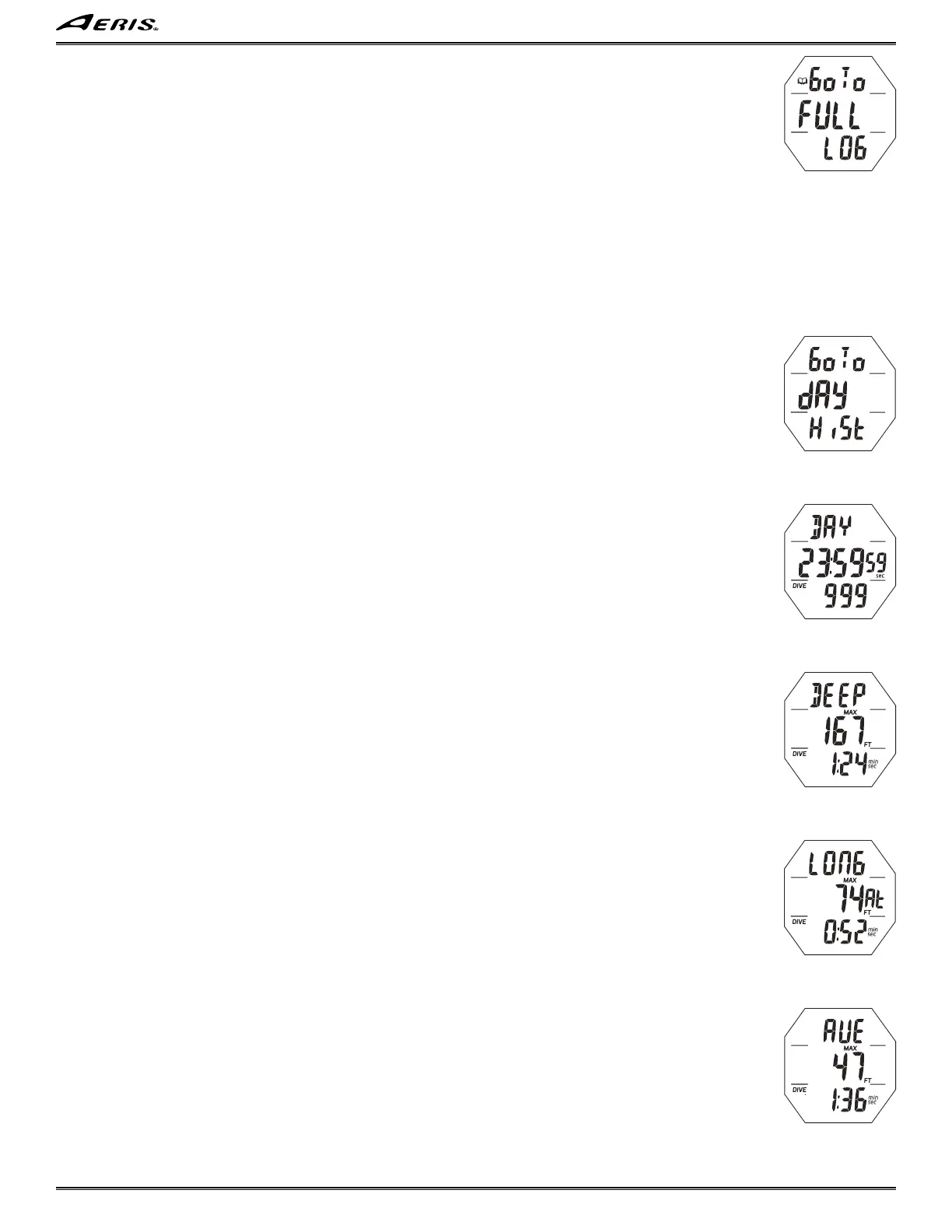
FULL LOG LEAD-IN, information is to include (Fig. 50):
> Graphics Go To FULL LOG with Log (book) icon.
• A (2 sec) - to step forward to Day History Lead-in.
• M (2 sec) - to step back to Day Log Lead-in
• A (< 2 sec) - to access Full Log Data 1.
Full Log Data screens and button operations are the same as those previously described for Day Log.
------------------------------------------------------------------------------------------------------------------------------------------------------------
------------------------------------------------------------------------------------------------------------------------------------------------------------
DAY HISTORY LEAD-IN, information is to include (Fig. 51):
> Graphics Go To, dAY, and HiST, solid.
• A (2 sec) - to step forward to Full History Lead-in.
• M (< 2 sec) - to step back to Full Log Lead-in.
• A (< 2 sec) - to access Day History Data 1.
DAY HISTORY DATA 1, information is to include (Fig. 52):
> Graphic DAY.
> Total accumulated EDT for that day starting at 0:00_01 (hr:min_sec) up to 23:59_59 (hr:min_sec) with sec icon.
> Total number of dives conducted for that calendar day, or session of the day if reset.
• A (< 2 sec) - to access Day History Data 2.
• A (2 sec), at any time, to exit and revert to Day History Lead-in.
DAY HISTORY DATA 2, information is to include (Fig. 53):
> Graphic DEEP indicating that the information displayed is for the deepest depth recorded that day and the Dive Time displayed
is associated with that Max Depth.
> Max Depth achieved that day with MAX and FT (or M) icons.
> Dive Time (min:sec) for that dive, with DIVE and min_sec icons.
• A (< 2 sec) - to access Day History Data 3.
• A (2 sec), at any time, - to exit and revert to Day History Lead-in.
DAY HISTORY DATA 3, information is to include (Fig. 54):
> Graphic LONG indicating that the information displayed is for the longest Dive Time recorded that day and the Max Depth
displayed is associated with that Dive Time.
> Max Depth for the dive with MAX and FT (or M) icons, and graphic At (meaning 'depth at').
> Dive Time (min:sec) for that dive, with DIVE and min_sec icons.
• A (< 2 sec) - to access Day History Data 4.
• A (2 sec), at any time, - to exit and revert to Day History Lead-in.
DAY HISTORY DATA 4, information is to include (Fig. 55):
> Graphic AVE indicating that the data displayed represents Averages for all dives conducted during that calendar day, or ses-
sion of the day if reset.
> Max Depth with MAX and FT (or M) icons.
> Dive Time (min:sec) with DIVE and min_sec icons.
• A (< 2 sec) - to revert back to the Data 1 screen for that dive.
• A (2 sec), at any time, - to exit and revert to Day History Lead-in.
------------------------------------------------------------------------------------------------------------------------------------------------------------
------------------------------------------------------------------------------------------------------------------------------------------------------------
Fig. 52 - DAY HISTORY
DATA 1
Fig. 53 - DAY HISTORY
DATA 2
Fig. 54 - DAY HISTORY
DATA 3
Fig. 55 - DAY HISTORY
DATA 4
Fig. 50 - FULL LOG
LEAD-IN
Fig. 51 - DAY HISTORY
LEAD-IN



 To Next Page