•
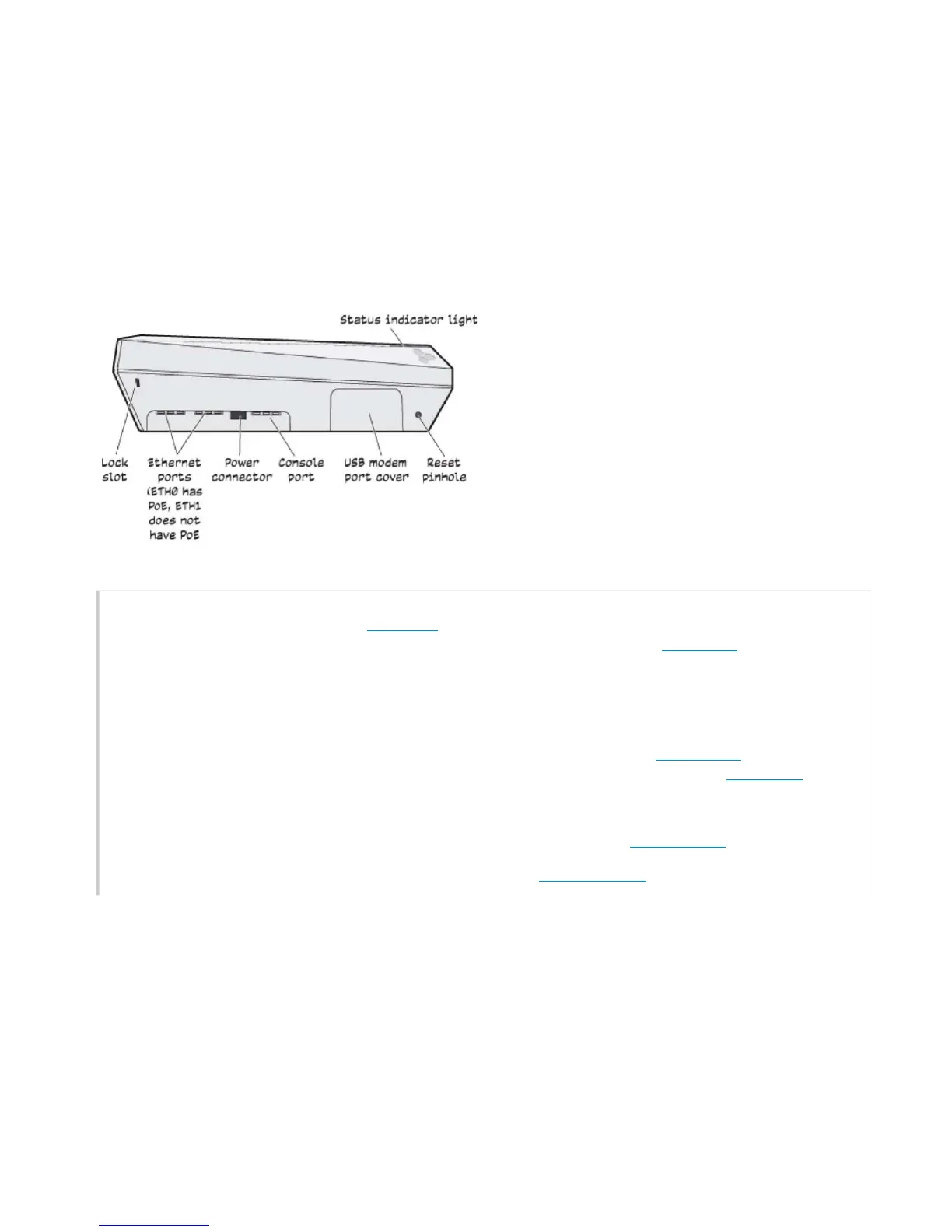
Sta
t
us
L
i
g
h
t
:
The status light
conveys
operational states for
sys
t
em
power,
firmware
updates, Ethernet and wireless
inte
rface
activity,
and major
alar
ms
.
For
detai
l
s,
see "
S
tatus
Light"
.
•
Console
Port:
You can
access
the
CLI
by making a serial connection to
t
he
RJ45 Console
port.
See "Console
Port"
.
•
Power
Connector:
There are two ways to power an
AP230.
You can connect a device to a 100
–
240-volt
AC
power source by
connecting an
AC/DC
power adapter
(av
a
i
l
able as an option) to the 12 V (1.1A)
DC
connector. You can also power the device
throu
gh
the
ETH0
port from
PSE
(power sourcing equipment) that is compat
i
b
l
e
with
t
he
802
.3a
f
and
8
02.3
a
t
standards.
Because
there is no
on/off
s
w
itch,
these devices automatically power on when you connect them to
power.
•
Ethernet Ports:
The
10/
100
/1
000-Mbps
RJ45
Ethernet
ports—ETH0
and
ETH1—are
co
mpa
t
ible
with
10
/10
0/
100
0Ba
s
e-T/
TX
and
automatically
negotiate
half- and full-duplex connections with the connecting device.
These
ports are
autosensing
and adjust
to
straight-
t
hrough
and
crossover
Ethernet cables
automatically.
The
ETH0
port is
PoE-capable. See
"Ethernet
Ports"
.
•
Reset
Button:
The
Rese
t
button allows you to reboot the device or reset
it
to its factory default settings.
See "Reset
Button"
.
•
Antennas
:
The
AP230 has
six internal single-band antennas. The 2.4
GHz
antennas
(802.11a/b/g/n)
have a 4.3 dB
ga
i
n
.
The 5GHz
antennas
(802.11a/b/g/b/ac)
have a 6.7 dB
gain
.
A
ll
antennas are omnidirectional and provide fairly
equ
a
l
coverage in
all
di
rec
tions.
•
USB
Modem
Port:
The Type-A
USB
2.0 port (backward compatible with
USB1.1)
allows you to connect a
wi
reles
s
3G/4G
USB
modem
to serve as a backup
WAN
connection. The modem
port
is hidden by a protective cover.
See "USB Modem
Port"
.
•
Lock
S
l
ot
:
When mounting the
AP
on a
ceiling
track or flat
s
u
rfa
c
e,
you can secure
it
to the track using a
Kensington®
lock in the
lock
s
l
ot
or using the
s
ecu
rity
screw and bracket that
ships
with the device.
See
"Locking the
A
P
230
"
.


 To Next Page