EasyManua.ls Logo

AES global CellCOM PRIME - Powering Up and Exit Button Functionality

AES global CellCOM PRIME
60 pages
Print Icon
To Next Page IconTo Next Page
To Previous Page IconTo Previous Page
Loading...
P a g e | 33
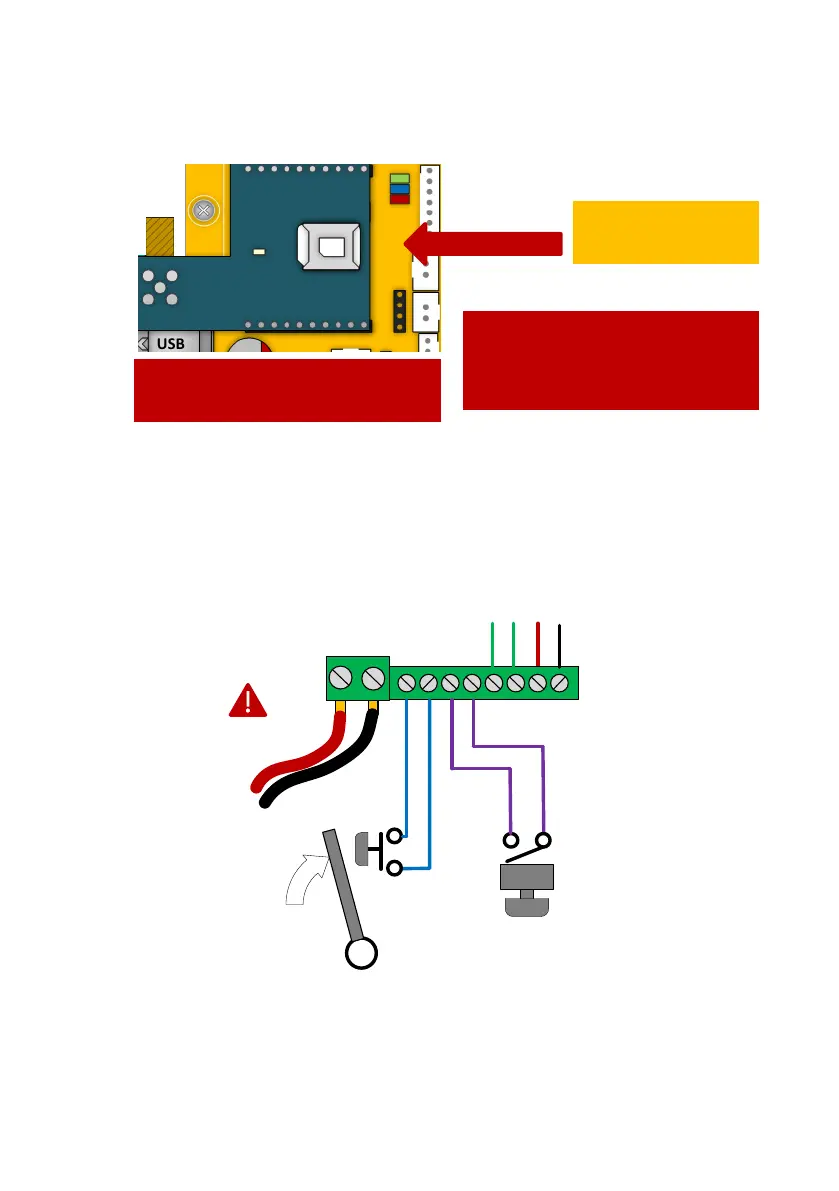
Inserting the SIM card
Powering Up
Perform a final check of wiring and ensure the antenna is connected before switching on the
power. Once the power is switched on, the power LED should illuminate.
Exit Button (PTE)
When the exit button is pressed it will trigger relay 1 for the pre-programmed time in the
app. (Default is 1 second)
24V dc
preferred
28V ac
absolute max!
Door/gate limit switch
(to allow remote checking
of door position)
Push to exit
button
(triggers relay 1)
Pre-wired to internal call
button *Not on iGate
24v
0v
Detect
Open
WARNING
Ensure power is OFF. Do not hot
insert or remove while power on.
45 chamfer IN
Pads DOWN
Ensure SIM is activated.
Pre-pay SIM will need credit first.
Pre-wired in iGate

Related product manuals