P a g e | 53
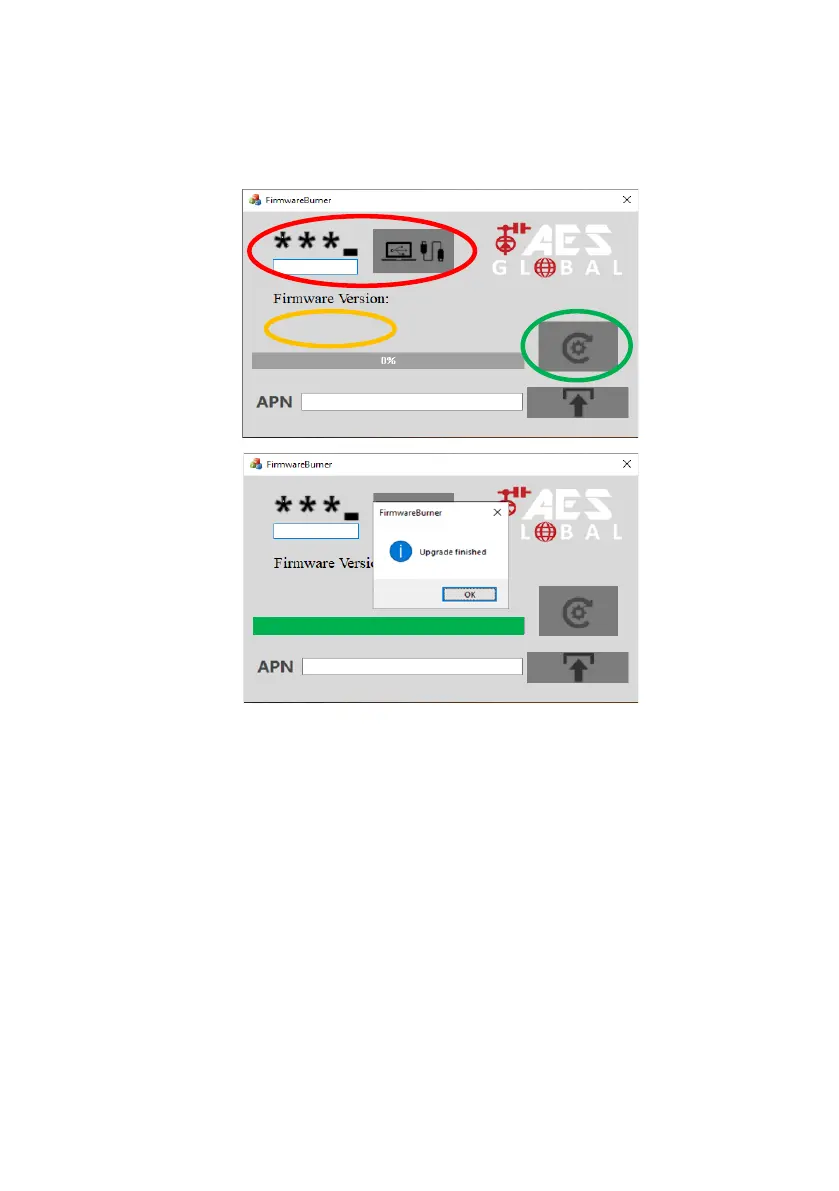
(c) Check the latest firmware version on the board.
**Available to view on most recent firmwares only.**
(d) Click ‘Flash’, locate the firmware file (bin file format), and wait for the
upgrade to complete.
(e) Close the 4G Upgrade Tool and remove the USB lead from the board.
**Default Programming Passcode/ Engineers Code is 9999.**
Tip: After PCB reconnects to network, reopen Upgrade Tool,
Connect and check new firmware version.**
Send the SMS for signal level to the unit to find the firmware
version now installed. (*20#)
If you find the data that was previously on the PCB has erased you can recall
the data by sending: *99#
App Updates
We will continually monitor the app’s performance and will release updates to enhance the
user's experience and/or fix any issues that arise over time. These updates will be available via


 To Next Page