EasyManua.ls Logo

AES global CellCOM PRIME - Battery Backup System Integration

AES global CellCOM PRIME
60 pages
Print Icon
To Next Page IconTo Next Page
To Previous Page IconTo Previous Page
Loading...
P a g e | 32
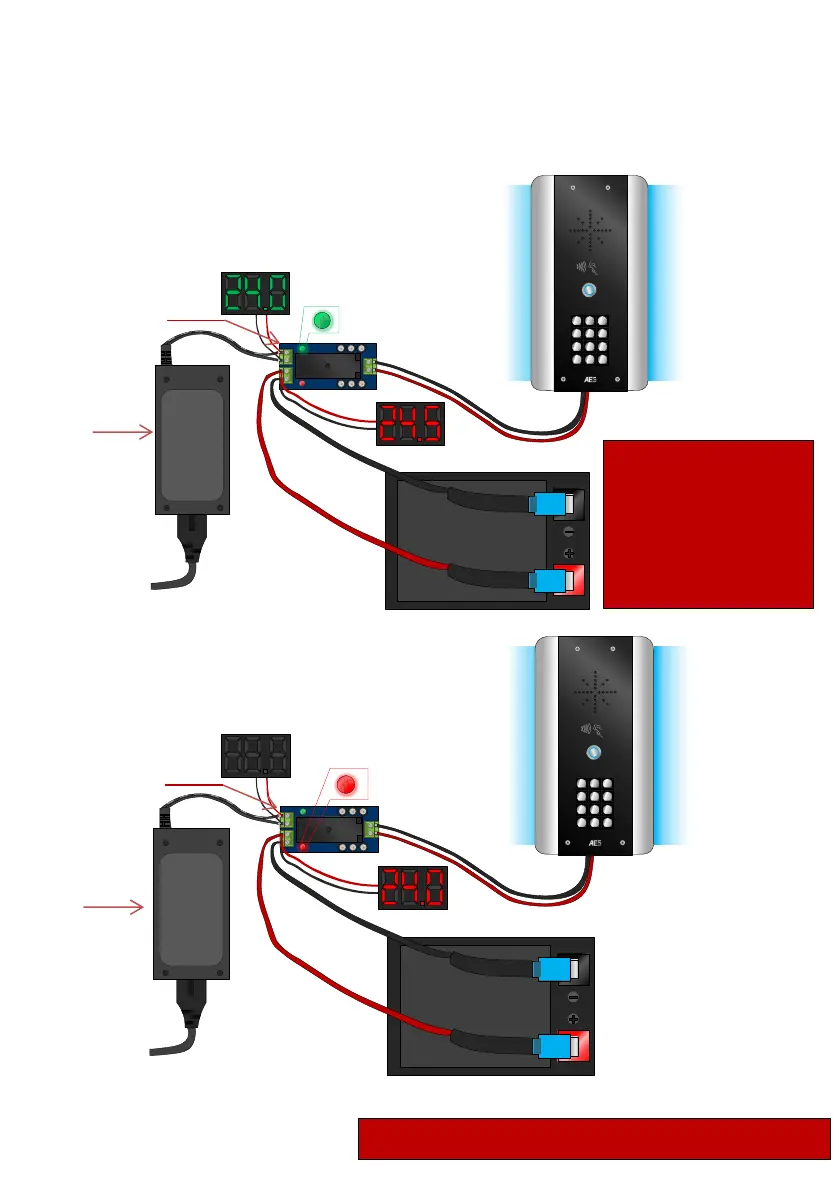
Battery Backup Option
If you wish to prevent your intercom from losing power in the event
of a power outage, we recommend using a battery backup.
Battery and switching mechanism sold separately
Diagrams below are for demonstrational
use only
POWER ON
POWER OFF
SWITCHING POWER ADAPTER
1
2 3
4 5 6
7 8
9
0
*
#
BATTERY
SWITCHING POWER ADAPTER
1
2 3
4 5 6
7 8
9
0
*
#
BATTERY
Power
Supply
Backup Battery
Switching Module
DC Power
Adapter Voltage
Storage Battery Voltage
Backup Battery
switching Module
Power
Supply
Storage Battery Voltage
DC Power
Adapter Voltage
When the backup
battery switching
module detects a loss in
power from the DC
power adapter it
switches over to the
Backup Battery.
Ensure battery is
regularly charged
this could be done
with solar power
(refer to last page).

Related product manuals