P a g e | 43
Receiving A Call and Opening Gates / Door
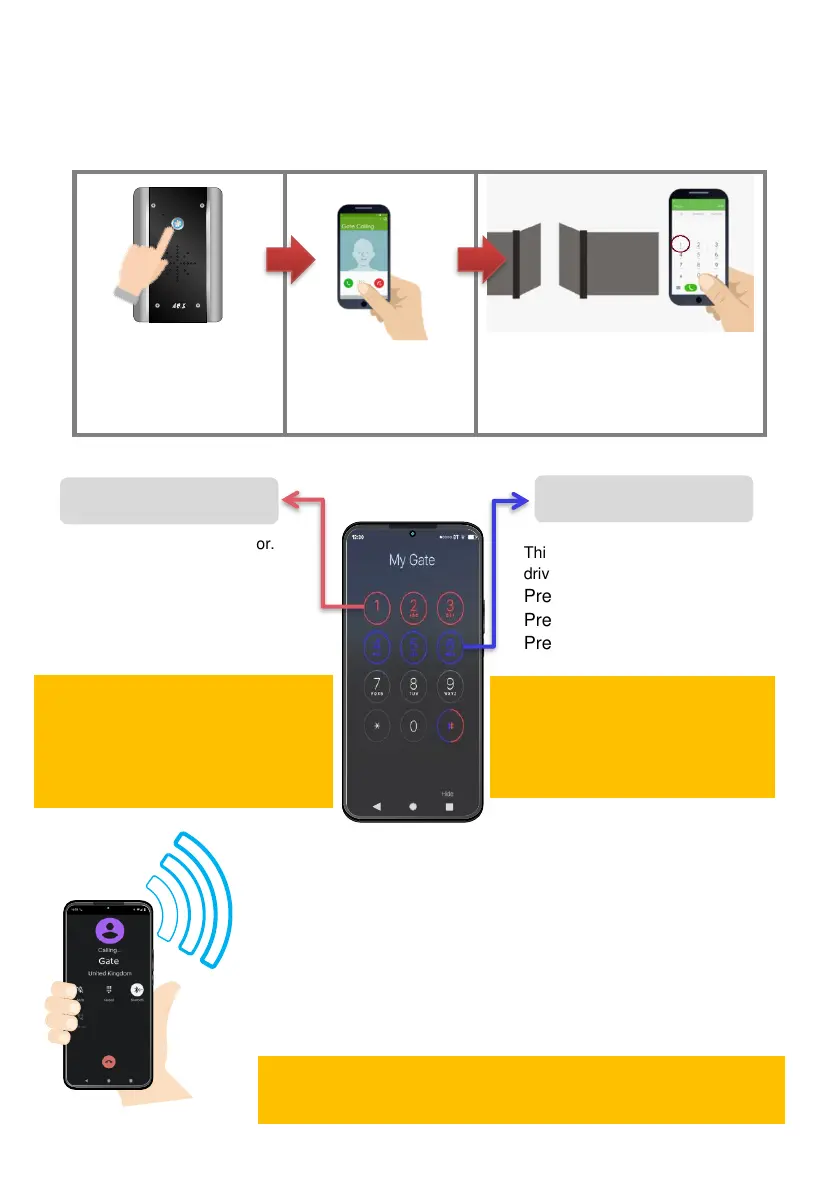
Visitors can press the call button, which will initiate a call from your intercom to the designated
phone numbers which will have been programmed by your installer.
1. Visitor press the call
button or waves in front of
sensor.
2. Intercom calls up to 3
phones in sequence
3. Answer the call, speak to the
visitor, and grant access by
telephone.
Access Control by Calling the intercom
(CallerID)
All residents can call the intercom to gain access at no call charge
using CallerID.
To open, simply ensure you have the phone number programmed
for CallerID and then call the intercom phone number from the
stored number and the relay will trigger as per programmed.
This is usually main gate/door.
Press 1# to open
Press 2# to hold open
Press 3# to un-hold
This can be pedestrian gate,
driveway lights or other.
Press 4# to open/activate
Press 5# to hold open/on
Press 6# to un-hold/off
DISABLE DTMF Confirmation
Remove the ‘#’ confirmation. Press 1, 2, 3
to trigger, latch & unlatch.
(False triggering may occur when disabled)
9999#52X#
(X=1 enable; X=0 disable)
ENABLE Latching feature via DTMF.
If latching is required.
9999#95X#
(X=1 enable, X=-0 disable)
Tip: Press/Wave again to cancel the call
Tip: We recommend naming your intercom in your
phonebook so you can call it by voice command.


 To Next Page