DILUMAT S® MA108201-C
50
6. USER INTERFACE
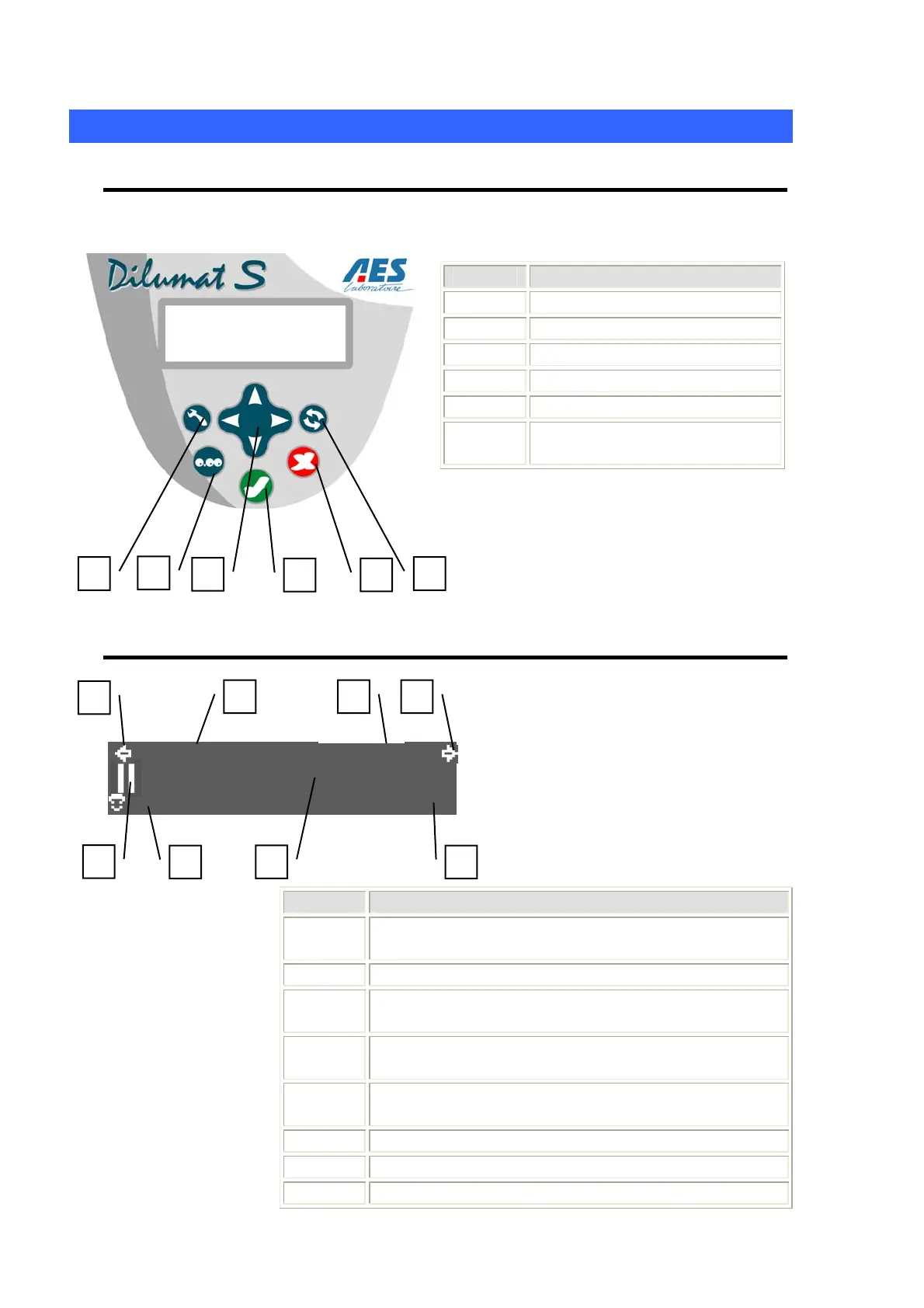
6.1 Keyboard
Label Description
1 Settings key
2 Weigh key / verification
3 Menu navigation arrows
4 OK key
5 Cancel key
6 Change Pump key (if option
included)
6.2 Screen
999990g 1/100
01 9999999999999999
1
24.
g
The screen contains 3 lines.
The information displayed varies
according to the Dilumat S® use
sequences (initializing, using,
configuring, etc.)
Label Description
1 Appears when the left pump is being used
(if the 2
nd
pump option is installed)
2 Appears when the right pump is being used.
3 Counter indicating the weight of the diluent
distributed using the current pump.
4 Dilution speed or amount to be dispensed by the
current pump.
5 Pictogram / icon indicating the status of Dilumat S®
(see the table below)
6 Selected user code
7 Weight
8 Sample ID (if option installed)
4
1
2
3
5
6
1
3 4 2
8
7
5
6



 To Next Page