DILUMAT S® MA108201-C
62
8.3 Selecting the operating mode (dilution/dose dispensing)
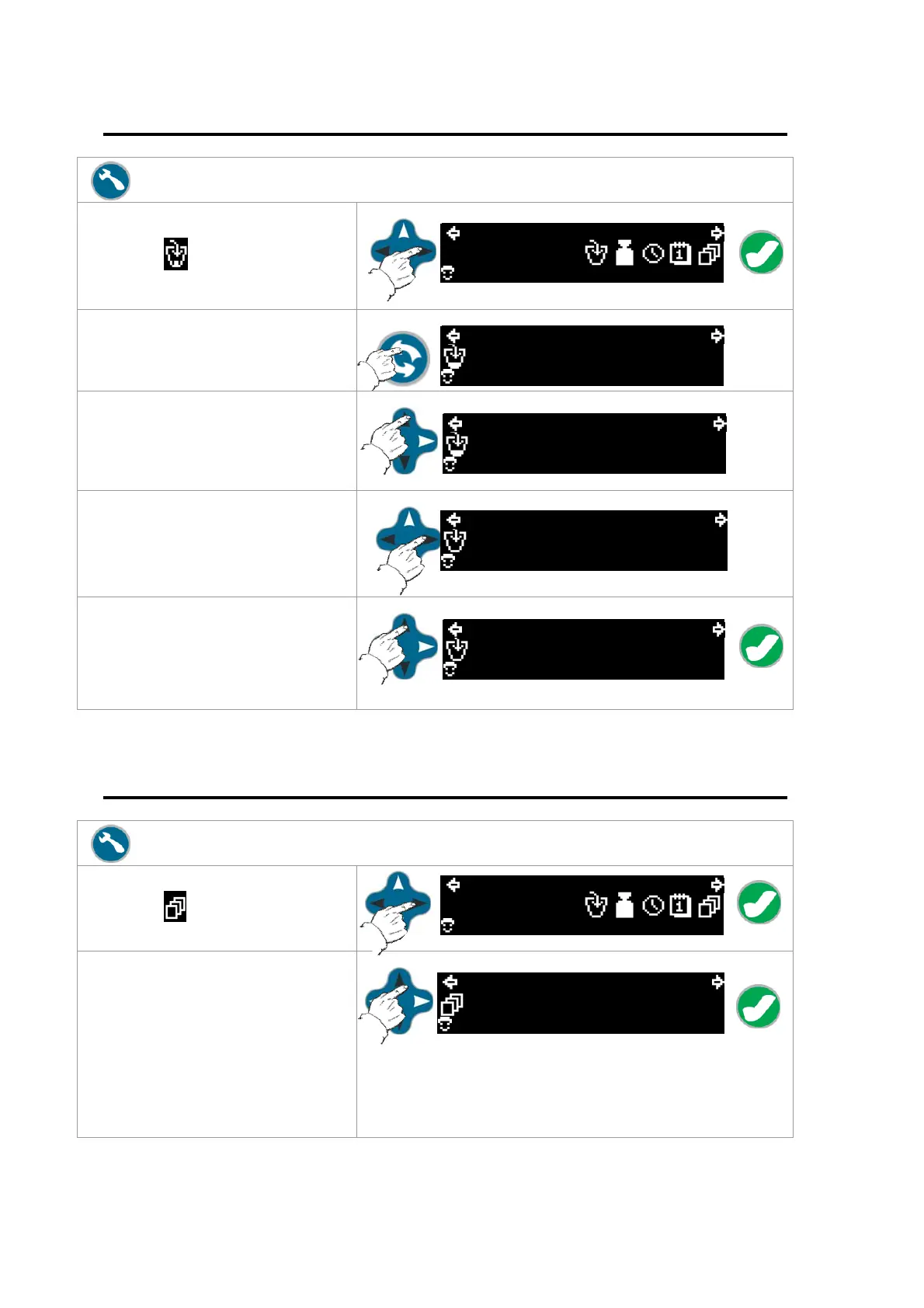
Press the "Settings" key.
Using the "Navigation" arrows,
select the
icon and then press
OK.
13:15 2008/11/12
01
Using the "Change Pump" key,
select the pump to change.
13:15 2008/11/12
1/010
01
Use the up/down arrows to select
the operating mode to use
(dilution or dose dispensing).
13:15 2008/11/12
1/010
01
The left/right arrows can enable a
dilution factor or amount to
distribute (depending on the
selected operating mode).
13:15 2008/11/12
11.0g
01
Use the up/down arrows to
increase or decrease the dilution
factor or amount to distribute
(depending on the mode
selected). Press the OK key.
13:15 2008/11/12
11.0g
01
8.4 Selecting the Operating Mode
Press the "Settings" key.
Using the "Navigation" arrows,
select the
icon and then press
OK.
13:15 2008/11/12
01
Use the up/down arrows to select
the operating mode and number
of tickets.
PRINT 1 to PRINT 9 allow you to
select the number of tickets to
print. The LIMS selection allows
you to export to a PC that is
connected to the Dilumat S.
13:15 2008/11/12
PRINT 1
01



 To Next Page