EasyManua.ls Logo

Aeware in.xm - In.k600 Keypad Function Description

Aeware in.xm
53 pages
Print Icon
To Next Page IconTo Next Page
To Previous Page IconTo Previous Page
Loading...
40
in.xm
TM
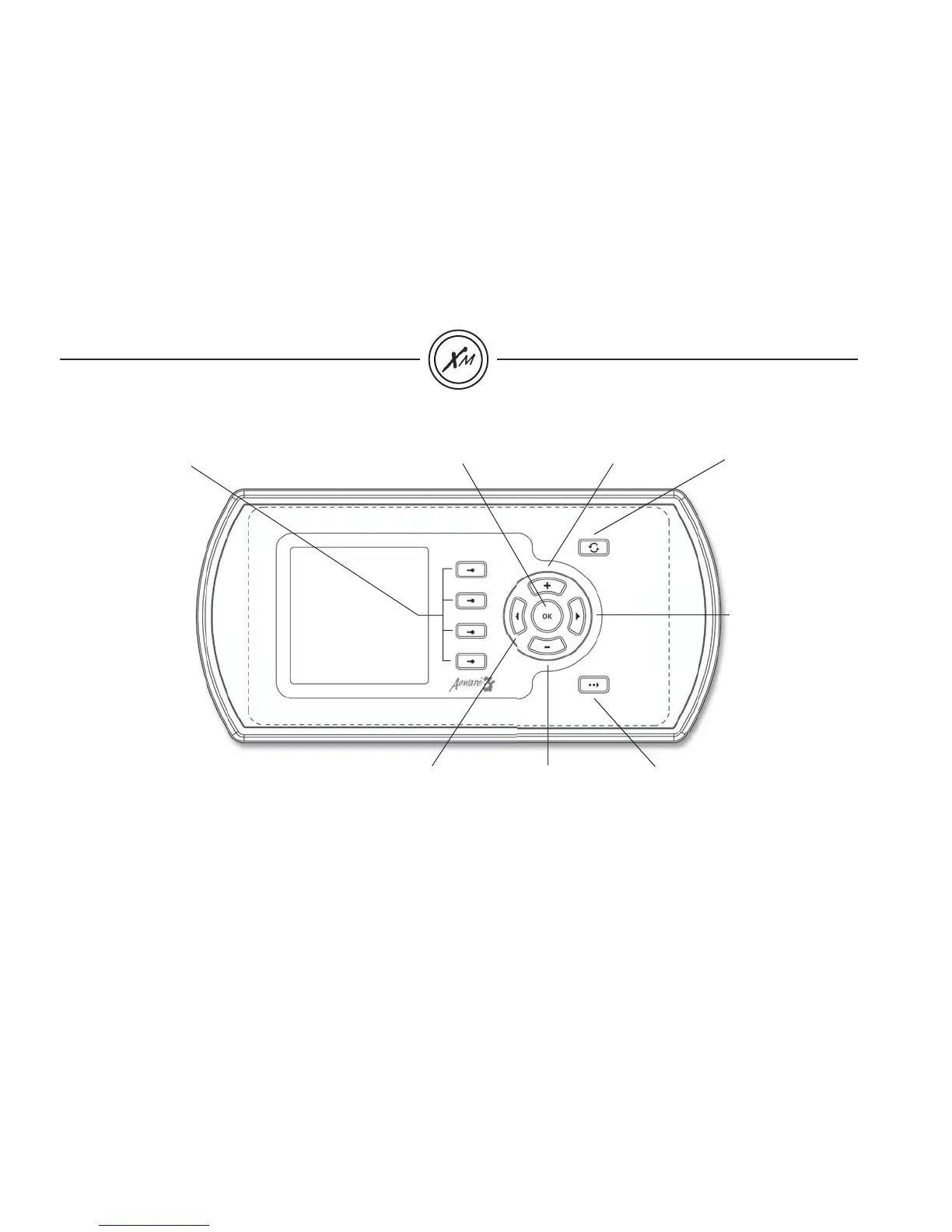
"Ok" Key
"Next" Key goes to
next menu page
"Mode" Key
selects mode of
operation: Spa, Audio,
and Options. Also, it
allows you to exit any
programming window
without saving any
changes and go
back to the previous
screen.
"Right"
Multifunction Key
"Minus" Key
decreases
parameter setting
"Left"
Multifunction Key
"Plus" Key increases
parameter setting
Multifunction Keys
1, 2, 3, 4
Each of these four
keys helps you
to select and/or
execute the indicated
function displayed
on the screen in
any given window.
In this way, the task
performed by a given
multifunction key will
vary depending on the
menu or window.
in.k600
TM
keypad function description
In.k600™ keypad menu driven interface