AG Duo Operation Manual
AR / 25.07.23 / Version 1 39
5.4 CONVEYOR DRIVE BELT TENSION
If the conveyor drive is intermittent and noisy, this may indicate that the drive belt may
require adjustment. To do this, the conveyor must be removed from the AG Duo, as follows:
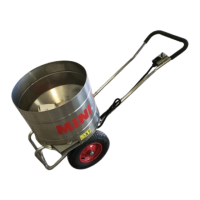
• Remove the conveyor motor access panel and disconnect the motor supply wires.
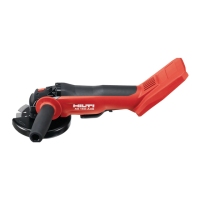
• Release the 4 screws securing the conveyor. These are best accessed from the
underside of the AG Duo. Cut-outs are provided in the conveyor sides for access to
the nuts.
Take extra care when working under the AG Duo. Ensure the AG Duo is secure.
• The complete conveyor can now be slid out from the tunnel.



 To Next Page