25
[4] Applying Blood Sample
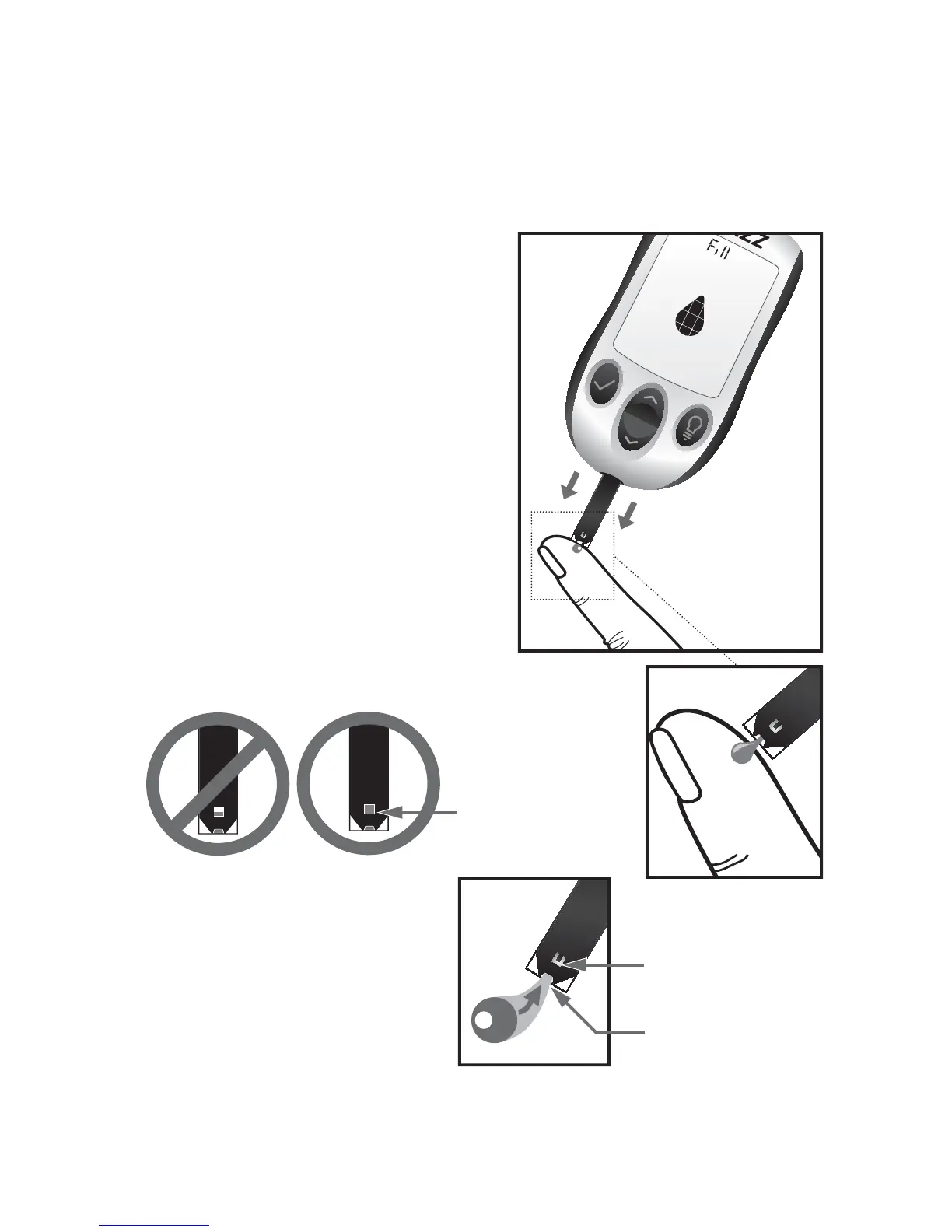
Bring Test Strip to Blood Sample: The meter now displays the
droplet symbol. This means your AgaMatrix WaveSense JAZZ
System is now ready for you to
apply blood. Immediately bring
the AgaMatrix WaveSense JAZZ
Test Strip to the blood sample.
The test strip fills from the tip.
Do not apply blood on the top
surface of the test strip.
The AgaMatrix WaveSense JAZZ
Test Strip acts like a sponge and
draws the blood into the test strip
through the sample area. The vi-
sual fill window of the AgaMatrix
WaveSense JAZZ Test Strip will
turn red.
This is the visual ll
window. DO NOT
PUT BLOOD HERE.
Apply blood here.
The entire
visual ll
window will
turn red.
WARNING: If the visual
ll window does not
completely ll, you may
get an inaccurate result.
Retest and ensure that
the visual ll window is
completely full.



 To Next Page