Step 2: Move the table of X axis to one of the most end and zero the value.
Make sure the coordinate is ABS model.
X0
Y0
X
1 32
-
+
CLS Arc
sin
TOOL
XYZ-COMPNON-LINE
X0
·
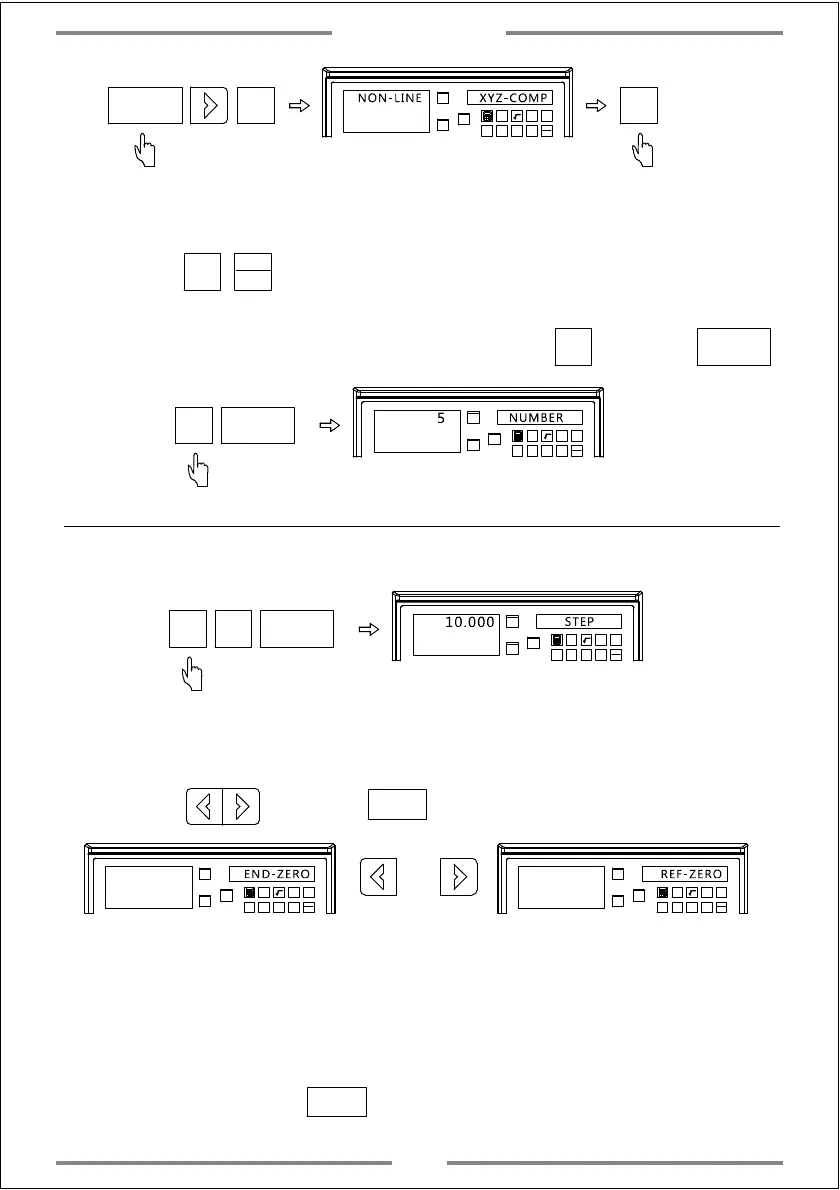
Step 3: Press to enter compensation of X axis.
Input the related parameter.
X
Step 4: Input the number of compensation part.Press ,and press
5
ENT
X0
Y0
X
1 32
-
+
CLS Arc
sin
TOOL
NUMBER
5
5
ENT
Note:The number of compensation part for each axis should be input on X axis.
Step 5: Input the length of each compensation part.
X0
Y0
X
1 32
-
+
CLS Arc
sin
TOOL
STEP
10.000
0
ENT
1
Step 6: Select the starting point(A:most end point of linear scale B:Mechanical
zero reference point of linear scale)
X0
Y0
X
1 32
-
+
CLS Arc
sin
TOOL
X0
Y0
X
1 32
-
+
CLS Arc
sin
TOOL
REF-ZERO
A:Most end point of linear scale B:Mechanical zero reference
point of linear scale
ENT
END-ZERO
Step 7: Set the starting point
1. If choosing option A,move the table of X axis to the most left end or right
end and zero the value.At this time,the starting point for compensation
isthe zero point.Press to enter next step.
ENT
Press ,and press to confirm.
ENT
MM
INCH
Basic Function
15



 To Next Page