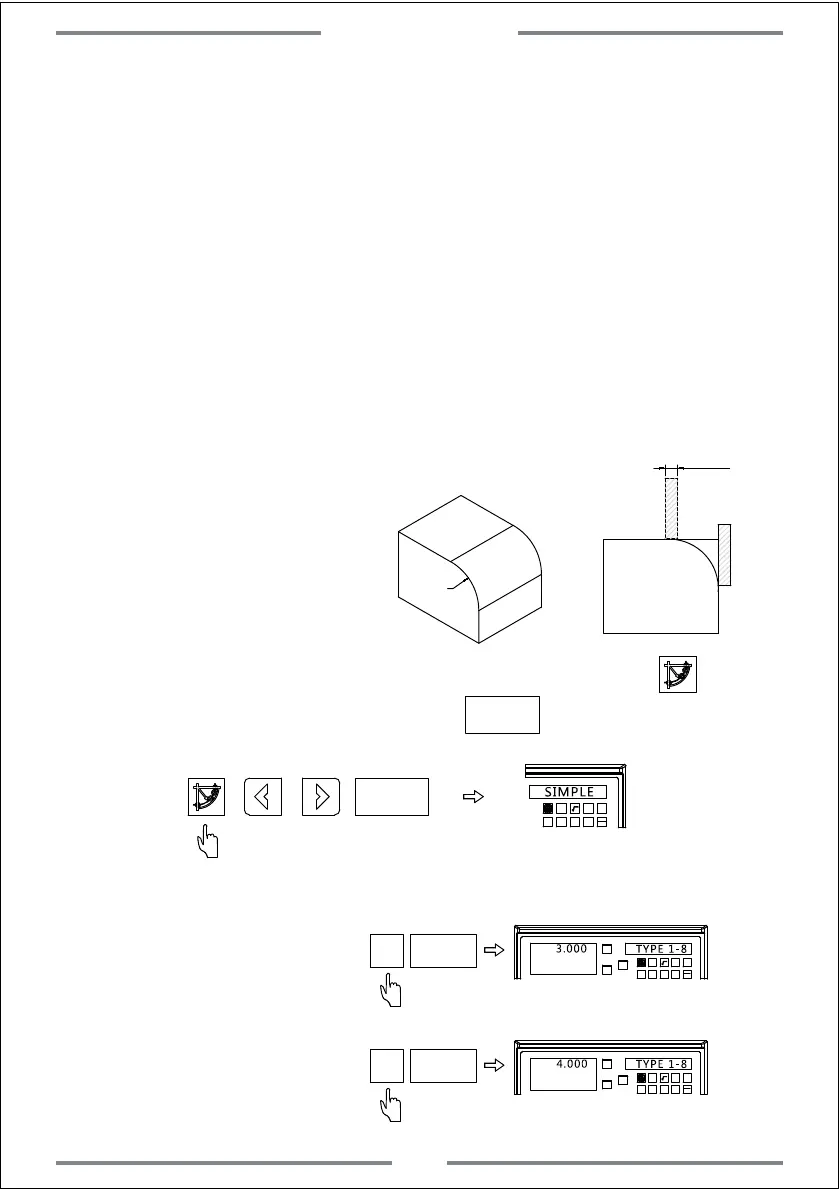
Example:Machine the arc as
shown in right figure.
Operation steps
1. Locate the zero point of work-piece and zero the value of axis
2. Enter the R function and select the simple R (SIMPLE)
3. Select the machining way from the preset 8 options.(TYPE 1-8)
4. Select the plane XY,XZ,YZ(ARC-XY,ARC-XZ,ARC-YZ)
5. Input the arc radius (R)
6. Input the tool diameter (TL-DIA) Note:When using the flat end mill to
machine the arc on plane of XZ and YZ,input the tool diameter as 0)
7. Input the maximum cutting amount (MAX-CUT)
8. Select the arc plane as convex or concave(RAD+RL or RAD-RL)
9. Machining the point by turn according to the DRO display.
R10
A
B
∅5
Step 1: Move the tool to the starting point of arc(A or B),press to enter
the R function and select simple R.Press to confirm.
ET
ET
1 32
-
+
CLS Arc
sin
TOOL
SIMPLE
3
ET
X0
Y0
X
1 32
-
+
CLS Arc
sin
TOOL
3.000
TYPE 1-8
Step 2: Select the machining way
A as the starting point
4
ET
X0
Y0
X
1 32
-
+
CLS Arc
sin
TOOL
4.000
TYPE 1-8
B as the starting point
Special Function
31



 To Next Page