(6): When the value on Z axis is equal to preset height value.The EDM
machining will stop.The right window will display EDM END.There are two
ways to exit the function.One is automatic exit once the preset height has
been reached.The other is to press to exit.Before the exit,the right
window will display EDM END to remind.
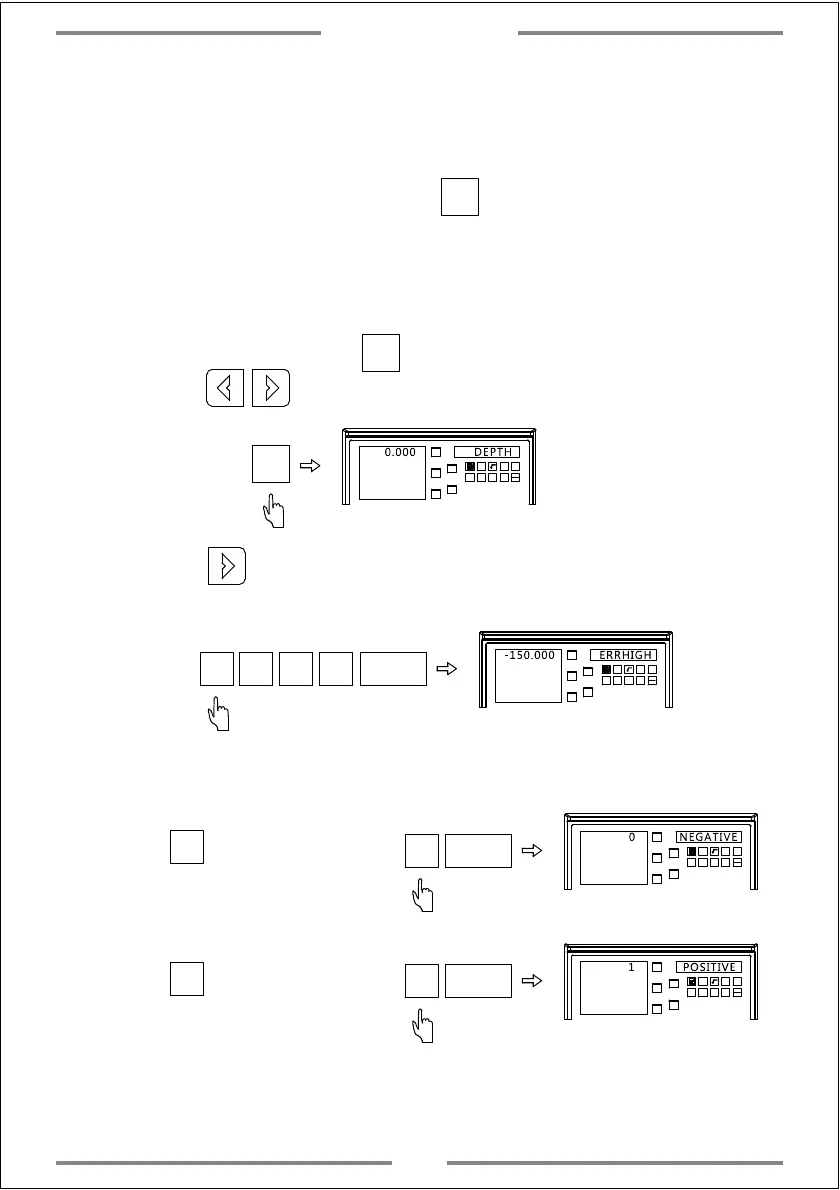
3. Fire Prevention of Reverse Height(ERRHIGH),Exit Model and Machining
Direction Setting(This setting could be done before machining)
Step 1: Zero all axis and press to enter the EDM function.
Press to set the different parameter.
X0
Y0
X
1 32
-
+
CLS Arc
sin
TOOL
Z0
Y
0.000 DEPTH
Step 2: Press to set the fire prevention of reverse height.
Here we input -150.
X0
Y0
X
1
32
-
+
CLS Arc
sin
TOOL
Z0
Y
-150.000 ERRHIGH
0
ENT
5
1
-
Step 3: Set the machining direction.The defaulted is positive direction.
X0
Y0
X
1 32
-
+
CLS Arc
sin
TOOL
Z0
Y
0 NEGATIVE
0
ENT
X0
Y0
X
1 32
-
+
CLS Arc
sin
TOOL
Z0
Y
1 POSITIVE
1
ENT
Press to choose the
negative direction(NEGATIV)
0
Press to choose the
positive direction(POSITIV)
1
Step 4: Enter exit model setting.The defaulted is automatic exit.
Special Function
40
SIFT
SIFT
SIFT



 To Next Page