Air Science
®
120 6th Street \ Fort Myers, FL 33907 \ T 239-489-0024 \ Toll Free 800-306-0656 \ F 800-306-0677 \ www.airscience.com
20 \ USER OPERATION MANUAL: Purair Basic Series
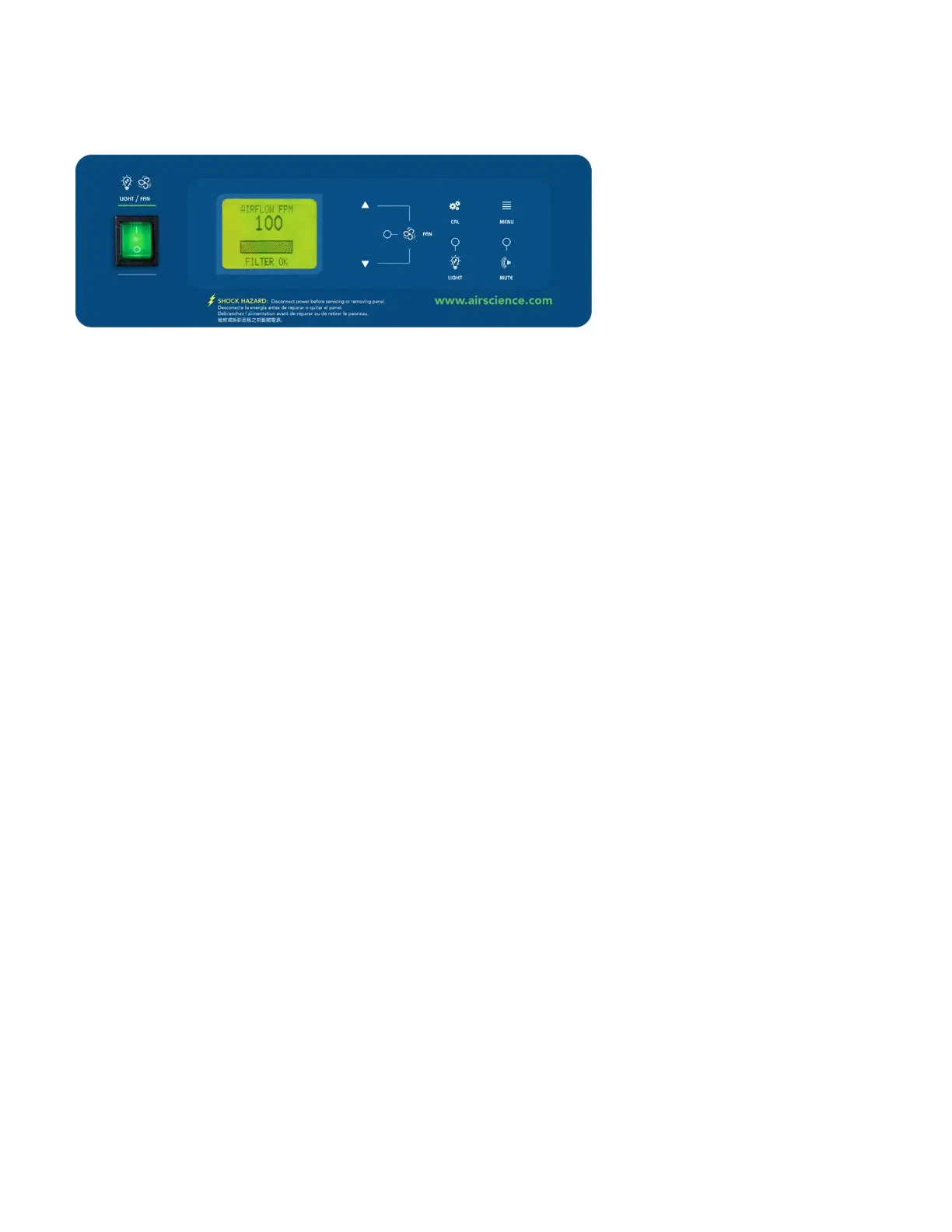
Monitair Control Panel (Optional)
The optional Monitair microprocessor controller monitors and displays cabinet operating parameters, air-
ow,containmentandofferslimiteddetectionoflowconcentrationsofhydrocarbon,somegasesandorganic
acids. Emits audio and visual alerts if conditions become unsafe. All displayed on a LCD screen.
Note: The unit is calibrated at the factory.
» A set face velocity is maintained on sash opening and closing using the incorporated Variable Air Volume
System.(Thesystemcanalsooperateonxeddrive.)
» On initial power up, the system auto detects the main AC supply frequency and sets the triac drive
accordingly (230 Vac or 115 Vac).
» On system start, three (3) screens are displayed in turn:
Screen 1: Can display company logos, text or both for a preset time.
Screen 2: Displays the data screen with details of elapsed time, alarm set time
andlterIDforapresetperiodoftime.
Screen 3: If an elapsed time alarm is present, the alarm screen will be displayed;
on acknowledgement the NORMAL RUN screen will be displayed.
Monitair Control Panel Operation:
» Thesystemscalibrationofairowandorganicltersaturationalarmareallcarriedoutfrom
the front membrane (no potentiometers) using easy to follow on screen instructions.
» The target face velocity is variable on calibration from 0.25 m/s to 0.80 m/s.
» The alarm point is software set and adjusted incrementally from the target face velocity set point.
» ThedisplayPCBautodetectsifasensorhasbeentted;ifnot,theorganicsaturationisdisabled.
» ThelterIDareidentiedanddisplayedontheDATAscreen(maximum6charactersperID)which
can be customized as required.
» AnylterIDcanbetaggedinrmwaresoifanacidcompositecarbonorHEPAlteristted,
theorganiclteralarmisdisabled.
» An elapsed time display and alarm is incorporated in the MENU section; the user select alarm
point is in hours.
» The menu access is code protected. To access, press and hold the MENU OPTIONS button for
4 seconds or a coded button sequence.


 To Next Page