Page
13Air Techniques, Inc.
Installation
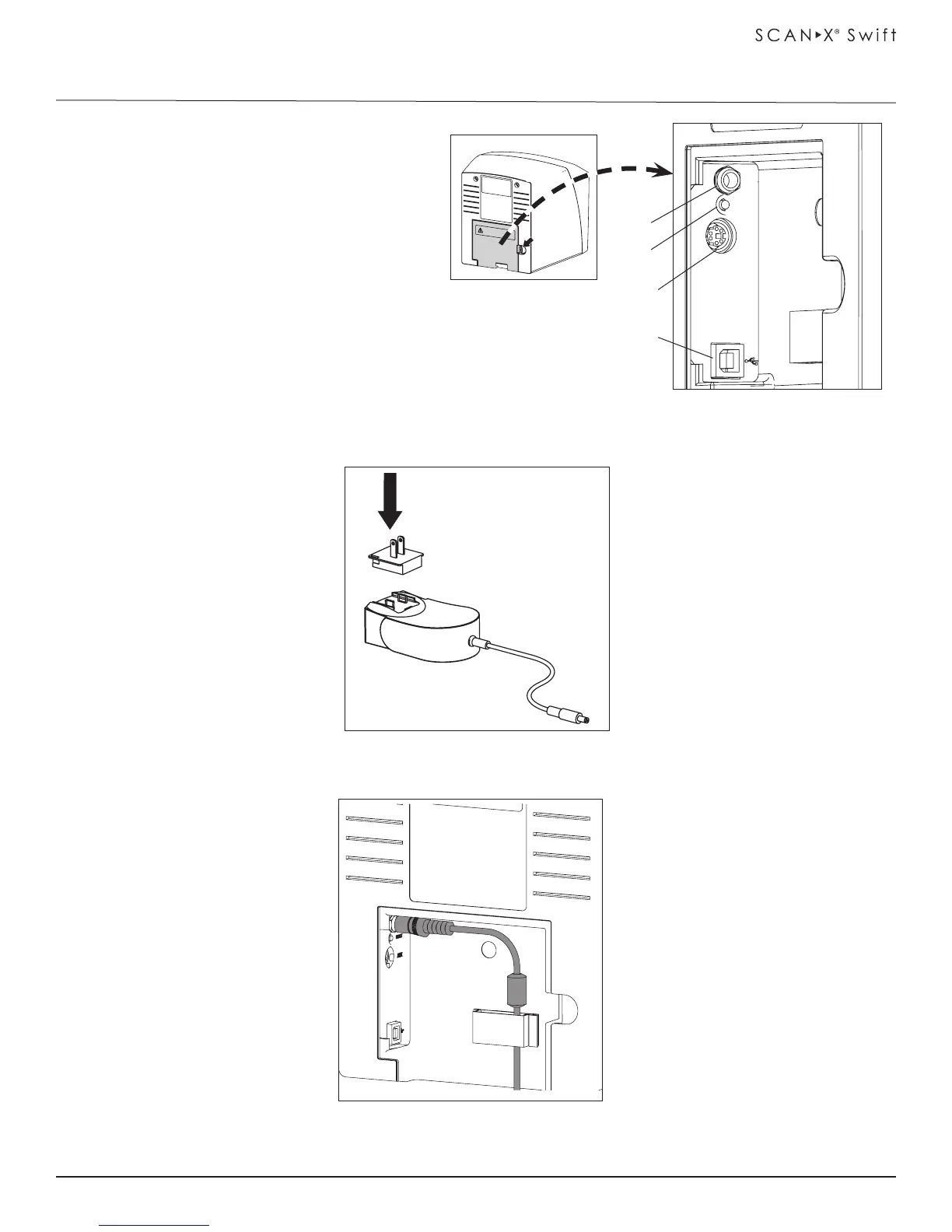
AUX
RESET
24V
1
3
4
2
1. 24V - Connection - The 24V -connection
provides the power to operate ScanX Swift.
2. Reset Button - Pressing and holding the Reset
button for 15 - 20 seconds while switching on
returns all settings of the unit to the original
factory settings.
3. AUX Connection - The AUX connection is
used for diagnosis purposes by our Service
Technician.
4. USB - Connection - USB Type A connector
that allows connection of a computer. ScanX
Swift can not operate using USB 1.1. Use USB
2.0 or higher.
Figure 10-1. ScanX Swift Rear Panel Connection Ports
Figure 10-3. Power Cable Secured with Cable Clip
Note: The power supply
adapter is the Mains
disconnect device.
Figure 10-2. ScanX Swift Swift Adapter Connecter
IMPORTANT:
Make sure Adapter Connector
is properly installed
IMPORTANT:
Must use USB 2.0 or higher.
Unit can not be operated
using USB 1.1.


 To Next Page