10 Chapter 2
Connecting the Optional Bluetooth
®
Portable Printer Device
To connect the Bluetooth printer to the Model TA465, power on the
unit and the printer. Then press the MENU soft key. From the Menu
use the and keys to highlight Bluetooth Functions and press the
key. Highlight Discover Devices and press the key. If other TSI
Bluetooth-printers are in the area, turn them off before searching. The
Model TA465 will then search for and list all available Bluetooth
devices.
For more information on establishing Bluetooth connections, refer to
TSI Applications Note AF-150.
Connecting to a Computer
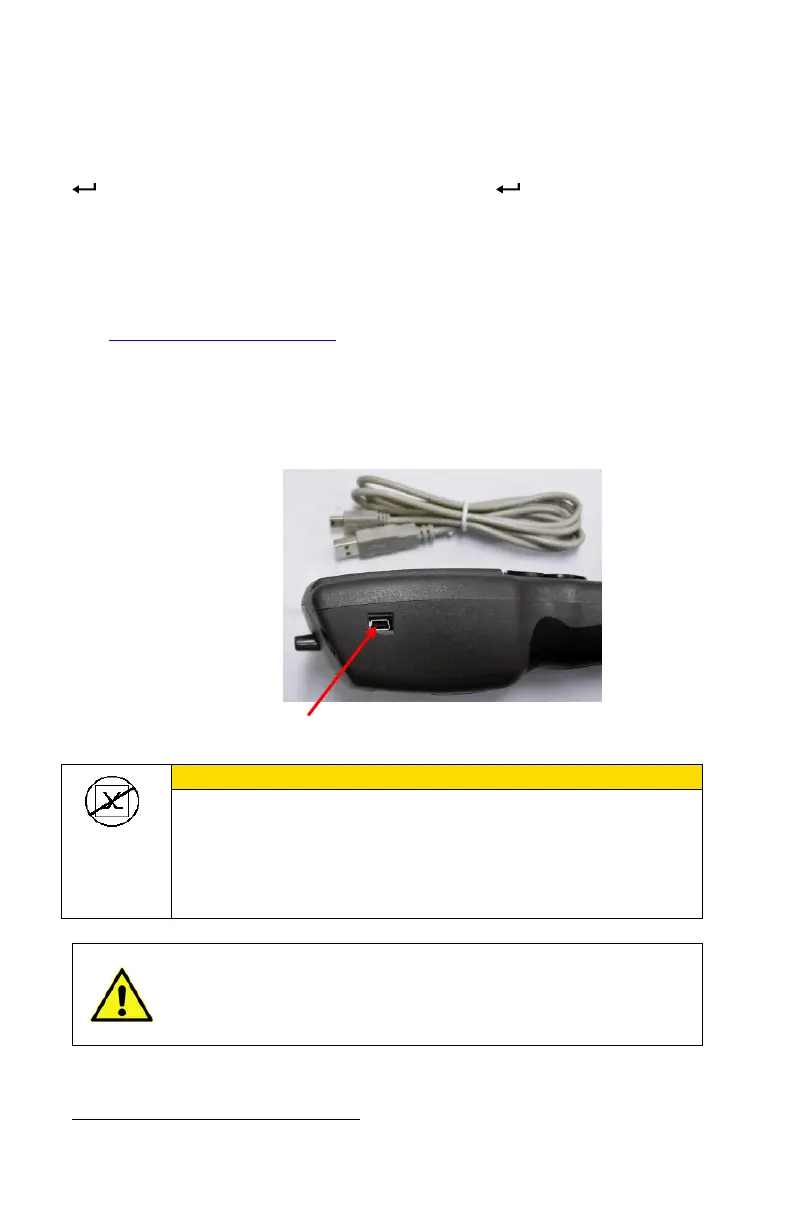
Use the Computer Interface USB Cable provided with the
Model TA465 to connect the instrument to a computer for
downloading stored.
This symbol is used to indicate that the data port of the
Model TA465 is not intended for connection to a public
telecommunications network. Connect the USB data port
only to another USB port on a safety certified computing
device.
Protection provided by the instrument could be impaired
if used in a manner other than specified in this user
manual.
Bluetooth is a registered trademark of Bluetooth SIG.


 To Next Page