6.1.2. Wireless
To activate WPS connection, please follow the steps below:
1. Power on your wireless router first and make sure it working.
2. Power on the Camera.
3. Respectively press WPS buttons of wireless router and Camera within a short time.
Then, wait a while and the wireless router will configure this camera WLAN setting
automatically.
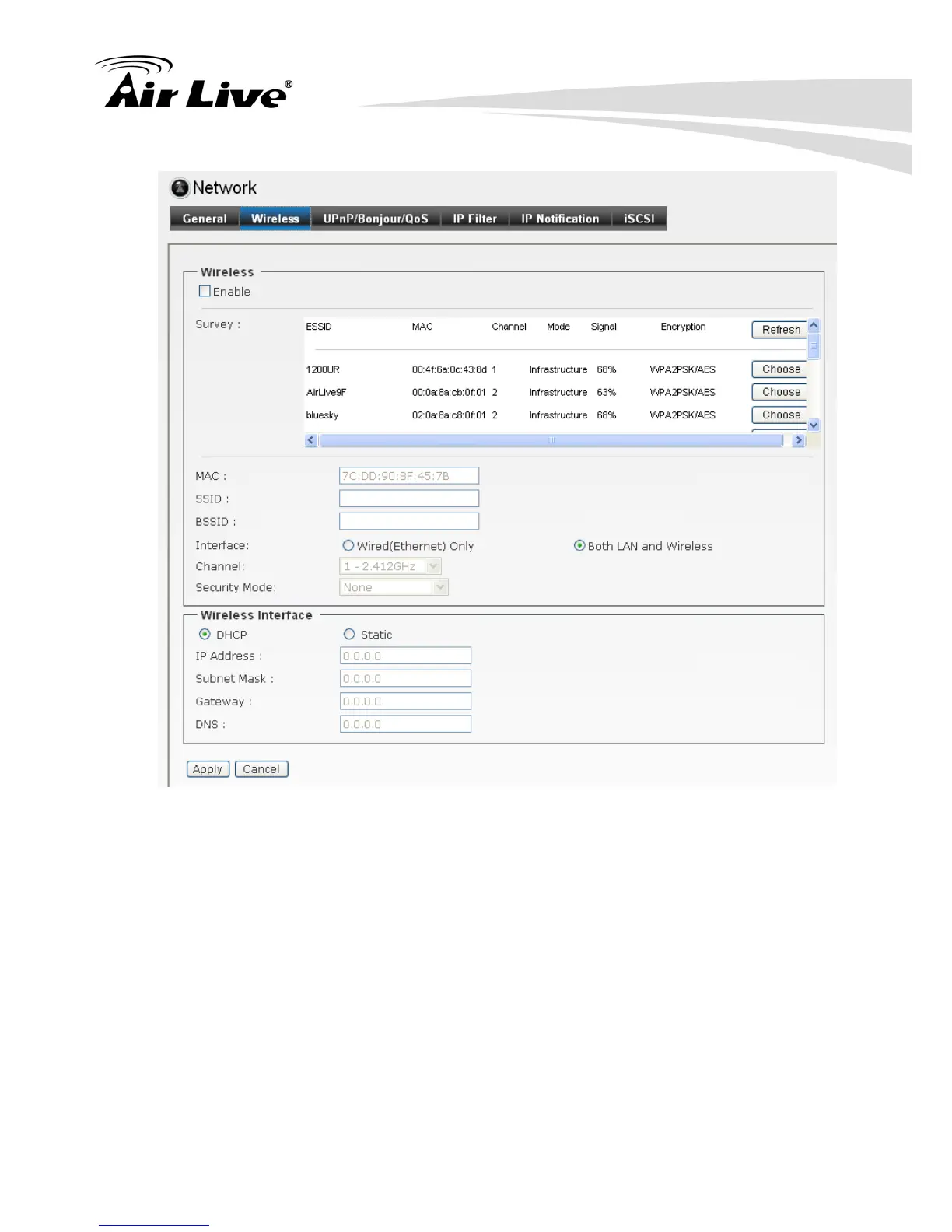
There are 2 easy steps to complete the Wireless connection. Please follow the
instructions on the screen.
Step1: Click Enable to enable Wireless.
Step2: Please choose the SSID from the Survey table.
Step3: Enter the Encryption key based on the security mode you choose and click
Apply to active the wireless setting.
Site Survey:
It will list all the available access point and click Refresh to refresh the information.
Access points with a disabled SSID Broadcast will not appear unless the camera is
associated with it.


 To Next Page
 Loading...