7. Reset Counter: Select the minimum time interval to reset the counter result.
8. Select Rotate Mode or Transform Mode in Edit Mode:
- Rotate Mode: User can rotate the zone at will.
- Transform Mode: User can drag the point of the zone to any shape
9. Directionality: User can select the detected moving direction from one to another or
both the directions.
10. Statistics Record: You can configure your camera in different ways to generate the
statistics you required and statistic data can be exported in csv format file.
- Select Auto, camera can send yesterday report to Samba server or FTP server
automatically.
- Select and choose the Statistics Period that you want and also you can export or
reset the result.
- Statistics Chart Display: Here will show the result of Trip Zone.
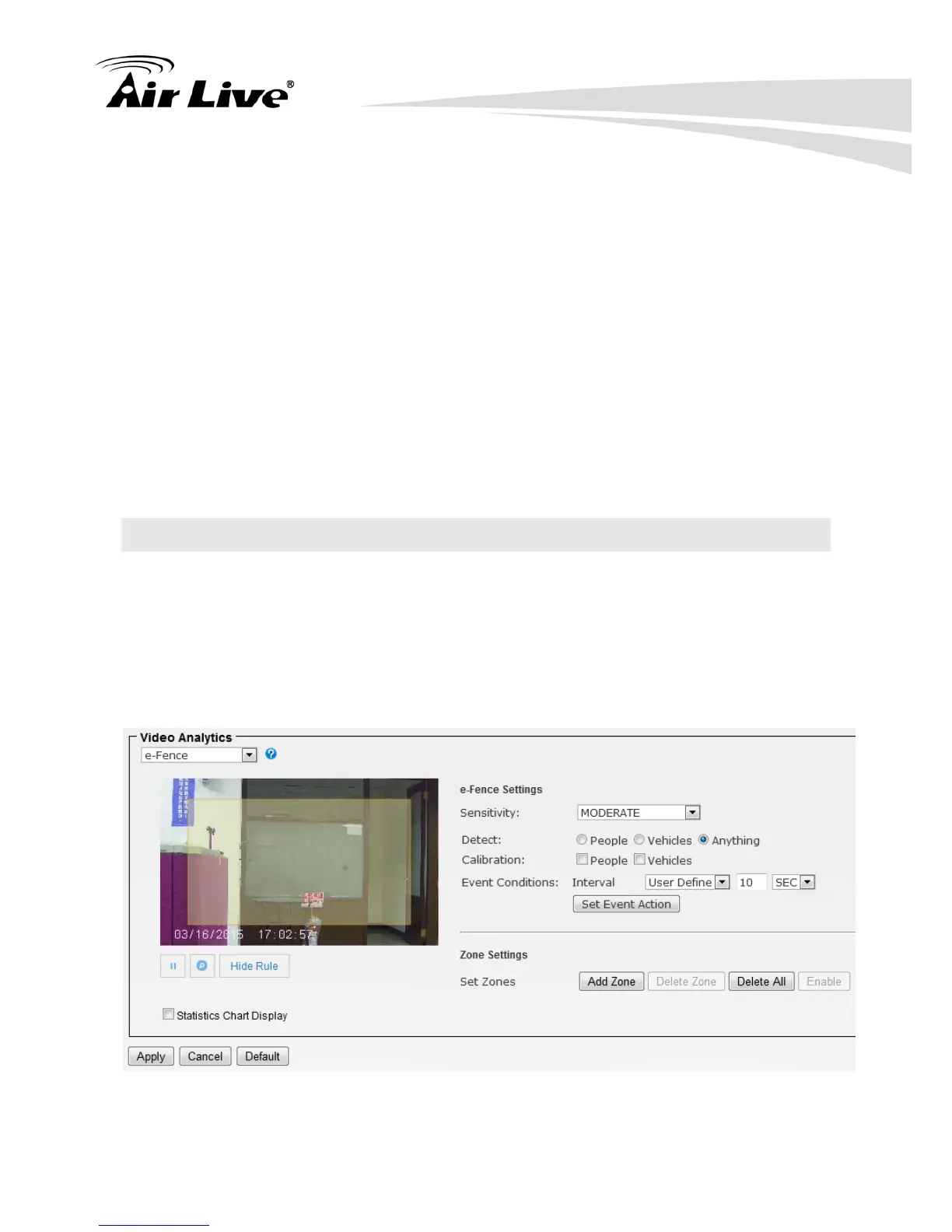
7.6. e-Fence
The e-Fence is an electronic fence protection system which is able to detect and send
output alert if any object is entering or leaving the boundaries you set in the camera. This
function can be used in many applications, either as a standalone protection system or
other protection systems such as airports, power plants, radio towers or even military
camps.
1. Select Sensitivity to set the detection sensitivity level. Higher sensitivity will make it
easier to detect and less objects missing, but more misjudgments.


 To Next Page