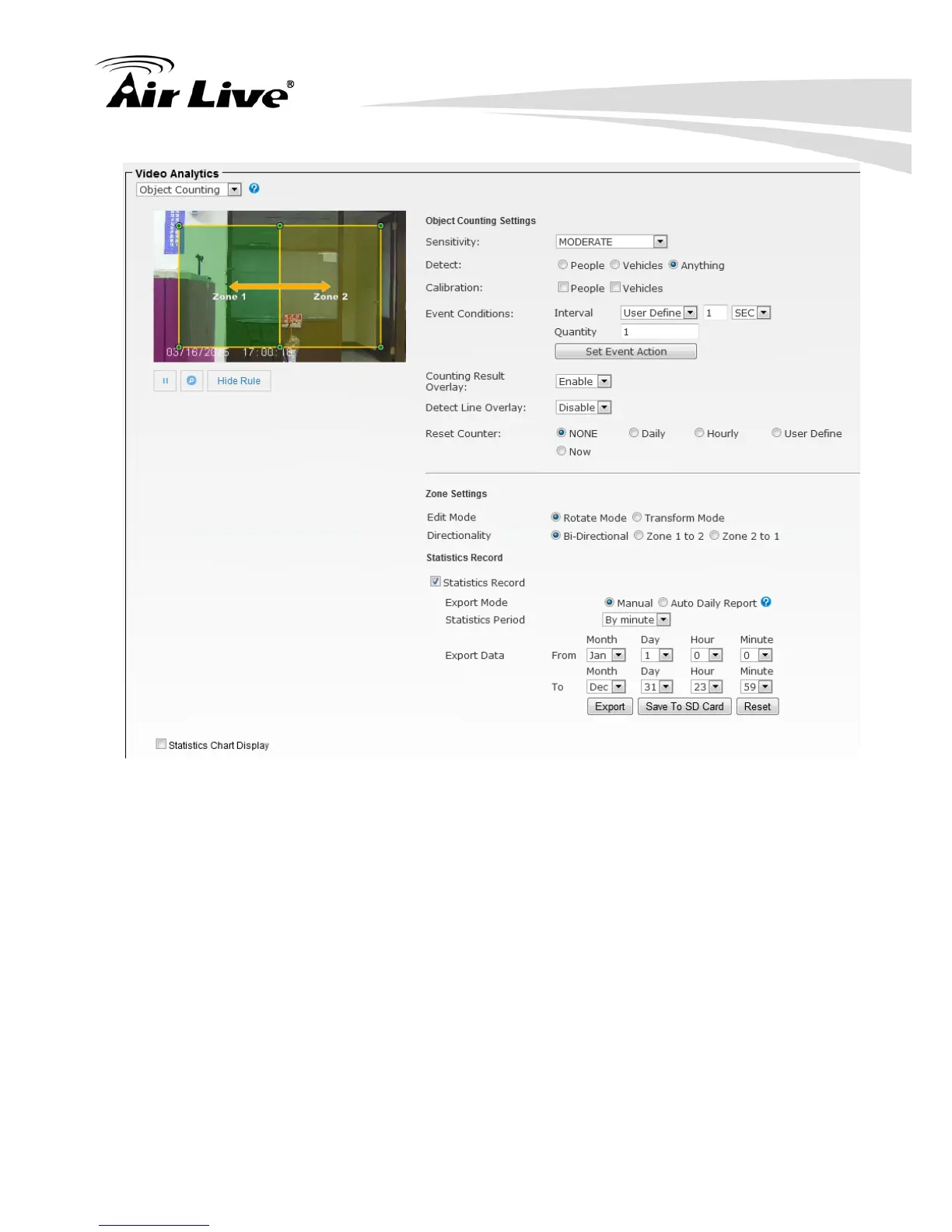
1. Select Sensitivity to set the detection sensitivity level. Higher sensitivity will make it
easier to detect and less objects missing, but more misjudgments.
2. Select People / Vehicles / Anything as the detected objects.
3. Select Calibration (People or Vehicle Object Sizes).The minimum and maximum
boundary of objects can be specified to improve the detection accuracy. If any false
detection caused by smaller objects, you can try to increase the minimum size.
- Min.Size of Calibration: The width and length values must be 6 pixels at least. If any
false detection caused by smaller objects, you can try to increase the minimum size.
- Max.Size of Calibration: It has to be larger than the minimum size and half the frame
size is the most.
4. In Event Conditions, you can specify the minimum time interval and quantity for
each alarm. And go add or edit the IVS event in the Set Event Action.
5. Enable / Disable the Counting Result Overlay.
6. Enable / Disable the Detect Line Overlay.


 To Next Page