Select ON/OFF to enable/disable the Tamper Detection.
Select Sensitivity to set the sensitivity level.
The higher the sensitivity, detects the minutest tampering attempts.
Select Reset Time. Once a tampering is detected, the camera will resume a normal
operating after a certain stability time (Reset Time) during which no detection will be
performed.
Select Alarm Type to specify the activation condition.
Statistics Chart Display: You can see the test result of alarm type here.
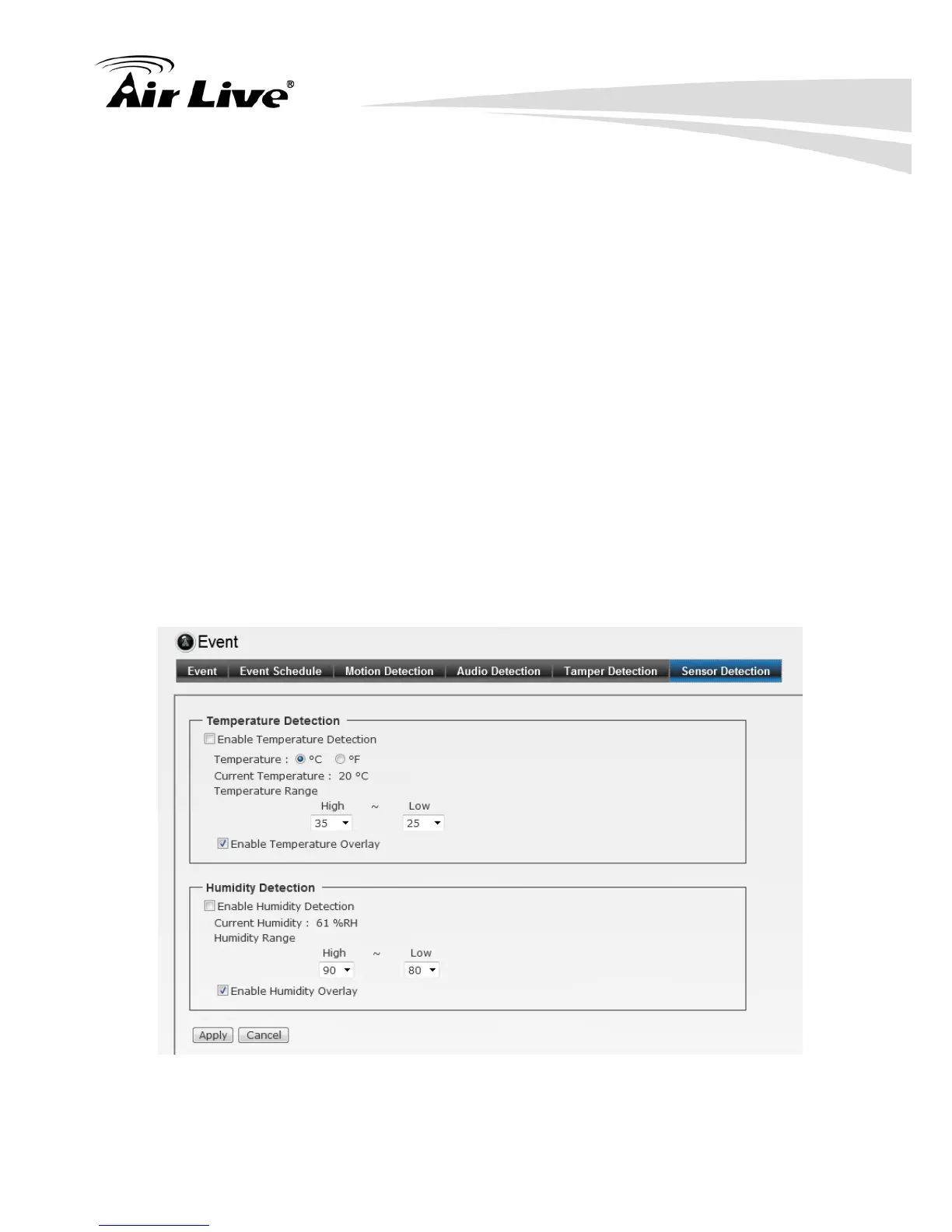
6.4.6. Sensor Detection
The camera provides the display of temperature and humidity in real-time. Alert the
user when temperature and humidity exceed or bellow certain value.
Temperature Detection
Check Enable Temperature Detection to enable the Temperature Detection.
High/ Low Temperature: You can set High and Low temperature
Check Enable Temperature Detection to display current temperature
Humidity Detection
Check Enable Humidity Detection to enable the Humidity Detection.
High/ Low Humidity: You can set High and Low Humidity
Check Enable Humidity Detection to display current humidity


 To Next Page