6408 216th Street SW | Mountlake Terrace, WA 98043 USA
T +1.425.778.7728 F +1.425.778.7727 | www.SymetrixAudio.com
16
Quick Start Guide
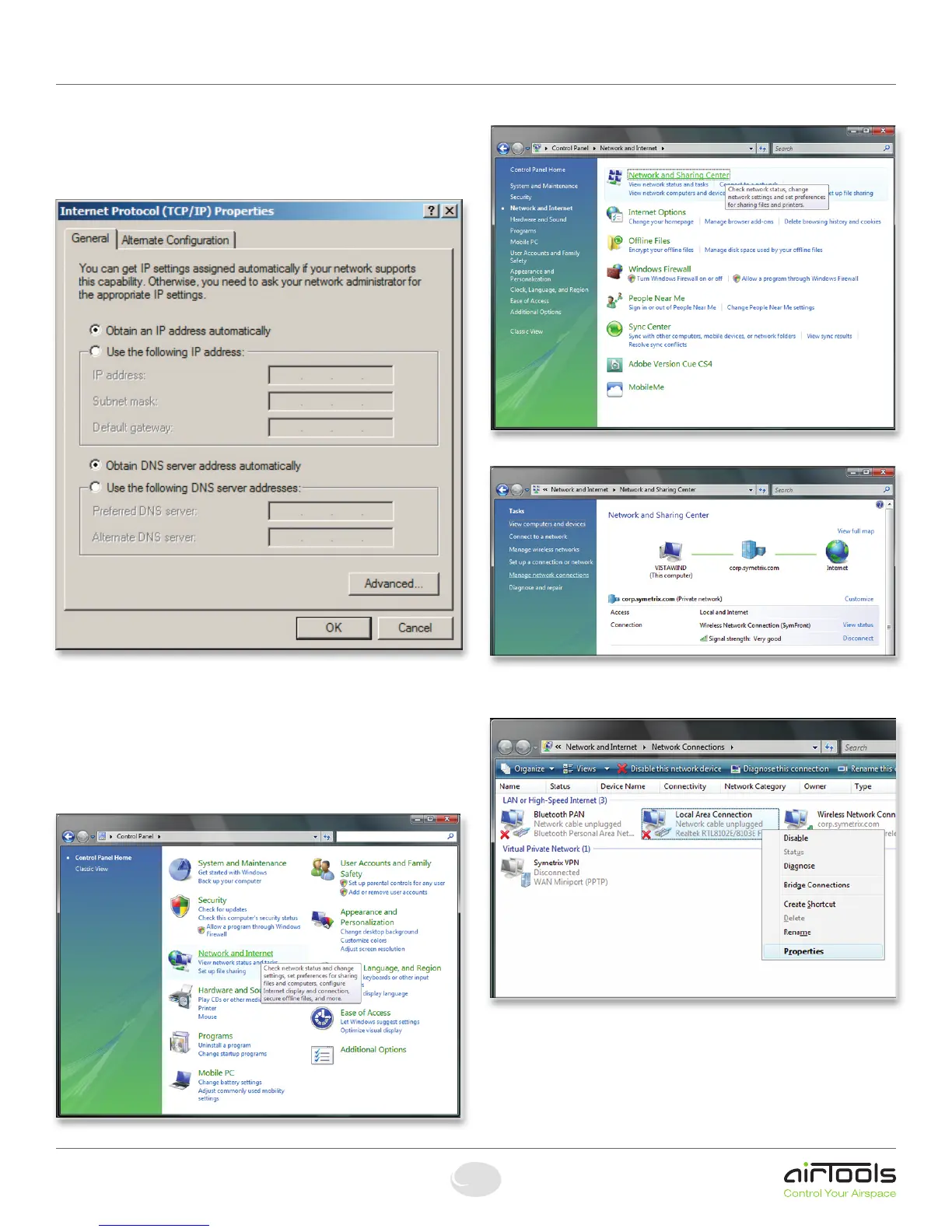
5. On the “General” tab, you may select “Use the following
IP address” to enter in the appropriate information if using
staticassignedaddresses.(DNSserverisnotrequiredfor
connection to a 2x). Otherwise, leave set to “Obtain an IP
address automatically” if using DHCP.
6.PressOKtosaveand“Close”toexitoutofthe“Local
Area Connection Properties”.
Configuring your computer for a network
connection: Windows
®
Vista
1.Select“Start->ControlPanel”.
2.Select“NetworkandInternet”.
3.Openthe“NetworkandSharingCenter”.
4.Choose“Managenetworkconnections”ontheleft.
5. Right-click the desired connection and choose
“Properties”.
2xNetworking


 To Next Page