17
Voice Processor 2x
6.
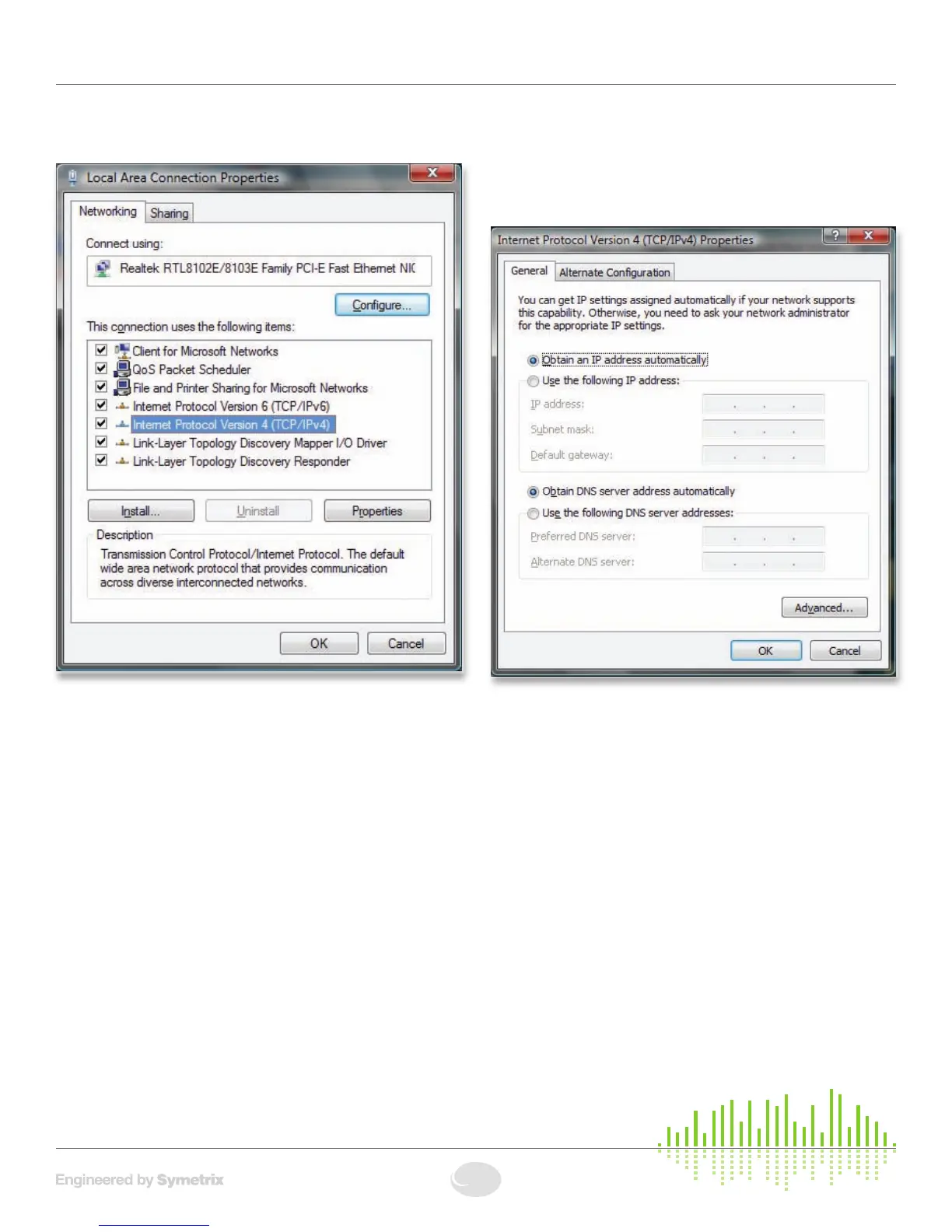
Under “This connection uses the following items”, select
“Internet Protocol Version 4 (TCP/IPv4)” and press
“Properties”.
7.Onthe“General”tab,youmayselect“Usethefollowing
IPv4 address” to enter in the appropriate information
ifusingstaticassignedaddresses.(DNSserverisnot
required for connection to a 2x). Otherwise, leave set to
“Obtain an IPv4 address automatically” if using DHCP.
Press OK to close.
8.Repeatsteps6and7for“InternetProtocolVersion6
(TCP/IPv6)” if on an IPv6 network. Consult your IT staff if
you are unsure.
9.PressOKtosaveand“Close”toexitoutofthe“Local
Area Connection Properties”.
For more information about configuring the host computer,
visit http://www.microsoft.com.
Note: Typically, only Admins or users belonging to the
NetworkCongurationOperatorsgroupcanalternetworking
configurations in Windows Vista.
Once you have completed the setup of your network and
any network hardware/interfaces, you may install the 2x
software or launch the software if you have already installed
it, then run the Connection Wizard.
2xNetworking


 To Next Page