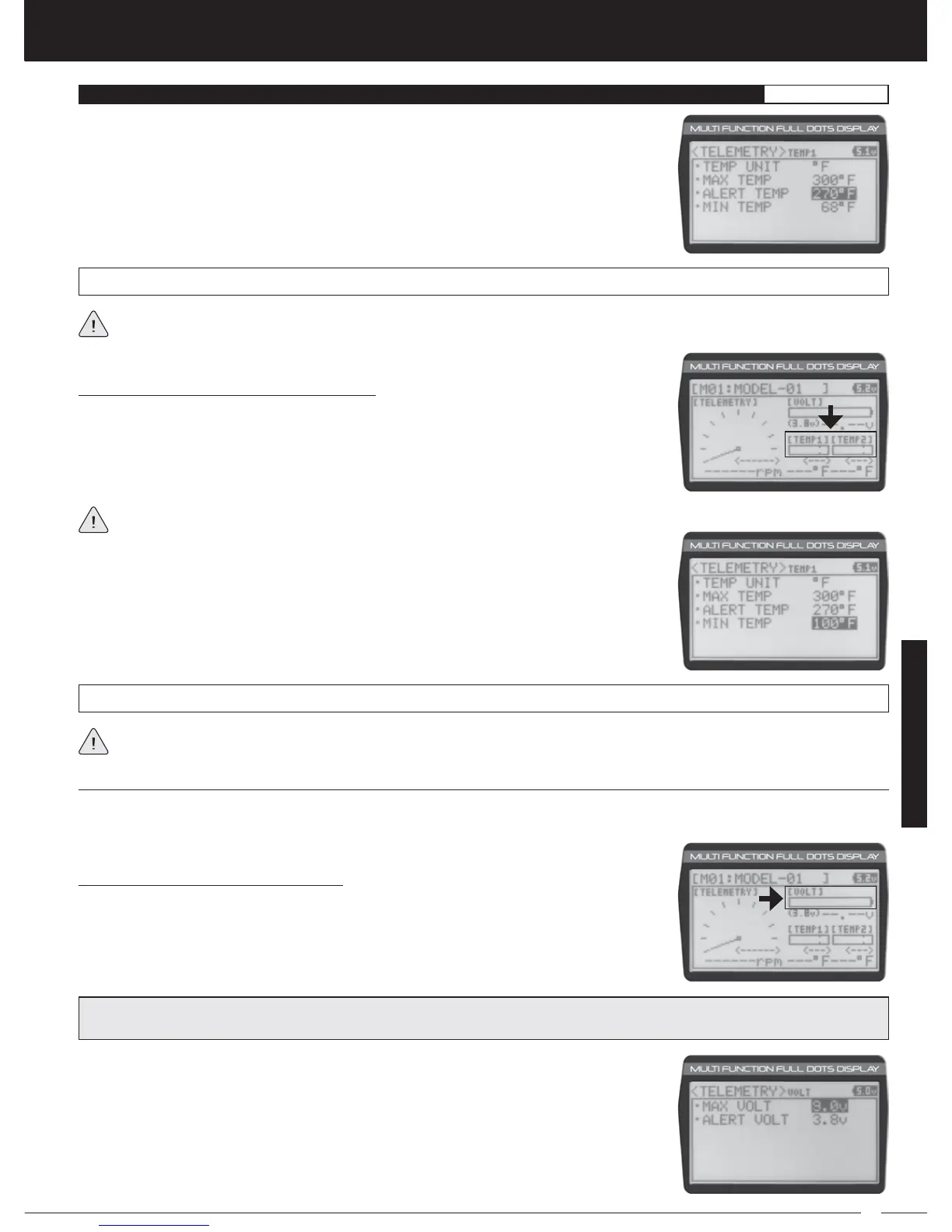
1) From within the TEMP1 or TEMP2 menu, scroll UP or DOWN to highlight ALERT TEMP
212ºF (or 100ºC).
2) Press the ENTER key, then scroll UP or DOWN to change the Alert Temperature value.
The Alert Temperature value is the temperature that the Temperature Alert alarm will
sound at.
TELEMETRY ALERT TEMP setting range is 68ºF to 302ºF (0ºC to 150ºC). The default setting is 212ºF (100ºC).
The Alert Temperature value cannot be set higher than the Maximum Temperature value. In addition, the Alert Temperature
value cannot be set lower than the Minimum Temperature value. In some cases, you may need to lower the Minimum
Temperature value prior to lowering the Alert Temperature value.
Changing the Minimum Temperature Value:
The Minimum Temperature value determines the Minimum temperature shown on the
[TEMP1] or [TEMP2] Telemetry Screen Temperature Display Monitors. This allows you to
calibrate each Temperature Display Monitor to match what the Temperatures Sensor is
attached to. This does not effect the TEMP1 or TEMP2 Digital Displays.
1) From within the TEMP1 or TEMP2 menu, scroll UP or DOWN to highlight MIN TEMP 68ºF
(or 20ºC).
2) Press the ENTER key, then scroll UP or DOWN to change the Minimum Temperature
value. The Temperature Display Monitor on the Telemetry Screen will not display
temperature values below the Minimum Temperature value programmed.
TELEMETRY MIN TEMP setting range is 32ºF to 302ºF (0ºC to 150ºC). The default setting is 68ºF (20ºC).
The Minimum Temperature value cannot be set higher than the Alert Temperature value or the Maximum Temperature
value. In some cases, you may need to increase these values prior to increasing the Minimum Temperature value.
The tick marks in the Temperature Display Monitors indicate the current temperature relative to the programmed Maximum
and Minimum Temperature values.
The Voltage Setting allows you to change the way receiver battery Voltage information is displayed on the Telemetry Screen
and when the Voltage Alert alarm sounds. For example, you can adjust the Voltage value that the receiver battery Low Voltage
Alert alarm will sound at to match the type of receiver battery you're using.
Changing the Maximum Voltage Value:
The Maximum Voltage value determines the maximum receiver battery Voltage that will
be shown on the [VOLT] Telemetry Screen Display Monitor. This allows you to calibrate the
Voltage Display Monitor to match your model's receiver battery. This setting does not effect
the VOLT Digital Display.
1) From within the TELEMETRY menu, scroll UP or DOWN to highlight VOLT SETTING.
2) Press the ENTER key. The VOLT menu will be displayed and MAX VOLT 9.0v will be
highlighted.
PRO TIP: We suggest using a value that matches as closely as possible the peaked voltage value of your receiver battery
after it's pulled off your charger.
SYSTEM



 To Next Page