EasyManua.ls Logo

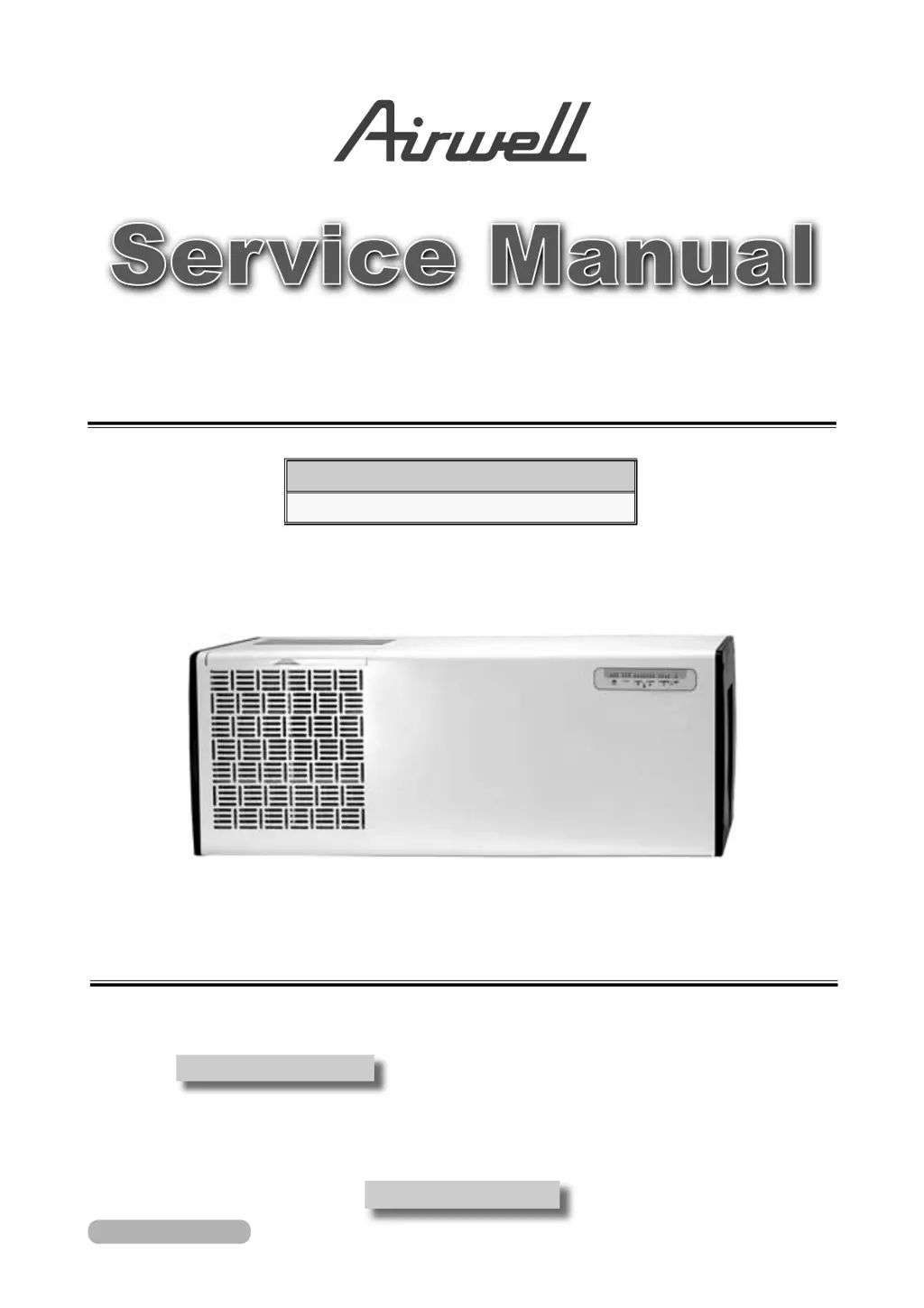
Airwell VAR 9 - User Manual

Airwell VAR 9
55 pages
Print Icon
To Next Page IconTo Next Page
Loading...
VAR Series
REFRIGERANT
R410A
COOLING ONLY
Heating (by an heating element)
AUGUST – 2008
Unit Description
Consol VAR 9 R410A
SM VAR 1-A.1 GB
CONTENT

Questions and Answers

  • W
    William YoungAug 15, 2025
    What to do if my Airwell VAR 9 indoor unit is leaking water?
    • J
      Jessica MillerAug 15, 2025
      If you notice water leaking from the indoor unit of your Airwell Air Conditioner, the most likely cause is a blocked drainage tube. Inspect the drainage tube and clear any obstructions.
  • E
    Eric ManningAug 18, 2025
    What should I do if the compressor is running, but the outdoor fan on my Airwell VAR 9 isn't working?
    • R
      Randall AlvaradoAug 18, 2025
      If the compressor of your Airwell Air Conditioner is running but the outdoor fan is not working, it could be due to high pressure protection or a problem with the PCB, outdoor fan capacitor, or motor. First, switch the unit to COOL mode, HIGH speed, with a 16°C set point for cooling. Check the outdoor motor power supply voltage; it should be higher than 198 VAC. If the voltage is correct, replace the capacitor. If it still doesn't run, replace the motor. If the voltage is lower than 198 VAC, replace the PCB.
  • K
    kimberly51Aug 22, 2025
    How to fix an Airwell VAR 9 when the green LED is on but the indoor fan won't start?
    • M
      Melissa SmithAug 22, 2025
      If the green LED is lit but the indoor fan of your Airwell Air Conditioner does not start, the issue could stem from the PCB, capacitor, or fan motor. Here's what to do: 1. Switch to HIGH speed and check the indoor FAN motor voltage to ensure it's higher than 198VAC. Also, check for any obstructions jamming the fan and remove them. 2. If the voltage is significantly lower than 198VAC, replace the PCB. 3. If the fan is not blocked and the voltage is correct, replace the indoor fan capacitor. 4. If it still doesn't run, replace the indoor fan motor.
  • D
    Donald TaylorAug 25, 2025
    Why does the compressor in my Airwell Air Conditioner stop while the green LED stays on?
    • J
      John PowersAug 26, 2025
      If the compressor in your Airwell Air Conditioner stops during operation, but the green LED remains on, it could be because the desired temperature has been reached or due to an electronic control or power supply problem. Perform diagnostics to identify the exact cause.
  • B
    Brendan MoonAug 28, 2025
    Why won't the compressor start on my Airwell VAR 9?
    • T
      trevorreyesAug 28, 2025
      If the compressor on your Airwell Air Conditioner does not start, it could be due to an electronics control problem or a protection being activated. Perform diagnostics to determine the exact issue.
  • W
    wrightbenjaminAug 31, 2025
    What to do if my Airwell Air Conditioner's compressor stops due to a protection activation for no apparent reason?
    • K
      Kevin KempAug 31, 2025
      If the compressor of your Airwell Air Conditioner stops because a protection is activated for no apparent reason, it could be due to a control problem or a refrigeration system issue. Perform diagnostics to detect the active protection and take action accordingly.
  • S
    Sean PenningtonSep 4, 2025
    How to troubleshoot if the red LED power indicator isn't lighting up on my Airwell Air Conditioner?
    • J
      Jeffrey JohnsonSep 4, 2025
      If the red LED power supply indicator on your Airwell Air Conditioner does not light up, it indicates a lack of power supply. Check the power supply. If the power supply is OK, check the display and display wiring. If those are also OK, replace the PCB.
  • J
    Jessica HudsonSep 7, 2025
    Why does the indoor fan of my Airwell Air Conditioner run even when the unit is turned off?
    • L
      Lynn TurnerSep 7, 2025
      If the indoor fan of your Airwell Air Conditioner continues to run even when the unit is turned off, the cause is likely a PCB problem. Replace the controller.
  • M
    Michelle MoraSep 12, 2025
    What does it mean when the filter LED comes on in my Airwell Air Conditioner?
    • R
      Ronald AndrewsSep 12, 2025
      When the filter LED illuminates on your Airwell Air Conditioner after 512 hours of operation, it indicates that it is time to clean the air filter. Clean the air filter and then press the RESET button.

Summary

Introduction to VAR Console Units

General Unit Overview

Details the new VAR console unit, its types (cooling only, heating by electrical element), and its features.

Key Features of the VAR Series

Highlights key technological innovations including R410A models, microprocessor control, and fan design.

Filtration System Details

Describes air filter types available for the console VAR series, including pre-filters and optional filters.

Control System Functionality

Explains the microprocessor indoor controller's functions and programming, referring to the Operation Manual.

Included Documentation

States that each unit includes its own installation and operation manuals.

Product Data Sheet

Model VAR 9 ST;RH Specifications

Detailed technical specifications for the VAR 9 ST/RH model, including capacity, power, airflow, and dimensions.

Rating Conditions

Operating Limits

Defines operating limits for cooling mode, specifying indoor/outdoor conditions and voltage.

Outline Dimensions

Model VAR 9 ST;RH Dimensions

Provides dimensional drawings and measurements for the VAR 9 ST/RH model.

Performance Data & Pressure Curves

Model VAR 9 ST;RH Performance Data

Details performance data for the VAR 9 ST/RH model.

Cooling Capacity Data

Presents cooling capacity data (kW) for various indoor/outdoor conditions.

Pressure Curves

Illustrates suction and discharge pressure curves against outdoor temperature.

Sound Level Characteristics

Sound Pressure Level Measurement Setup

Details the setup for measuring sound pressure levels within a room environment.

Sound Pressure Level Spectrum Analysis

Presents octave band sound pressure level spectrum data for different fan speeds.

Electrical Data

Single Phase Unit Specifications

Provides electrical specs for single-phase units, including power supply, current, and wiring.

Wiring Diagrams

Model VAR 9 ST;RH Wiring Diagram

Illustrates the electrical connections and components for the VAR 9 ST/RH model.

Refrigeration Diagrams

VAR 9 ST;RH Cooling Only Diagram

Depicts the refrigeration circuit for the VAR 9 ST/RH cooling-only model.

Troubleshooting

Common Problems and Solutions

Lists common operational issues, their probable causes, and recommended corrective actions.

Control System

Electronic Control and Model Plug Settings

Introduces electronic control, its groups, and model plug settings.

Controller Components: PCB, Display, and Interfaces

Details main PCB controller, display board, components, and legends.

Control Function Abbreviations

Lists and defines abbreviations used in the control system section.

General Control Functions

Details general operational functions like compressor, fan, and heater operations.

System Protections and Thermistor Operation

Explains system protections and thermistor operation and fault detection.

RV Fault and General Features

Describes RV fault detection and general operational features.

Cooling Mode General Definitions and Control Functions

Details general definitions and control functions for the cooling mode.

Cooling Mode Sequence Diagrams

Illustrates sequence diagrams for maintaining room temperature in cooling mode.

Heating Mode General Operations

Defines heating mode compensation and IFAN operation rules.

Heating Mode Fan and Heater Operations

Details IFAN rules for RH group and heater operation rules.

Heating Mode Sequence Diagrams (RC;SH Group)

Shows the sequence diagram for maintaining room temperature in heating mode for RC or SH groups.

Heating Mode Sequence Diagrams (RC;SH with Autofan)

Illustrates the sequence diagram for controlling COMP, IFAN, and OFAN in heating mode with Autofan.

Heating Mode Sequence Diagrams (RH Group)

Depicts the sequence diagram for controlling heating elements in the RH group during heating mode.

Heating Mode Sequence Diagrams (RH with Autofan)

Shows the sequence diagram for controlling 2-stage electric heaters in RH group with Autofan.

Automatic Cooling or Heating General

Explains AUTO mode for models with compressor, covering switching temps and mode change.

Automatic Mode Sequence Diagrams (RC;SH Groups)

Illustrates sequence diagrams for automatic cooling or heating in RC or SH groups.

Automatic Cooling or Heating Sequence Diagram (RH Group)

Depicts sequence diagrams for automatic cooling or heating in the RH group.

Dry Mode Operation

Explains control function of Dry mode for ST, RC, or P2000 models to reduce humidity.

Dry Mode Operation (SH;RH Groups)

Details control function for Dry mode in SH or RH groups to reduce humidity.

Protection Mechanisms

Cooling Mode Protections

Details protections for cooling mode, focusing on indoor coil defrosting.

High Pressure Protection (Cooling)

Explains high pressure protection to prevent COMP damage from outdoor coil pressure build-up.

Heating Mode Protections

Covers heating mode protections, including outdoor coil deicing and thresholds.

High Pressure Protection (Heating)

Details high pressure protection for heating mode to protect the compressor.

Condensation Pump Protection

Describes condensation pump operation to prevent overflow of condensed water.

Forced Operation Modes

Operation Modes and Settings

Details forced operation modes (Cooling, Heating) and preset temperatures for different models.

Sleep Mode Operations

SPT Adjustment in Sleep Mode

Explains how SPT is adjusted positively or negatively in different modes during sleep operation.

Sleep Mode Time Adjustments

Illustrates standard and extended sleep modes, including exception cases for time adjustment.

Controller Self-Test Procedures

Self-Test Procedure via Jumper J1

Provides a flowchart for performing controller self-tests by shorting test jumper J1.

Self-Test Procedure via Remote Control

Details steps for enabling self-test mode and confirming model settings using the remote control.

Self-Test Walk Tests and Input Checks

Describes LED walk tests, relay walk tests, frequency testing, and input testing procedures.

Memory Test and Sensor Data

Explains the EEPROM memory test and provides sensor temperature vs. voltage data.

System Diagnostics

Fault Indication and Troubleshooting Codes

Details fault indications via LED blinking and provides a system diagnostics fault code table.

Exploded Views and Spare Parts Lists

Model VAR 9 ST;RH Exploded View (Part 1)

Presents an exploded view diagram of the VAR 9 ST/RH model with numbered components.

Model VAR 9 ST;RH Exploded View (Part 2)

Continues the exploded view of the VAR 9 ST/RH model with additional numbered components.

Model VAR 9 ST;RH Spare Parts List

Lists spare parts for the VAR 9 ST/RH model with item codes, descriptions, and quantities.

Appendix A

Installation and Operation Manual Reference

References the Installation and Operation Manual for the VAR 9 ST/RH unit.

Airwell VAR 9 Specifications

General IconGeneral
BrandAirwell
ModelVAR 9
CategoryAir Conditioner
LanguageEnglish

Related product manuals