19
ES
EN
FR
IT
PT
DE
ASSEMBLY AND CONNECTION EVALUATION
Check:
- The thermostat is powered.
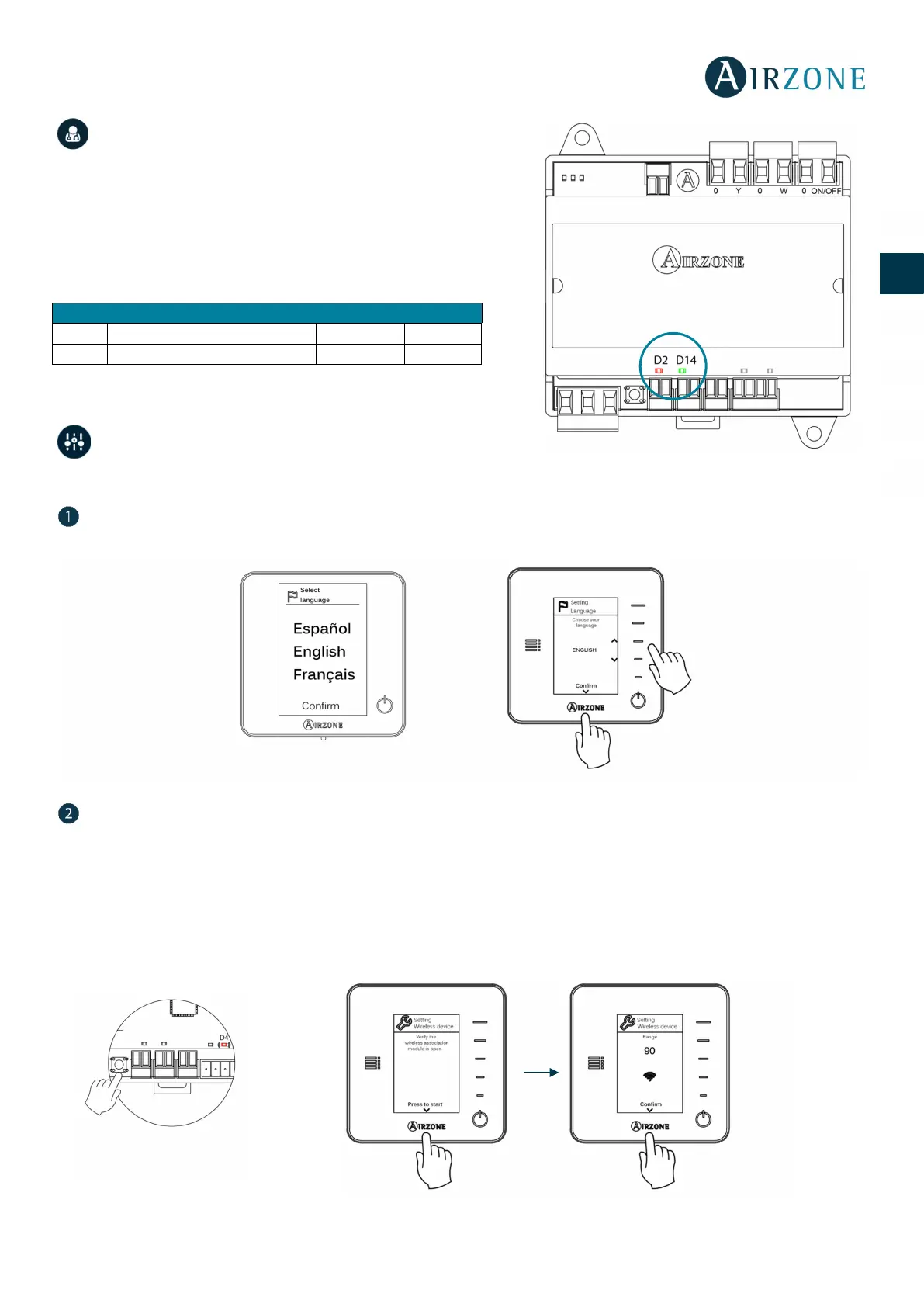
- The state of the LEDs of the main control board.
Important: In the Main Control Board, to verify the correct performance,
check D2 and D14 LEDs.
INITIAL CONFIGURATION
Important: Once the setup has been started, it must conclude. You will be able to modify the desired parameters later.
Language
Select your language. These are the available languages: Spanish, English, French, Italian, German and Portuguese.
Setting wireless device (only available for wireless thermostat)
- Open the radio channel. To do that, press on SW2, the LED D4 will remain solid red. Once open, you have 15 minutes
to make the association. If that period of time expires, start the process over again.
IMPORTANT: not to open more than one radio channel at the same time, it may alter the process.
- Press Airzone to start seeking and then confirm the Wireless association.
- Verify the range is correct (30% minimum) and confirm.
Main control board activity
UNO Wireless main control board


 To Next Page