EasyManua.ls Logo

Aiwa NSX-SZ310 - Tape Operations; Basic Playback; Tape Counter and Continuous Play; Type II Tape Playback

Aiwa NSX-SZ310
12 pages
Print Icon
To Next Page IconTo Next Page
To Previous Page IconTo Previous Page
Loading...
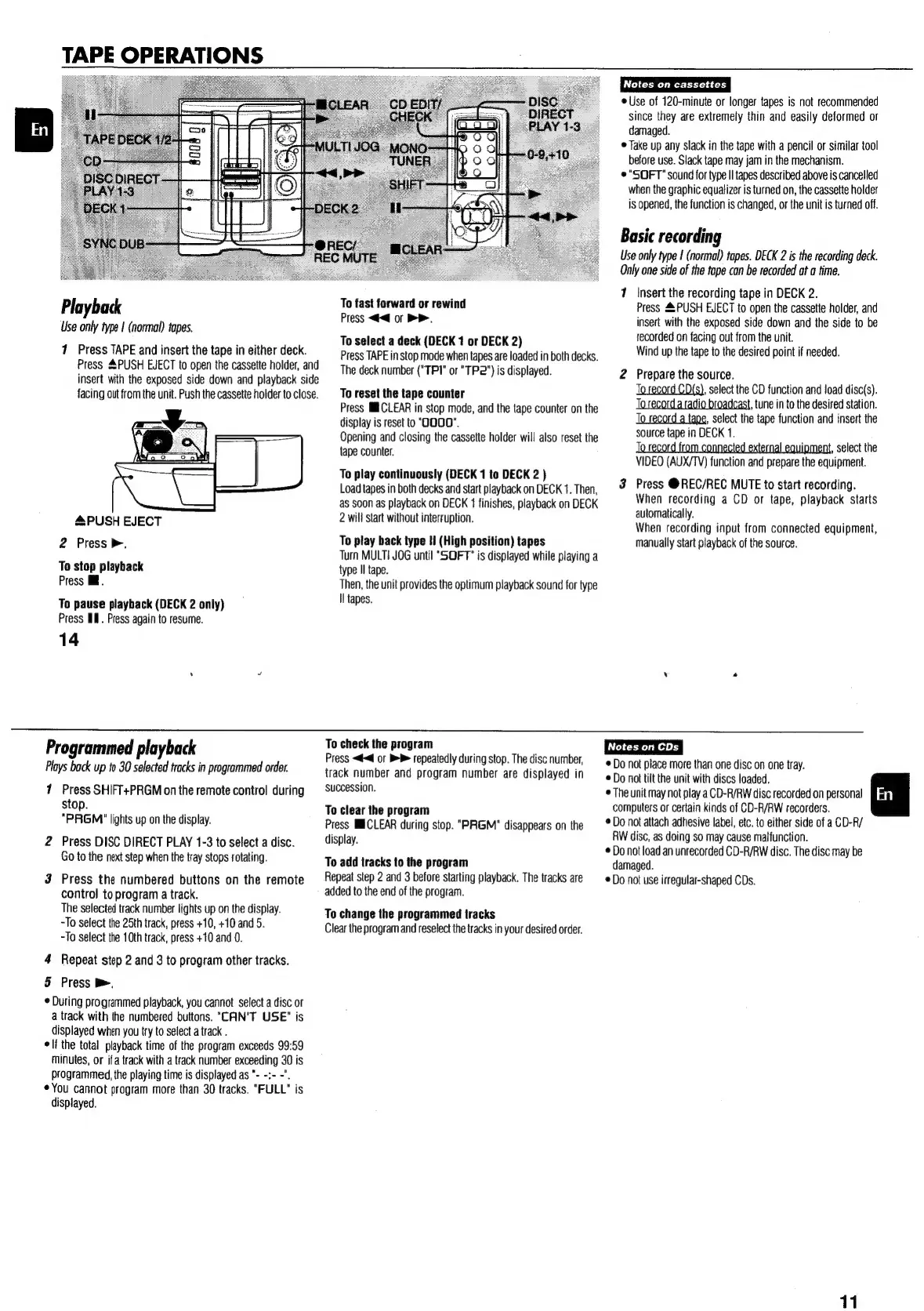
TAPE
OPERATIONS
Playback
Use
only
type
|
(normal)
tapes.
71
Press
TAPE
and
insert
the
tape
in
either
deck.
Press
&PUSH
EJECT
to
open
the
cassette
holder,
and
insert
with
the
exposed
side
down
and
playback
side
facing
out
from
the
unit.
Push
the
cassette
holder
to
close.
&PUSH
EJECT
2
Press
>.
To
stop
playback
Press
iil.
To
pause
playback
(DECK
2
only)
Press
IM.
Press
again
to
resume.
To
fast
forward
or
rewind
Press
<<@
or
>>.
To
select
a
deck
(DECK
1
or
DECK
2)
Press
TAPE
in
stop
mode
when
tapes
are
loaded
in
both
decks.
The
deck
number
("TP1"
or
"TP2")
is
displayed.
To
reset
the
tape
counter
Press
MECLEAR
in
stop
mode,
and
the
tape
counter
on
the
display
is
reset
to
"OOOO".
Opening
and
closing
the
cassette
holder
wil!
also
reset
the
tape
counter.
To
play
continuously
(DECK
1
to
DECK
2
)
Load
tapes
in
both
decks
and
start
playback
on
DECK
1.
Then,
as
soon
as
playback
on
DECK
1
finishes,
playback
on
DECK
2
will
start
without
interruption.
To
play
back
type
Hi
(High
position)
tapes
Turn
MULTI
JOG
until
"SOFT"
is
displayed
while
playing
a
type
II
tape.
Then,
the
unit
provides
the
optimum
playback
sound
for
type
Il
tapes.
Notes
on
cassettes
©
Use
of
120-minute
or
longer
tapes
is
not
recommended
since
they
are
extremely
thin
and
easily
deformed
or
damaged.
©
Take
up
any
slack
in
the
tape
with
a
pencil
or
similar
tool
before
use.
Slack
tape
may
jam
in
the
mechanism.
©
"SOFT"
sound
for
type
Il
tapes
described
above
is
cancelled
when
the
graphic
equalizer
is
turned
on,
the
cassette
holder
is
opened,
the
function
is
changed,
or
the
unit
is
turned
off.
Basic
recording
Use
only
type
|
(normal)
tapes.
DECK
2
is
the
recording
deck.
Only
one
side
of
the
tape
can
be
recorded
at
a
time.
7
Insert
the
recording
tape
in
DECK
2.
Press
4
PUSH
EJECT
to
open
the
cassette
holder,
and
insert
with
the
exposed
side
down
and
the
side
to
be
recorded
on
facing
out
from
the
unit.
Wind
up
the
tape
to
the
desired
point
if
needed.
2
Prepare
the
source.
To
record
CD{s),
select
the
CD
function
and
load
disc(s).
To
record aradio
broadcast,
tune
in
to
the
desired
station.
To
record
a
tape,
select
the
tape
function
and
insert
the
source
tape
in
DECK
1.
To
record
from
connected
external
equipment,
select
the
VIDEO
(AUX/TV)
function
and
prepare
the
equipment.
3
Press
@REC/REC
MUTE
to
start
recording.
When
recording
a
CD
or
tape,
playback
starts
automatically.
When
recording
input
from
connected
equipment,
manually
start
playback
of
the
source.
14
Programmed
playback
To
check
the
program
Plays
back
up
to
30
selected
tracks
in
programmed
order.
7
Press
SHIFT+PRGM
on
the
remote
control
during
stop.
"PRGM'"
lights
up
on
the
display.
2
Press
DISC
DIRECT
PLAY
1-3
to
select
a
disc.
Go
to
the
next
step
when
the
tray
stops
rotating.
3
Press
the
numbered
buttons
on
the
remote
control
to
program
a
track.
The
selected
track
number
lights
up
on
the
display.
-To
select
the
25th
track,
press
+10,
+10
and
5.
-To
select
the
10th
track,
press
+10
and
0.
4
Repeat
step
2
and
3
to
program
other
tracks.
5
Press
>.
During
programmed
playback,
you
cannot
select
a
disc
or
a
track
with
the
numbered
buttons.
"CAN'T
USE"
is
displayed
when
you
try
to
select
a
track
.
elf
the
total
playback
time
of
the
program
exceeds
99:59
minutes,
or
ifa
track
with
a
track
number
exceeding
30
is
programmed,
the
playing
time
is
displayed
as
"-
-:-
-".
¢You
cannot
program
more
than
30
tracks.
"FULL"
is
displayed.
Press
<<
or
BB
repeatedly
during
stop.
The
disc
number,
track
number
and
program
number
are
displayed
in
succession.
To
clear
the
program
Press
MCLEAR
during
stop.
"PRGM"
disappears
on
the
display.
To
add
tracks
to
the
program
Repeat
step
2
and
3
before
starting
playback.
The
tracks
are
added
to
the
end
of
the
program.
To
change
the
programmed
tracks
Clear
the
program
and
reselect
the
tracks
in
your
desired
order.
©
Do
not
place
more
than
one
disc
on
one
tray.
©
Do
not
tilt
the
unit
with
discs
loaded.
©
The
unit
may
not
play
a
CD-R/RW
disc
recorded
on
personal
computers
or
certain
kinds
of
CD-R/RW
recorders.
©
Do
not
attach
adhesive
label,
etc.
to
either
side
of
a
CD-R/
RW
disc,
as
doing
so
may
cause
malfunction.
©
Do
not
load
an
unrecorded
CD-R/RW
disc.
The
disc
may
be
damaged.
©
Do
not
use
irregular-shaped
CDs.
En
11

Other manuals for Aiwa NSX-SZ310

Related product manuals